EasyManua.ls Logo

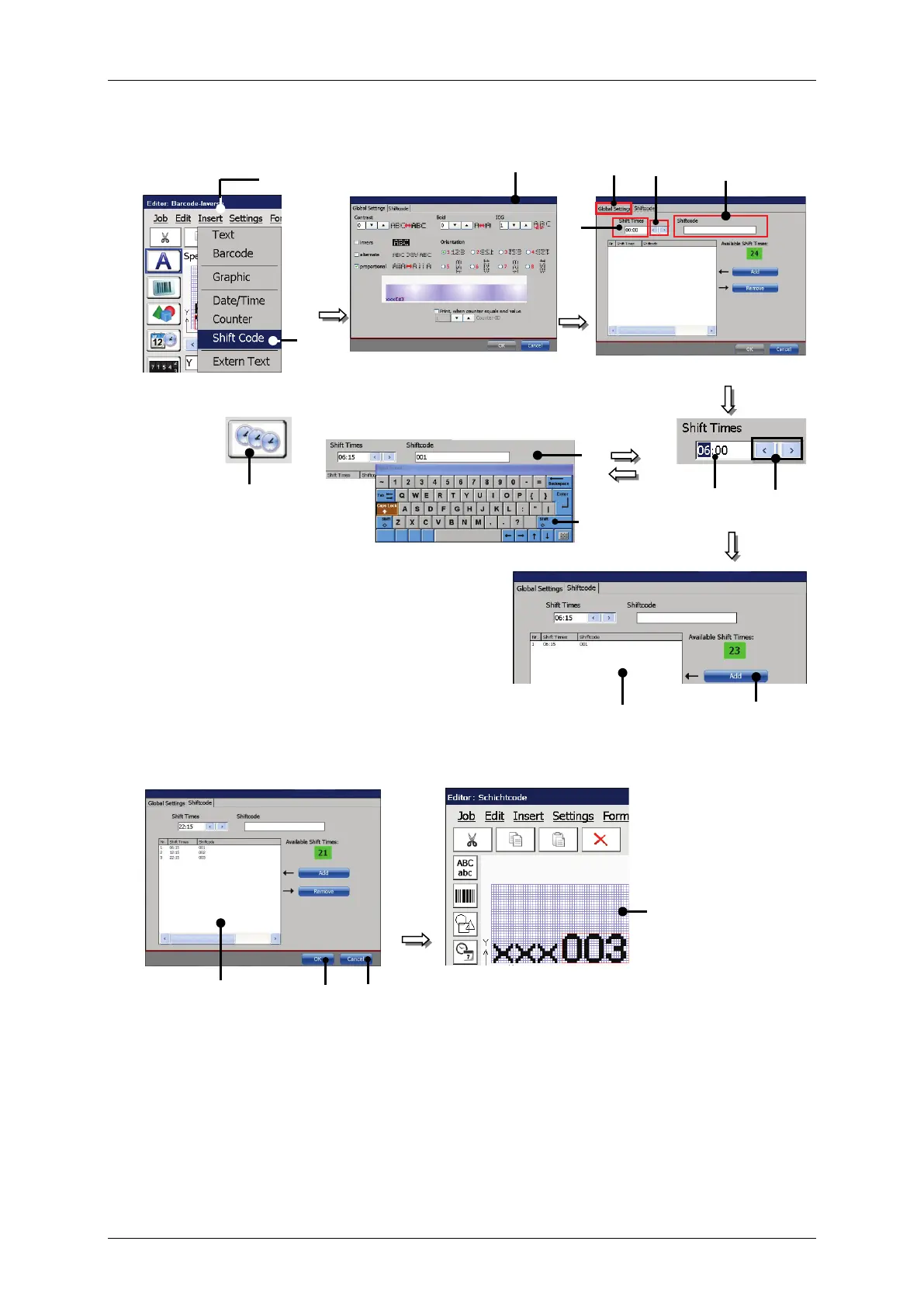
Leibinger JET3 up - Figure 173 Print Elements - Shift Code Set up

Leibinger JET3 up
412 pages
Print Icon
To Next Page IconTo Next Page
To Previous Page IconTo Previous Page
Loading...
Group 8 Job Editor Page 329
JET3up Release R1.06
Figure 173 Print elements - Shift code set up
or:
Example: Input shift code 1
Example:
Display shift 2 Depends on the current time
1 Drop-down menu <Insert>
9 – Selected (marked) time block
2 Option <Shift Code>
10 – <Enter> Button
3 Direct button (Shortcut)
11 – <Add> Button
4 <Global Settings> Tab
12List of shift codes
5 – <Shift Code> Tab
13 – <Cancel> Button
6 – Input <Shift Times>
14<OK> Button
7 – Arrow keys
15<Job editor>
8 – Input field <Shiftcode>
2
8
6
1
12
11
7
9
8
10
3
12
14
13
5
7
4
15

Table of Contents

Other manuals for Leibinger JET3 up

Related product manuals