Group 8 Job Editor Page 151
JET3up Release R1.06
7.3.2 Hydraulik settings
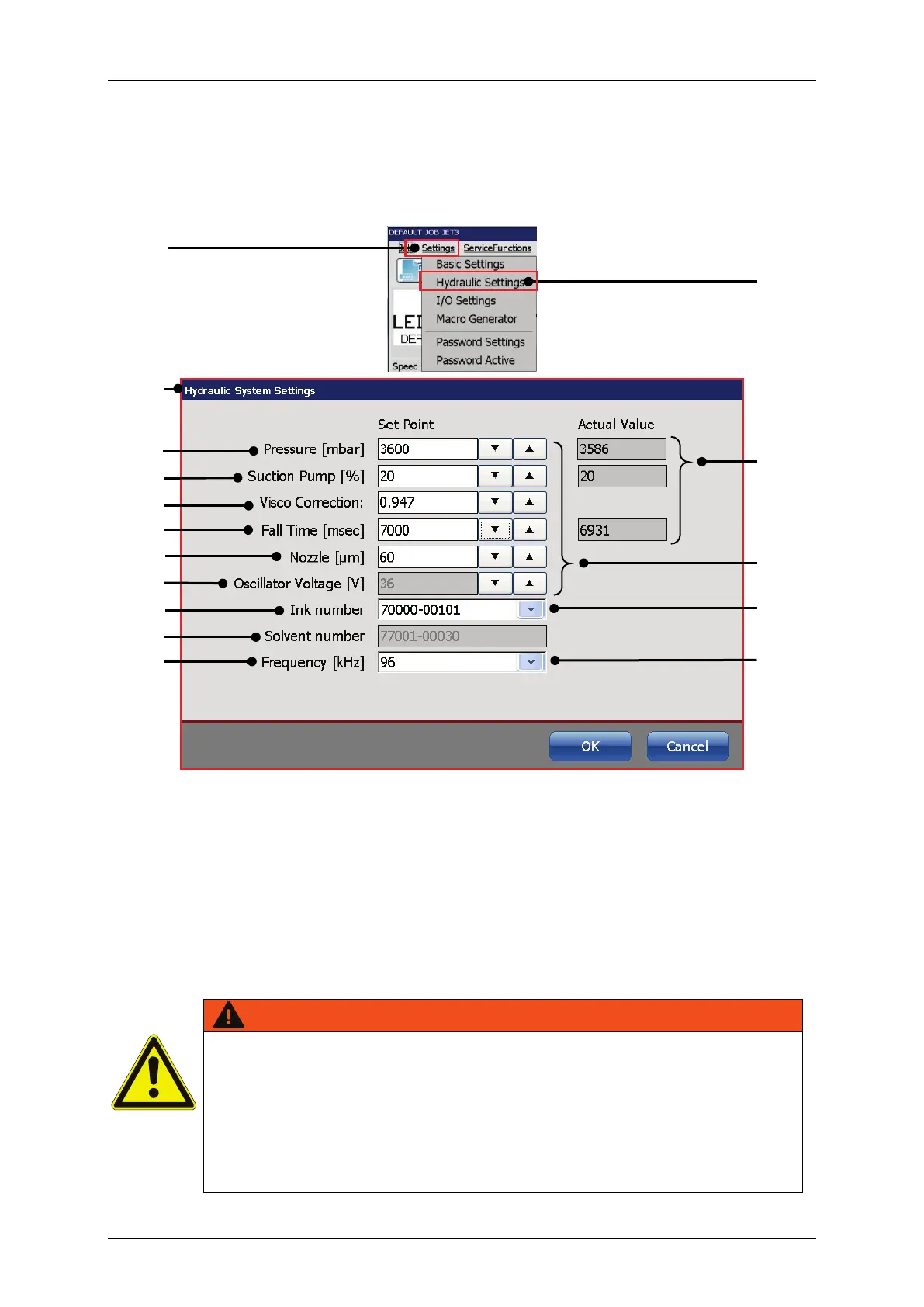
Figure 60 Hydraulic settings
1 – Drop-down menu <Settings>
9 – Input field <Oscillator Voltage [V]>
2 – Option <Hydraulic settings>
10 – Input field <Ink number>
3 – Dialog box <Hydraulic settings>
11 – Input field <Solvent number>
4 – Input field <Pressure [mbar]>
12 – Input field <Frequency [kHz]>
5 – Input field <Suction pump [%]>
13 – Indicators for current values
6 – Input field <Visco correction>
14 – Spin buttons for settings
7 – Input field <Fall time [msec]>
15 – Drop-down list <Ink number>
8 – Input field <Nozzle [µ]> size
16 – Drop-down list <Frequencies>
All settings in the <Hydraulic> menu have a direct impact on the
functionality of the printer!
Wrong or inappropriate settings may cause the printer to stop the work
and /or may lead to hardware damages!
All values were set at factory for an optimal operation. Changes must
only be carried out by LEIBINGER service technicians or staff trained by
LEIBINGER service technicians.



 To Next Page