Page 190 Job Editor Group 8
Release R1.06 JET3up
7.5.2.2 Product counter settings
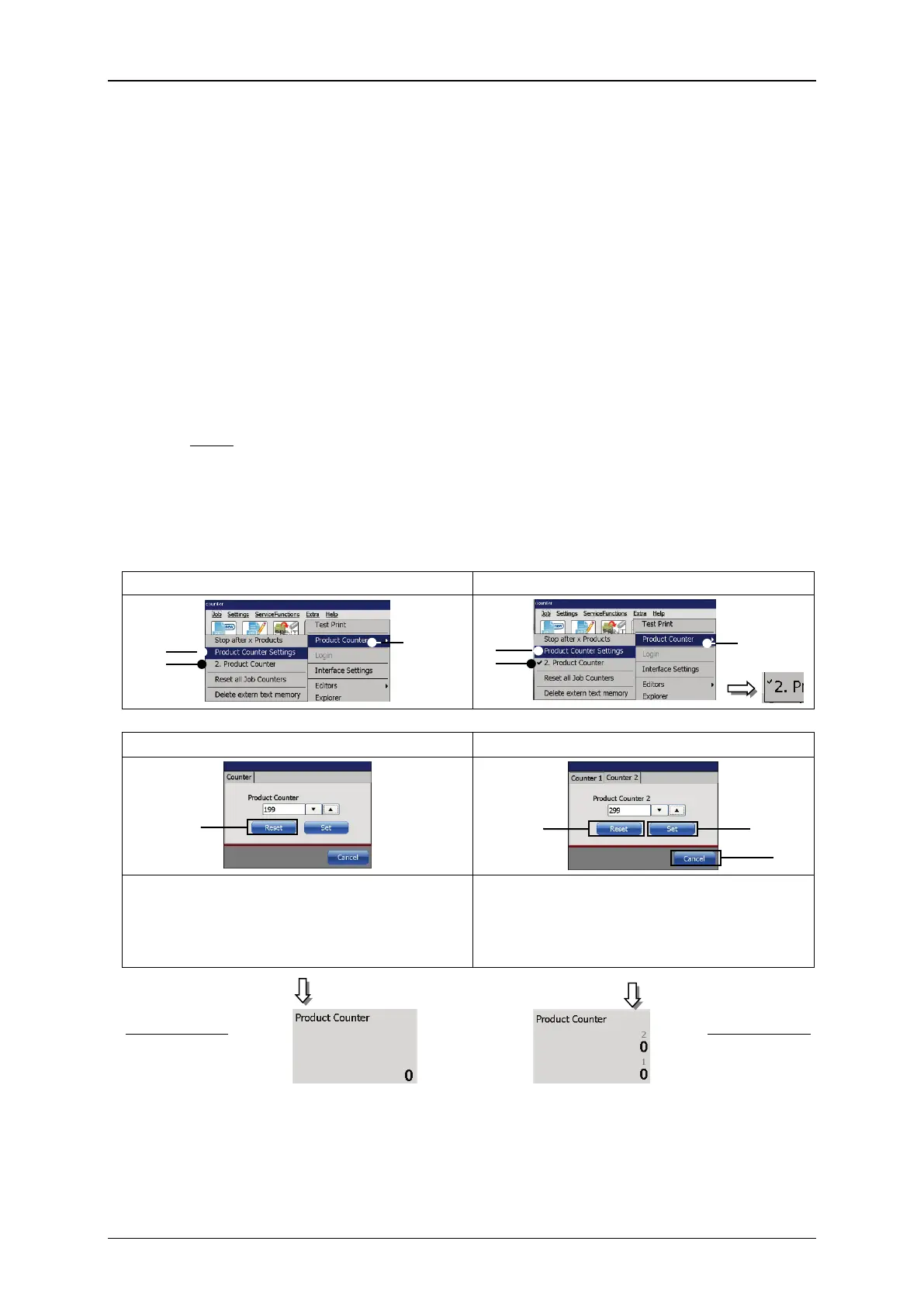
Proceeding (see Figure 86 and Figure 87)
Press the option <Product Counter Settings> (2).
The window <Product Counter Settings> is displayed. Depending on how
many product counters are defined (1 or 2) (6) you can see 1 or two tabs.
1. Reset counter (Figure 86)
Press the button <Reset> (4) to reset the counter or cancel the process
with the button <Cancel> (6).
If there are 2 product counters defined each of them has to be reset
separately.
Note: The will be no further confirmation prompt.
The value „0“ is now displayed in the status field <Production Counter> of
the main dialog box.
Figure 86 Product Counter Settings - Reset
Select Product Counter Settings / 1 or 2 product counters
Settings for 1 product counter
Settings for 2 product counters
Reset one product counter
Reset two product counters
To reset the product counter push the
<Reset> button. The dialog box will
close and the product counter is set to 0.
Each product counter has to be reset
separately. Pushing the <Reset> button
will close the dialog box and set the
respective product counter to 0.
Results
1 – Options <Product Counter>
2 – Option <Product Counter Settings>
3 – Option <2. Product Counter> with indicator



 To Next Page