Group 8 Job Editor Page 183
JET3up Release R1.06
7.4.8 Error Format
Deactivating error messages pose a safety risk
Only LEIBINGER service staff or service staff trained by LEIBINGER are
allowed to deactivate error messages.
Deactivating error messages is allowed only for service purposes.
With the function <Error Format> it is possible to deactivate certain erro
messages. This function is meant only for service purposes!
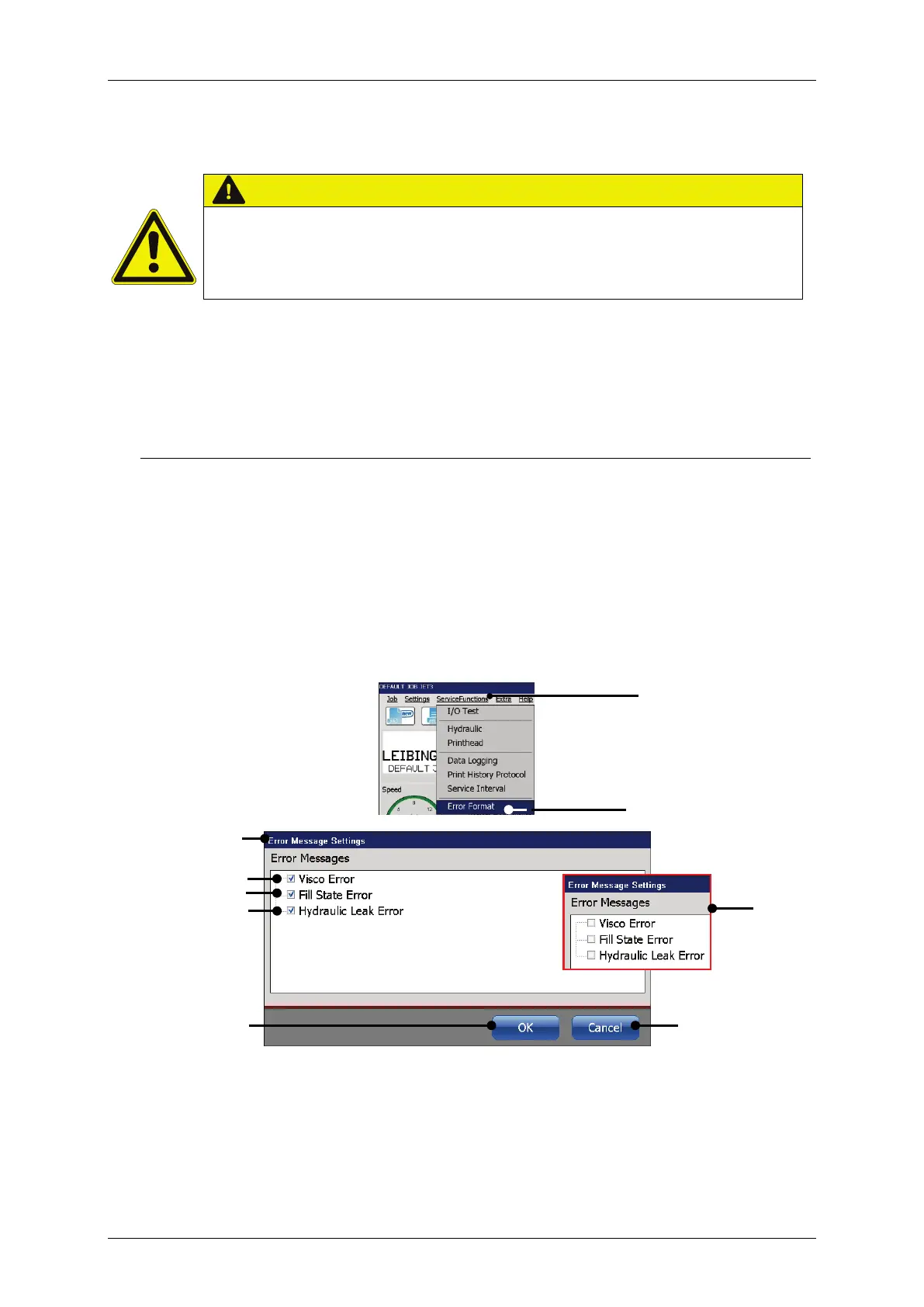
The option <Erro Format> (2) opens the dialog box <Error Message Settings>
(3). The dialog box shows the following parameters:
Visco Erro(4)
Fill State Error (5)
Hydraulic Leak Error (6)
With the <OK> button (8) alle chages are saved and the dialog box is closed. The
<Cancel> button (9) discards all changes and closes the dialog box.
Figure 81 Dialog box Error Message Settings
1 – Drop-down menu <Service functions>
5 – Option <Fill State Error>
2 – Option <Error Format>
6 – Option <Hydraulic Leak Error>
3 – Dialog box <Erro Message Setting>
7 – Deactivated error messages



 To Next Page