Page 72 Job Editor Group 8
Release R1.06 JET3up
6.4 User interface and printer operation
This chapter describes the essential operating- and indicating elements of the
LEIBINGER JET3up main window.
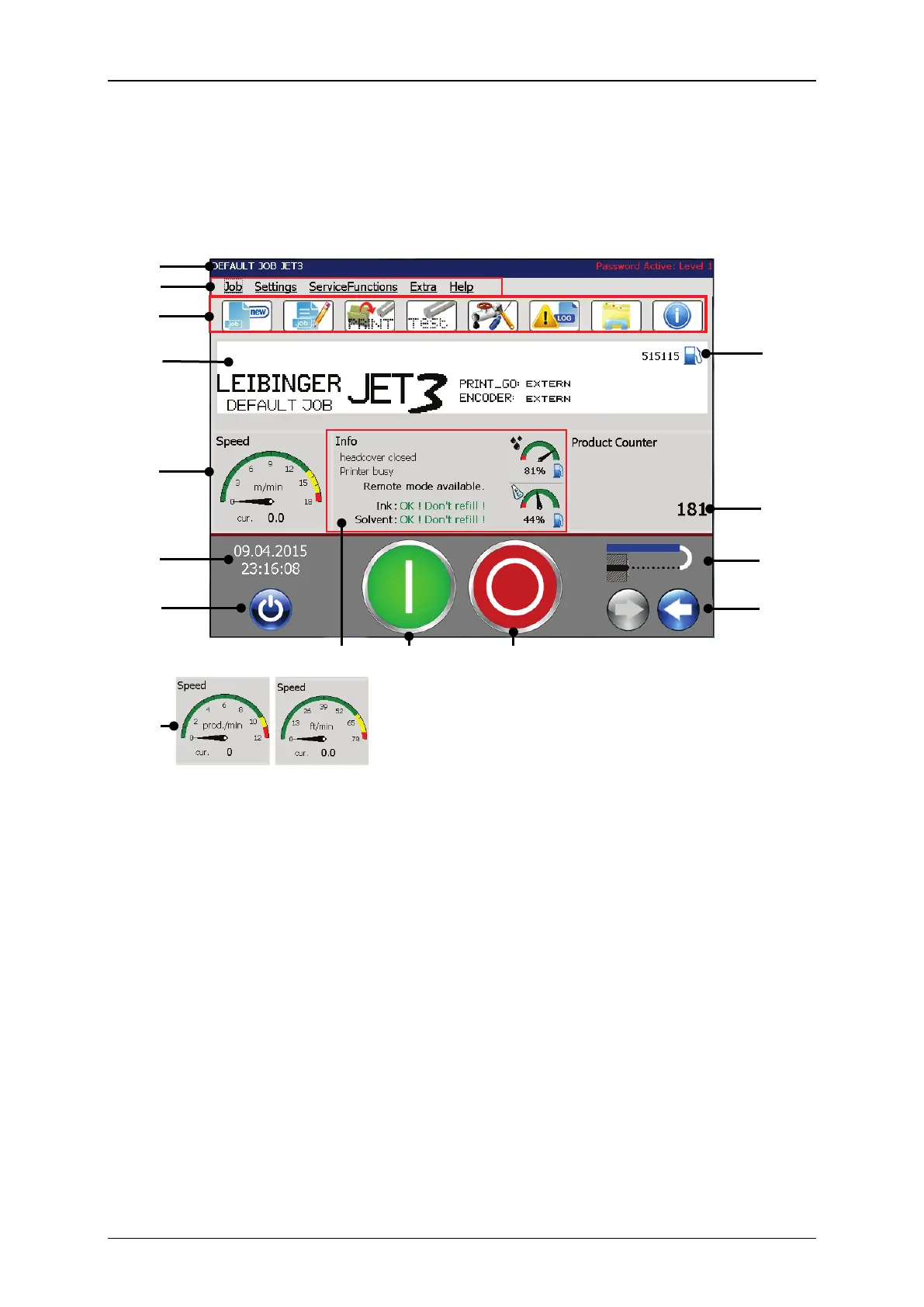
Figure 17 Design of the main window
Optional speed indicators
8 – <Remaining prints> indicator
9 – <Product counter> indicator
3 – Menu shortcuts (Direct buttons)
10 – <Nozzle> status indicator
4 – WYSIWYG display – Print preview
11 – <Open / Close Nozzle> buttons
5 – Printing speed<m/min> /
<Products/minutes> indicator
12 – Indicator for general status
information
6 – <Date/Time> indicator
7 – <Off/Shut down> button
Title bar (1): The title bar of the main window shows the name of the active print
job and indicates the currently logged-in user. The logged-in user is only displayed
when the <Password active> option is selected. Please see chapter 7.3.5
Password settings and user permissions for details.
Menu bar (2): Most functions of the JET3up can be accessed through the menu bar.
Each menu entry provides a drop-down list with respective options. The following
menu entries are available:
Job Service functions Help
Settings Extra



 To Next Page