Page 148 Job Editor Group 8
Release R1.06 JET3up
Please contact your system administrator in order to implement the
LEIBINGER JET3up printer in a local network. LEIBINGER cannot
liable for any malfunctions caused by inappropriate network settings!
The software suggested are to be understood as examples.
The suggested software are no LEIBINGER products nor it will be
supported by LEIBINGER.
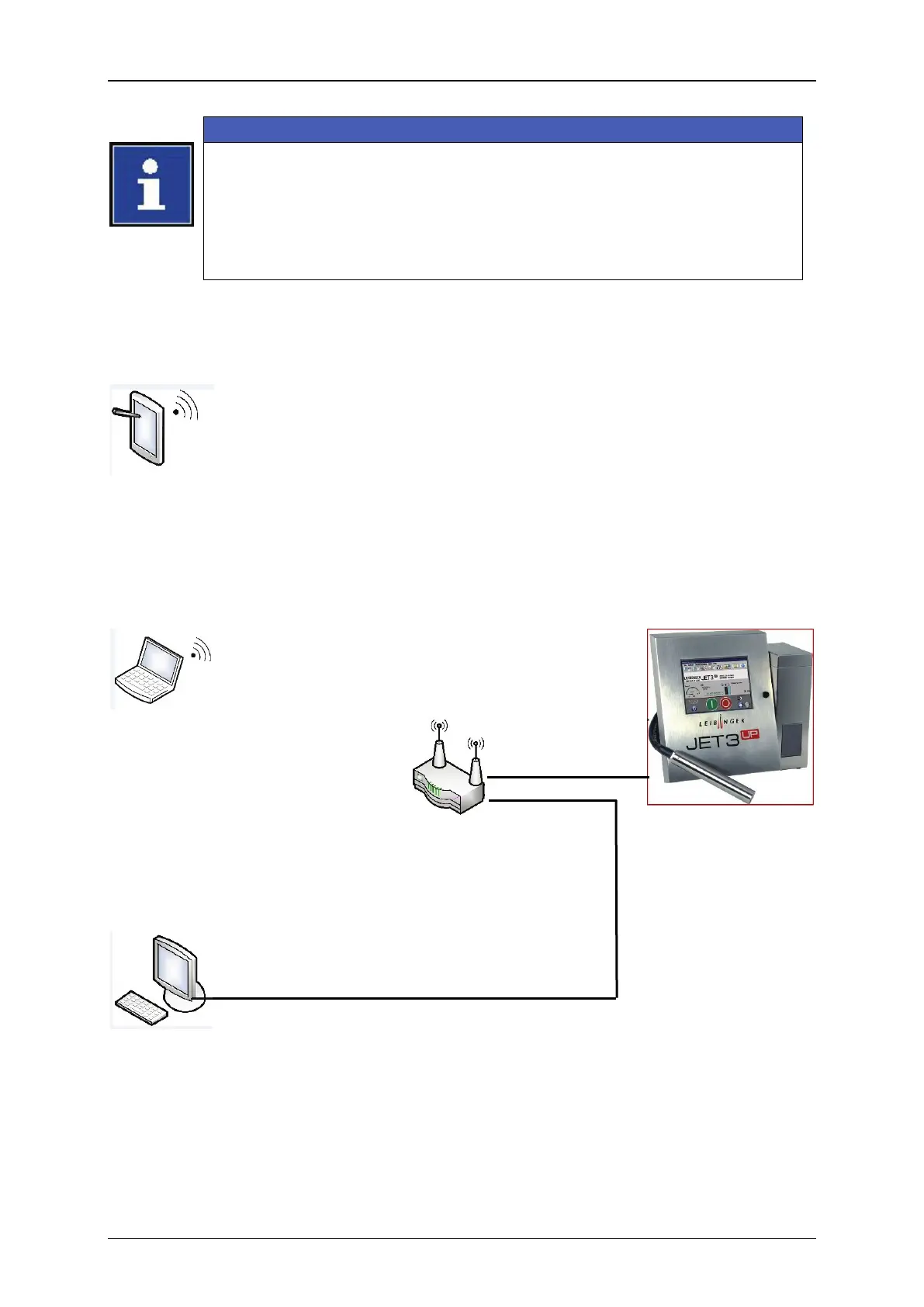
Figure 58 Remote Control – Connection scheme
Tablet WiFi connection
Connected to router by WiFi.
Using
the SSID and password of the
WiFi router
LEIBINGER JET3up
VNC Client software is required
A cable for the M12D coded socket of
the JET3up is required.
Connected to router by WiFi. Using
the SSID and password of the WiFi
router
VNC Client software is required
JET3up IP-Address:
192.168.1.10
Subnet mask:
255.255.0.0
192.168.1.1
Desktop PC cable connection
Connected to router by cable
VNC Client software is required
Example:
Desktop PC IP-Address: 192.168.1.5
The address has to be within the address space of the router.



 To Next Page