EasyManua.ls Logo

Leibinger JET3 up - Figure 121 Job Editor - Parameter Settings Dialog Box); Job Settings Dialog Box - Overview

Leibinger JET3 up
412 pages
Print Icon
To Next Page IconTo Next Page
To Previous Page IconTo Previous Page
Loading...
Group 8 Job Editor Page 239
JET3up Release R1.06
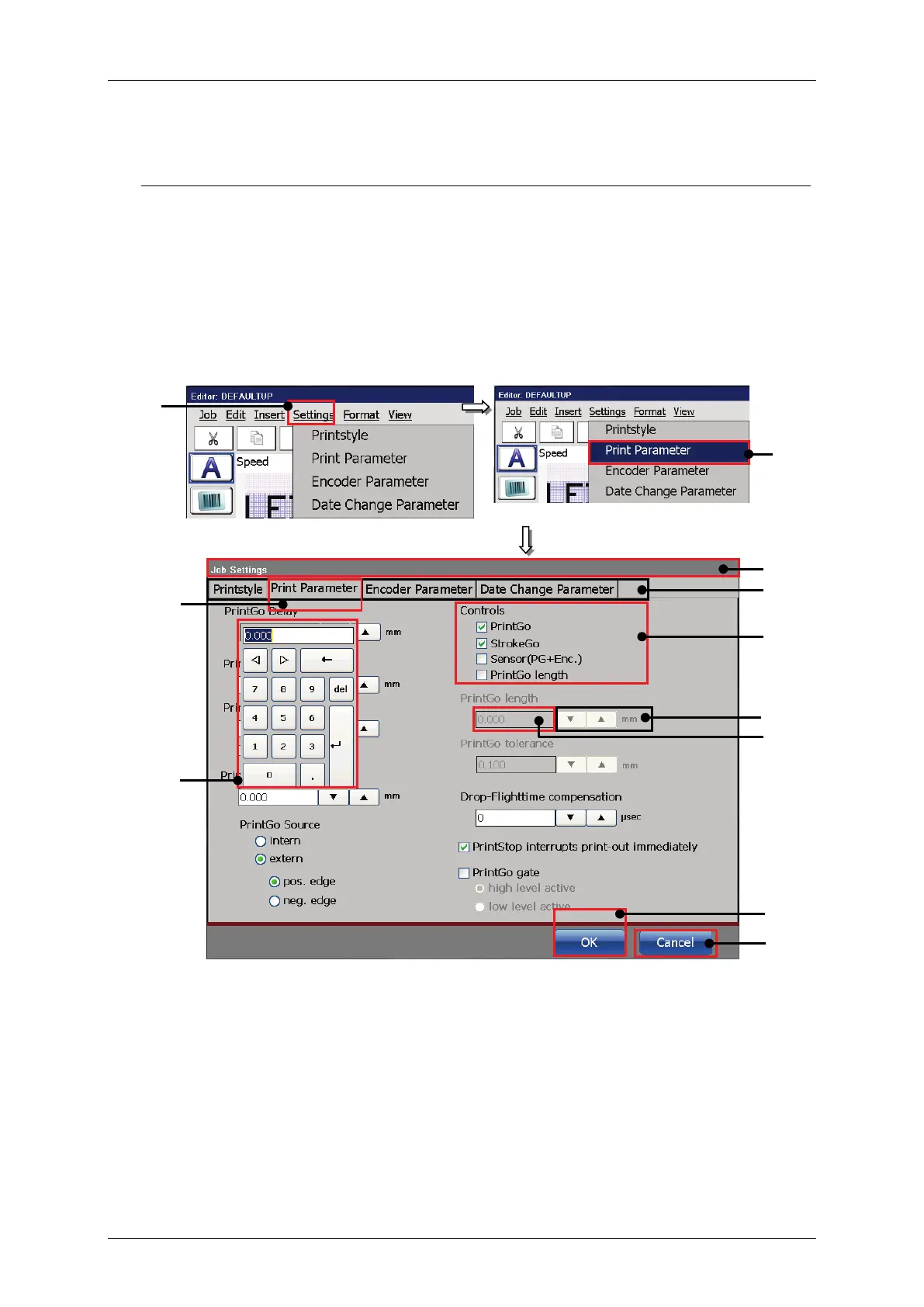
8.2.5 Job settings dialog box - Overview
The drop-down menu <Settings> offers the following options:
Printstyle
Print parameter
Encoder parameter
Date changing parameter
The settings for each option are arranged in tabs.
Figure 121 Job editor - Parameter settings dialog box)
1 – Drop-down menu <Settings>
7 – Arrow keys
2 – Option <Print Parameter>
8 – Display field
3 – Dialog box <Job settings>
9 – Numeric keypad
4 – Tab bar
10 – Button <OK>
5 – Tab caption <PrintGo Parameter>
11 – Button <Cancel>
6 – Check boxes
1
2
4
6
7
8
10
11
9
3
5

Table of Contents