Group 8 Job Editor Page 179
JET3up Release R1.06
7.4.6 Print history protocol
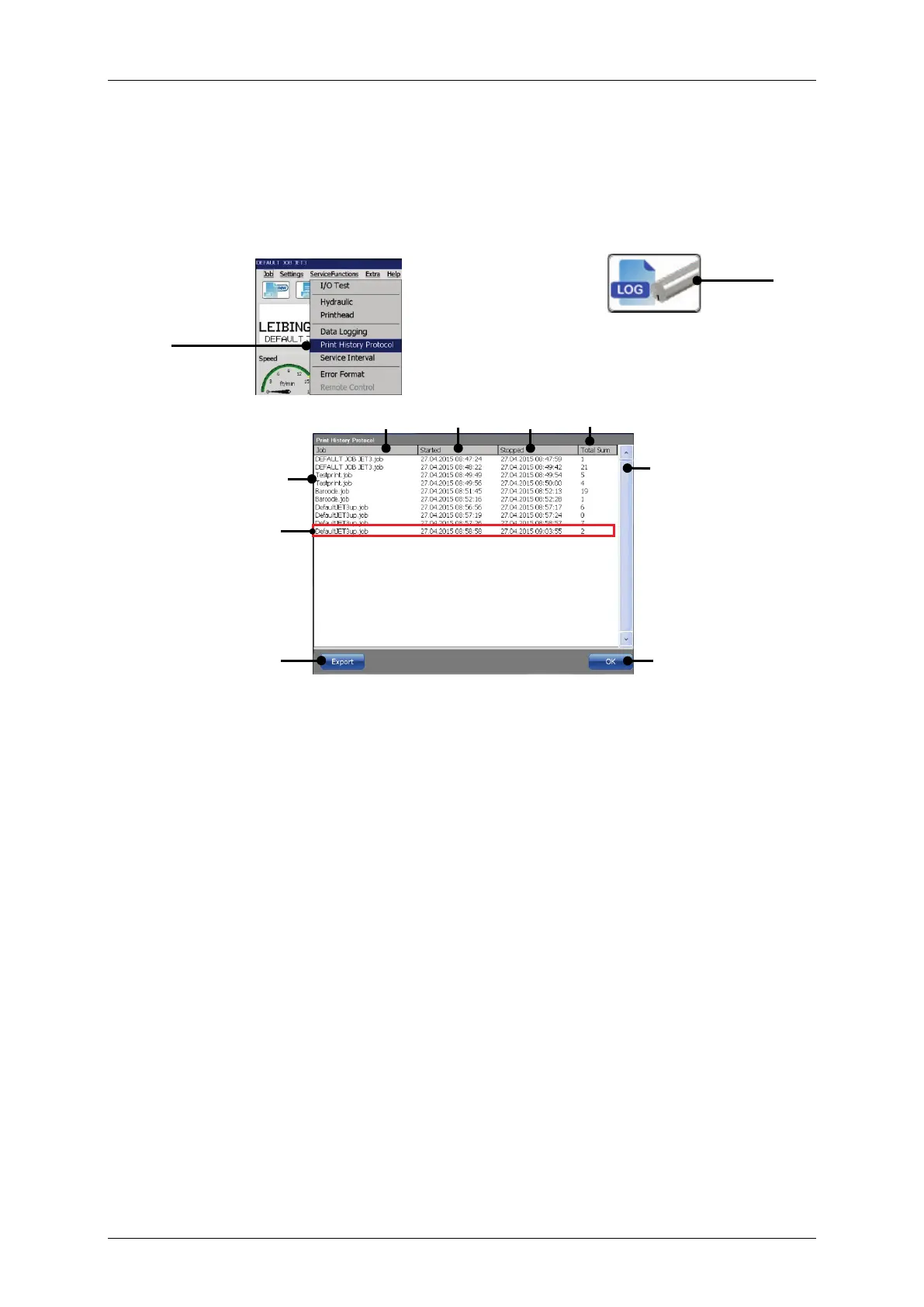
The <Print History protocol> shows all print jobs printed and provides information
about the start and stop time and the total number of printouts per print job..
Figure 78 Print historie protocol
or
1 – Option <Print History Protocol>
2 – Shortcut <Print History Protocol>
4 – Time stamp: first start of the print job
5 – Time stamp: last stop of the print job
6 – Total printouts of the selected print job
Open the <Print History Protocol> of the printer either by clicking on the
respective option on the <ServiceFunctions> drop-down list (1) or through the
respective direct button (shortcut icon) (2).
The <Print History Protocol> shows a list of the last 1000 print events (8).
Each entry shows the name of the print job (3), the date and t
started first (4) and the date and time when it was stopped last (5). The
sum> column shows the total number of print outs (6)
event. The vertical scrollbar allows to scroll through the list (7).
A <Print event> (9) is defined by a <PrintStart> signal and a <PrintStop>
signal.



 To Next Page