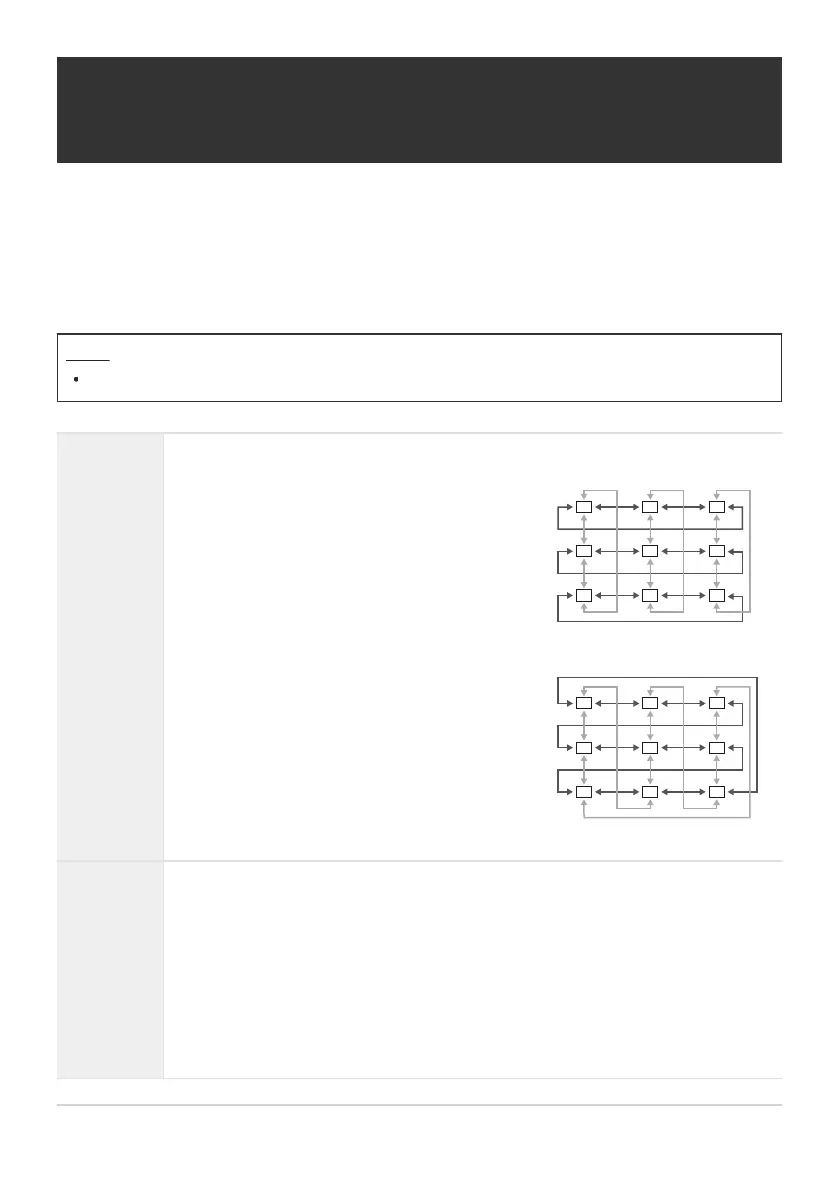
[Loop 1]: If you continue to press the multi
selector in the same direction after reaching the
border of the display, the target in the same
row or column on the opposite border will be
selected.
“Loop 1”
[Loop 2]: If you continue to press the multi
selector in the same direction after reaching the
border of the display, the target in the next
row or column on the opposite border will be
selected.
“Loop 2”
Enabling AF Target Selection Wrap (Y Loop
Settings)
You can choose whether AF target selection “wraps around” the edges of the display. You can also
choose whether you have the option of selecting bAll (all targets) before AF target selection “wraps
around” to the opposite border of the display.
Menu
MENU U AF U 6. AF Target Settings & Operations U Y Loop Settings
Y Loop
Selection
[Off]: Wrap disabled. Target selection stays within the borders of the display.
Via bAll
[No]: Target selection does not pass through bAll (all targets) before wrapping
around.
[Yes]: If [Loop 1] or [Loop 2] is chosen for [Y Loop Selection], target selection
will pass through bAll (all targets) before wrapping around to the opposite
border.
Hiding bAll (all targets) in [KAF Target Mode Settings] (P.109) fixes [Via
bAll] at [No].
141
Enabling AF Target Selection Wrap (Y Loop
Settings)
C


 To Next Page
 Loading...



