Shooting
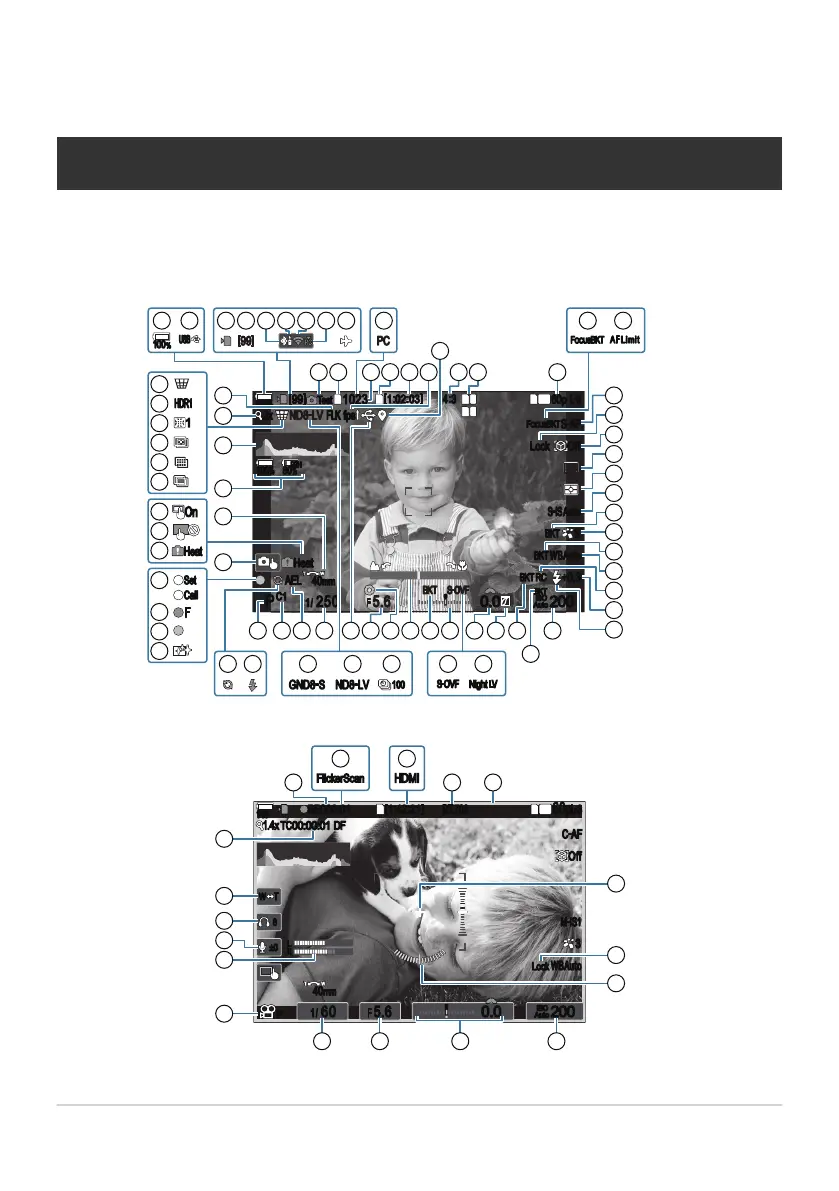
Information displays while shooting
For information on the super control panel, which appears on the monitor by default, see “Settings
Available in the Super Control/LV Super Control Panel” (P.93).
Monitor display during still photography
Off
1 1
1
FF
Lock
2
FF
L
1
4K
L
+
-
P
100
%
[
99
]
ND8
-
LV2x
1023
[
1
:
02
:
03
]
fps
FLK
4
:
3
100
%
PBH
80
%
60p L
-
8
F!"#$BKT
S
-
AF
S
-
IS Auto
BKT
3
WBAuto
BKT
+0.3
BKT RC
200
BKT
ISO
Auto
0.0
0
S
-
OVF
5.6
BKT
F
C1
1
/
250
40mm
AEL
Heat
Test
ND8
-
LV
GND8
-
S
100
%
[
99
]
USB
PC
F!"#$BKT
AF Limi t
S
-
OVF
Night LV
100
F
Set
Call
Heat
On
HDR1
1
/
1 2
27
29
31
33
28
30
32
34
35
39 36
37
384043444547 4648
49
5051
5354
56
55
57
70
72
71
73
74
12
14 16
11 13
15
17
18
20
25
19
26
987653 4
10 2221
23
24
4142
52
62
66
67
68
69
75
76
65
64
63
61
58
60
59
Monitor display during movie mode
1
1
4K
+
-
145
min
REC
00:01
1.4x TC
00:00:01
DF
[
1
:
42
:
21
]
BT.709
Off
C
-
AF
60p
L
-
8
3
M
-
IS1
WBAuto
Lock
200
ISO
Auto
0.0
0
8
±0
W T
P
L
R
1
/
60 5.6
F
40mm
FlickerScan
HDMI
77 78
79 80 81
4752 3643
85
86
87
88
89
90
82
83
84
44
Information displays while shooting
B


 To Next Page
 Loading...




