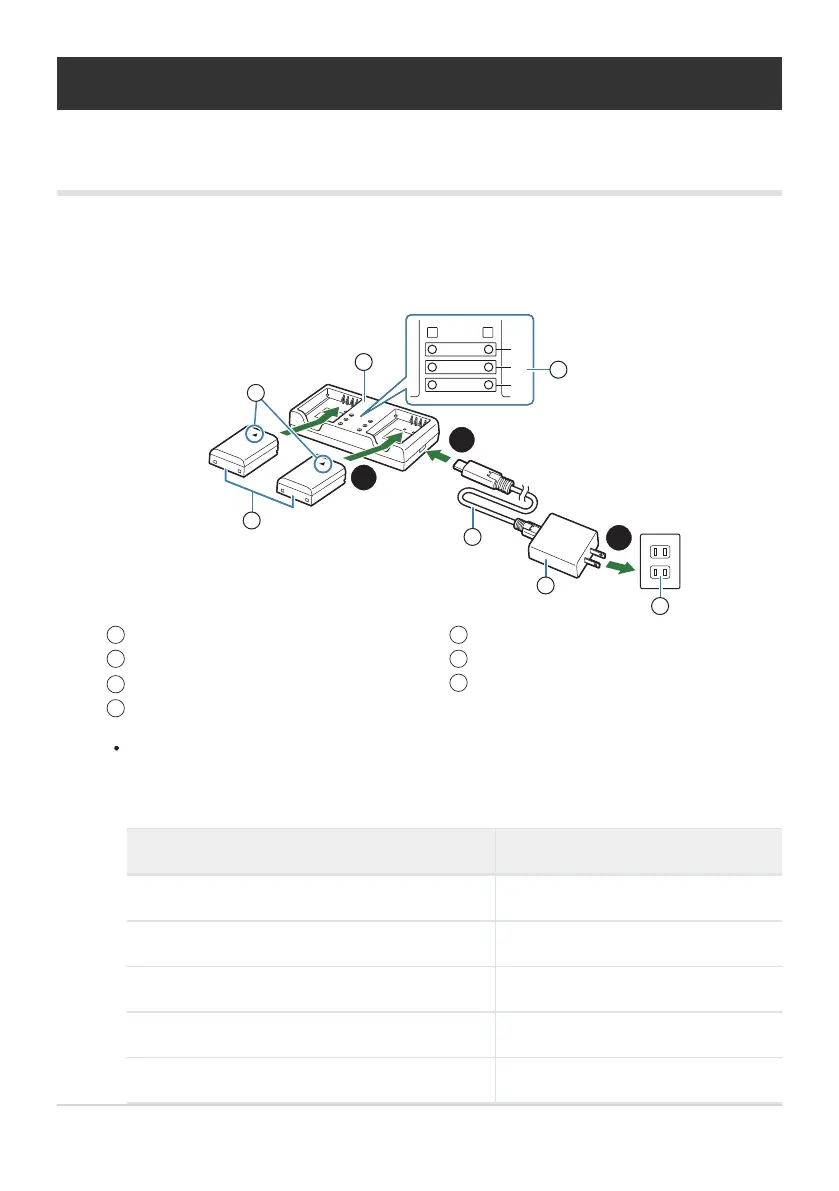
Lithium ion battery (BLX-1)
Direction indicating mark (J)
Lithium-ion charger
Charging indicators
1
2
3
4
USB cable (CB-USB13: supplied)
USB-AC adapter (F-7AC: supplied)
AC wall outlet
5
6
7
Optional Accessories
Using the charger (BCX-1)
Two batteries can be inserted. It can also be used with only one battery inserted.
Charge the battery.
50%
80%
100%
A
B
1
2
3
1
1
5
3
7
6
4
2
3
2
Charging time is approximately 2 hours 30 minutes. See the table below for status of the
charging indicators and battery charge.
Charging time does not change even when you charge two batteries at the same time.
Charging indicator Battery charge
Indicator 1: Blinks Charging (less than 50%)
Indicator 1: Lights up; Indicator 2: Blinks Charging (between 50% and 80%)
Indicators 1 and 2: Light up; Indicator 3: Blinks Charging (between 80% and 100%)
All indicators: Unlit Charging complete
All indicators: Blinking Charging error
477
Optional Accessories
1.


 To Next Page
 Loading...




