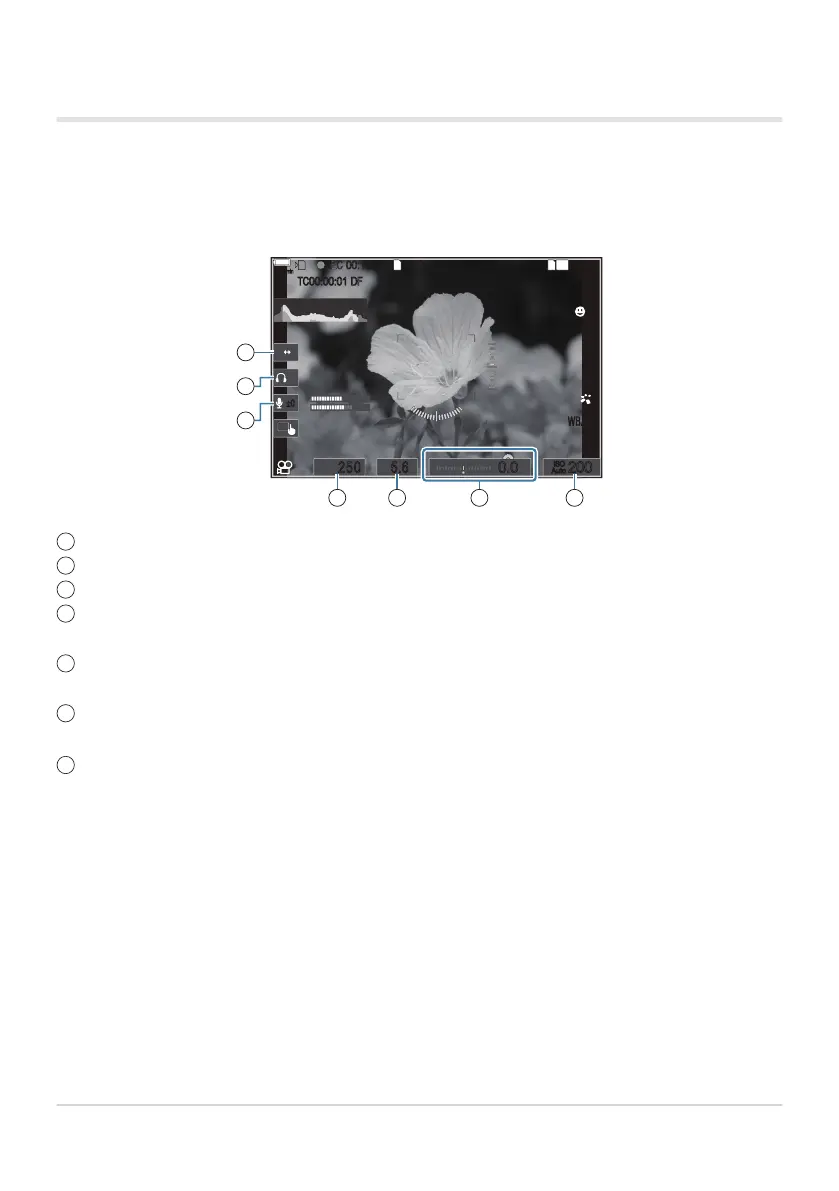
Touch Controls (Silent Controls)
You can prevent the camera from recording operating sounds that occur due to camera operations
while shooting. After tapping an item, tap the displayed arrows to select the settings.
LL
R
88
W TW T
R
145
min
145
min
REC
P
1
/
250
P
1
/
F
250 5.65.6
1
[
1
:
02
:
03
][
1
:
02
:
03
]
60p60p L
-
8L
-
8
C
-
AFC
-
AF
M
-
IS2M
-
IS2
33
WBAutoWBAuto
OffOff
1
4K
ISO
Auto
ISO
Auto
F
00
+
-
0.00.0
REC
00:1200:12
±0±0
TC
00:00:01
TC
00:00:01
DFDF
200200
1
2
3
65 74
Electronic Zoom: Zoom power zoom lenses in or out.
Headphone Volume: Adjust volume when using headphones.
Sound Recording Level: Choose the recording level.
Shutter Speed: Adjust shutter speed when [S] (shutter-priority AE) or [M] (manual) is selected for
[nMode] (movie exposure mode) (P.79).
Aperture Value: Adjust aperture value when [A] (aperture-priority AE) or [M] (manual) is selected
for [nMode] (movie exposure mode) (P.79).
Exposure Comp.: Adjust exposure compensation. If [M] is selected for [nMode] (movie exposure
mode) (P.79), exposure compensation is available when [Auto] is selected for [nISO] (P.166).
nISO: Adjust [nISO] (P.166). This option is available when [M] is selected for [nMode] (movie
exposure mode) (P.79).
Silent controls are not available during high-speed movie recording (P.214).
You can configure the camera so that silent controls using the touch panel can also be used during
still photography. g[Silent 7 Operation] (P.371)
82
Recording Movies
1
2
3
4
5
6
7
C
B


 To Next Page
 Loading...




