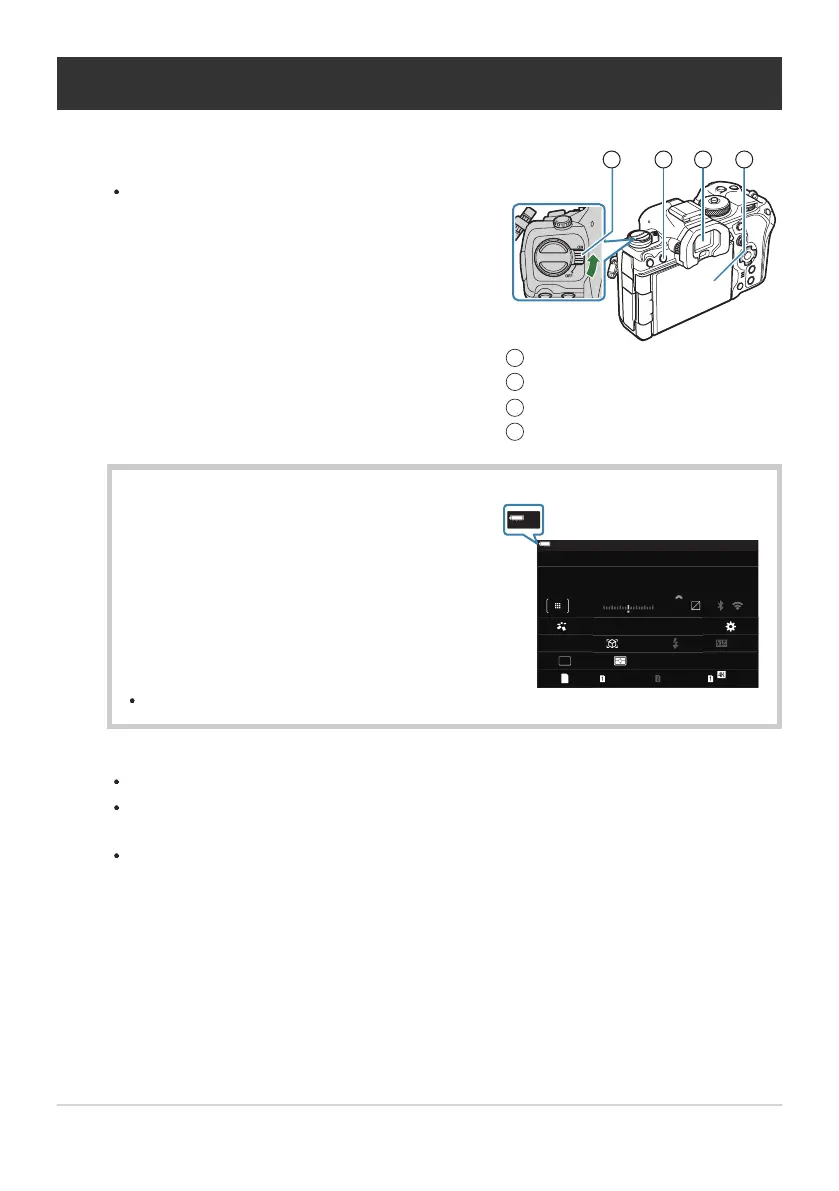
Set the ON/OFF lever to the ON position.
When the camera is turned on, the monitor will turn
on and display the super control panel.
ON/OFF lever
U (LV) button
Viewfinder
Monitor
1
2
3
4
The camera displays the level of the battery
currently in use. The battery level is shown as
percentages.
L
F
1023 1:02:03
S-IS Auto
±
0.3
2024.01.01 16:30:43
0.0
5.6 200250P
Small
S-AF
4 : 3
1/ Auto
ISO
L
F
0
60p L
-
8
Off
3
0
+
-
100
%
100
%
±
F
WB Auto
Turning the camera on
Battery level
The O indicator flashes red when the level reaches 10%.
Press the U (LV) button; a confirmation dialog will be displayed.
The viewfinder turns on when you put your eye to the viewfinder. When the viewfinder is lit
up, the monitor turns off.
To turn the camera off, return the lever to the OFF position.
The Fn lever can be configured to turn the camera on and off using the [Fn Lever/Power Lever]
option. g“Configuring [Fn Lever/Power Lever]” (P.356)
39
Turning the camera on
1.
B


 To Next Page
 Loading...




