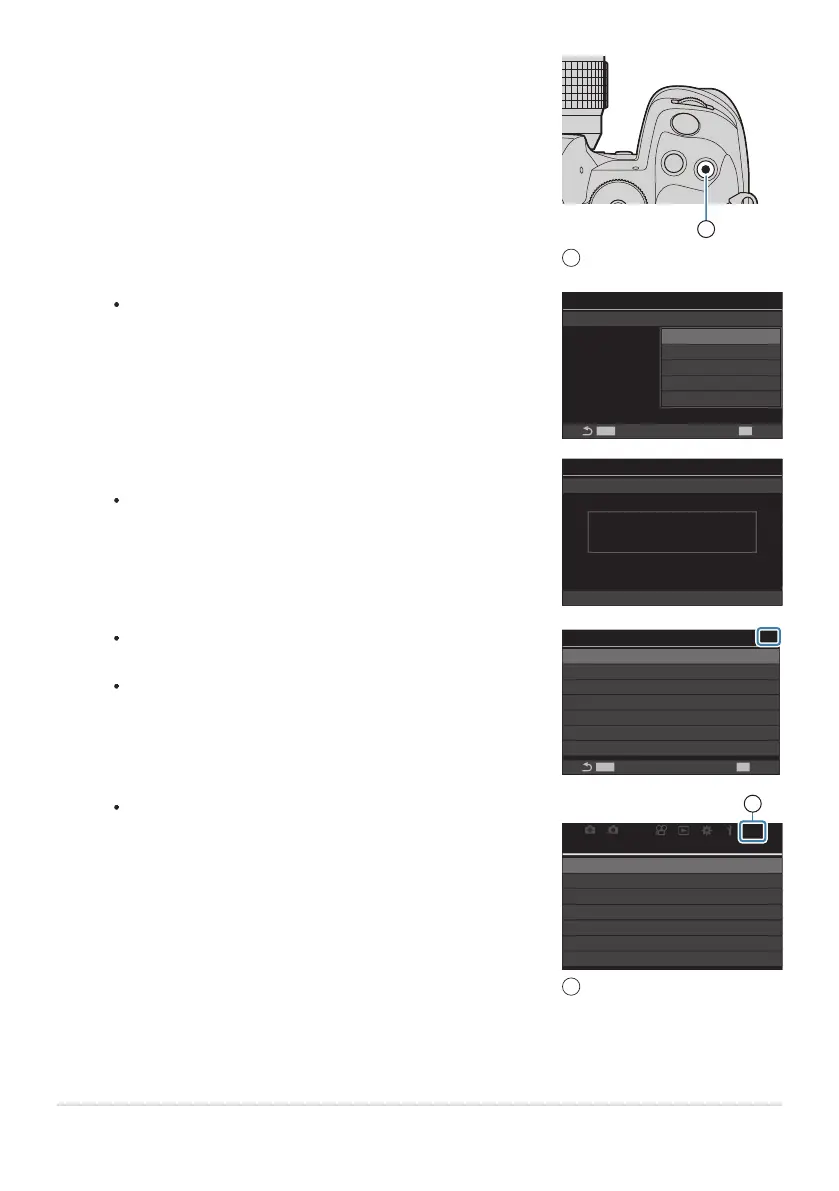
Press the R button.
R button
1
You will be prompted to choose a page. Use FG on the
arrow pad to choose the “My Menu” page to which the item
will be added.
MENU
OK
Select My Menu to add.
My
Bulb/Time Timer
Live Composite Timer
Bulb/Time Monitor
Live Bulb
Live Time
Composite Settings
Bulb/Time Focusing
8min
3h
-7
Off
0.5sec
1/2sec
On
My1
My2
My3
My4
My5
Press the OK button to add the item to the selected page.
The camera will display a message stating that the item has
been added to “My Menu”.
My1
Bulb/Time Timer
Live Composite Timer
Bulb/Time Monitor
Live Bulb
Live Time
Composite Settings
Bulb/Time Focusing
8min
3h
-7
Off
0.5sec
1/2sec
On
Added to My Menu.
Items that have been added to “My Menu” are indicated by
the number of the “My Menu” page.
Items can be removed from “My Menu” by pressing the R
button. Select [Yes] and press the OK button.
BULB/TIME/COMP Settings
Bulb/Time Timer
Live Composite Timer
Bulb/Time Monitor
Live Bulb
Live Time
Composite Settings
Bulb/Time Focusing
8min
3h
-7
Off
0.5sec
1/2sec
On
MENU
OK
My1
Items saved to “My Menu” are added to the My (“My
Menu”) tab.
21
AF
My
My
1.
On
Bulb/Time Focusing
My Menu
1
My (“My Menu”) tab
1
To access “My Menu”, select the “My” tab.
385
My Menu
3.
4.
5.


 To Next Page
 Loading...




