Press the INFO button to switch between uppercase,
lowercase and symbols.
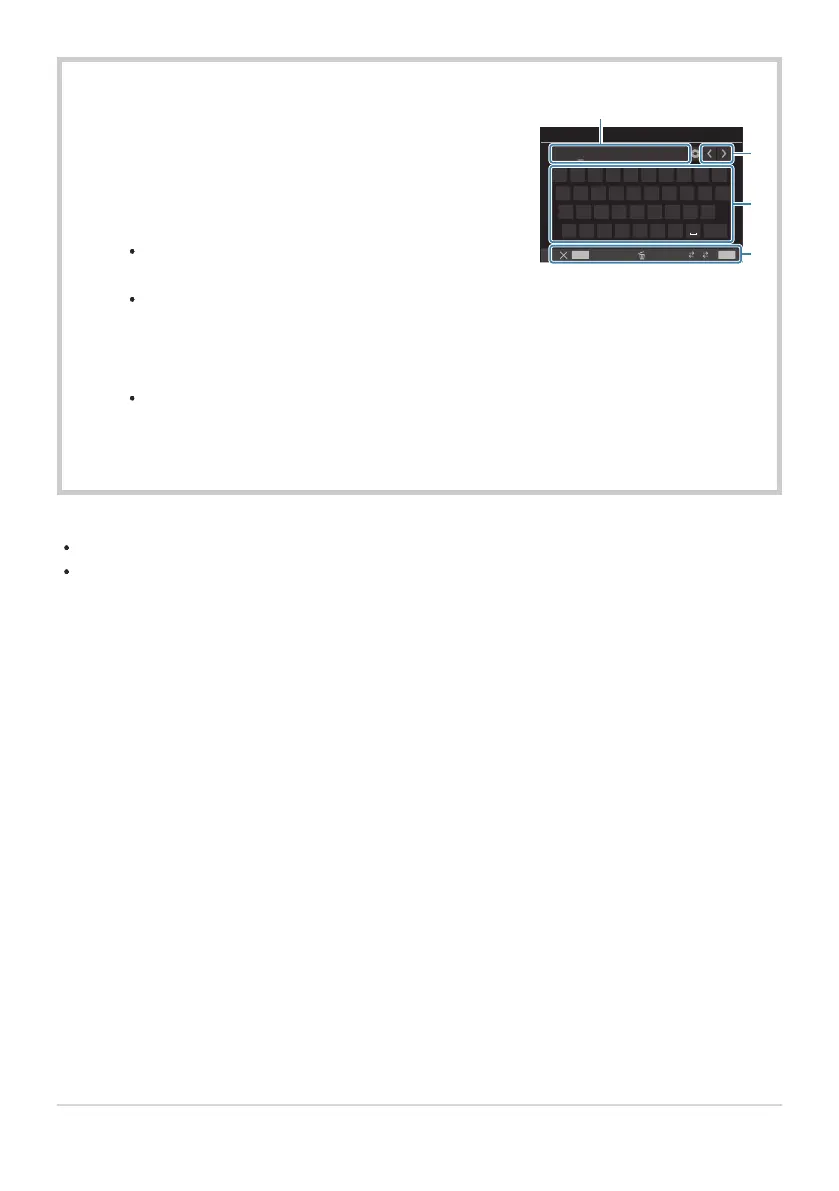
Highlight a character using FGHI press the OK
button to enter.
The selected character appears in the character entry
area (a).
To delete a character, press the D button.
To delete a character in the character entry area (a), move
the cursor using the front and rear dials.
Select a character and press the D button to delete it.
When you have finished entering, select [End] and press
the OK button.
1.
2.
3.
4.
1 2 3 4 5 6 7 8 9 0
q w e r t y u i o
a s d f g h j k l
z x c v b n m
End
p
1 2 - 4 0
Lens Name 5/31
MENU
INFO
a A #
a
b
c
d
a Character entry area
b Cursor movement keys
c Keyboard
d Operation guide
Touch operation can also be
used to enter characters and
operate a to d.
B
Entering characters
The lens will be added to the lens info menu.
When a lens that does not supply info automatically is attached, the info used is indicated by checks
(P). Highlight lenses to which you want to add checks (P) and press the OK button.
395
Saving lens info (Lens Info Settings)


 To Next Page
 Loading...



