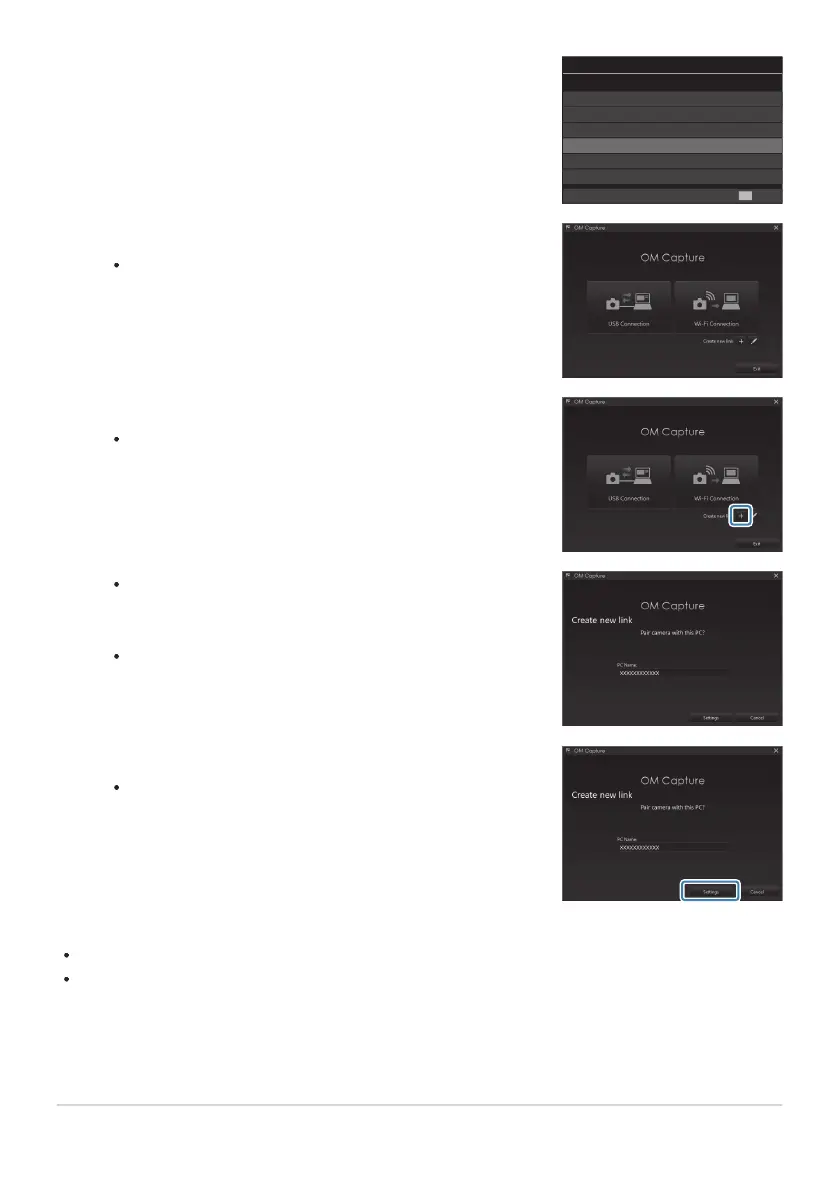
Highlight [0RAW/Control] using the FG buttons and
press the OK button.
USB
MTP
Webcam
0
RAW/Control
USB PD
Exit
OK
Storage
Launch the copy of OM Capture installed on the computer.
After starting up, “OM Capture” will prompt you to choose
the connection type.
Click the [+] to the right of [Create new link].
If nothing happens, reconnect the camera.
Enter the name that will be used on the camera to identify
the computer. The default is the computer’s “Computer
Name”.
The name used on the camera can be up to 15 characters
long.
Click [Settings] in OM Capture.
When a message is displayed stating that pairing is
complete, disconnect the camera as instructed.
Repeat the above steps to pair the camera with each additional computer.
The pairing information stored on the camera can be viewed and deleted using “OM Capture”.
If the connection to the computer does not work, the computer needs to recognize the camera.
440
Pairing the Computer with the Camera (New
Link)
3.
4.
5.
6.
C


 To Next Page
 Loading...




