The monitor battery-level indicator (P.39) shows “PBH” when the camera is
powered by the battery in the HLD-10.
2024.01.01 16:30:43
100
%
100
%
PBH
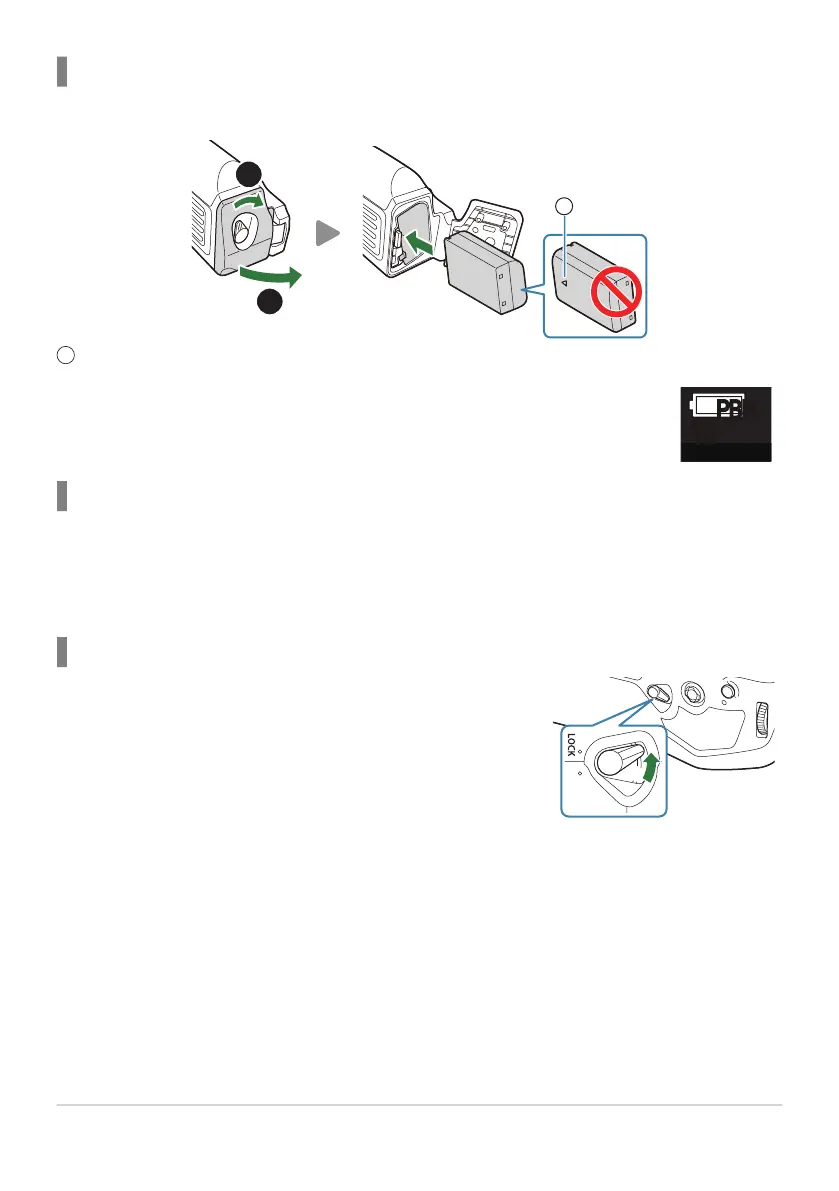
Slide the vertical shooting lock of the HLD-10 in the direction of the
arrow.
Inserting the battery
Use BLX-1 battery. Once you load the battery, make sure to lock the battery cover.
Direction indicating mark
Charging the battery in the power battery holder
To charge the battery in the power battery holder, load a battery in the holder and attach the holder
to the camera; charge the battery in the same way as described in “Charging the Battery using the
USB-AC adapter” (P.30).
The charge lamp of the holder lights during charging.
Using the buttons
The roles performed by the F (Exposure compensation) button, ISO button and AF-ON button on
the HLD-10 can be selected using the [Button Function] item. g“Changing the roles of buttons
(Button Settings)” (P.334)
Buttons on the HLD-10 cannot be used when the vertical shooting lock is in the LOCK position.
479
Optional Accessories
1
B
C


 To Next Page
 Loading...




