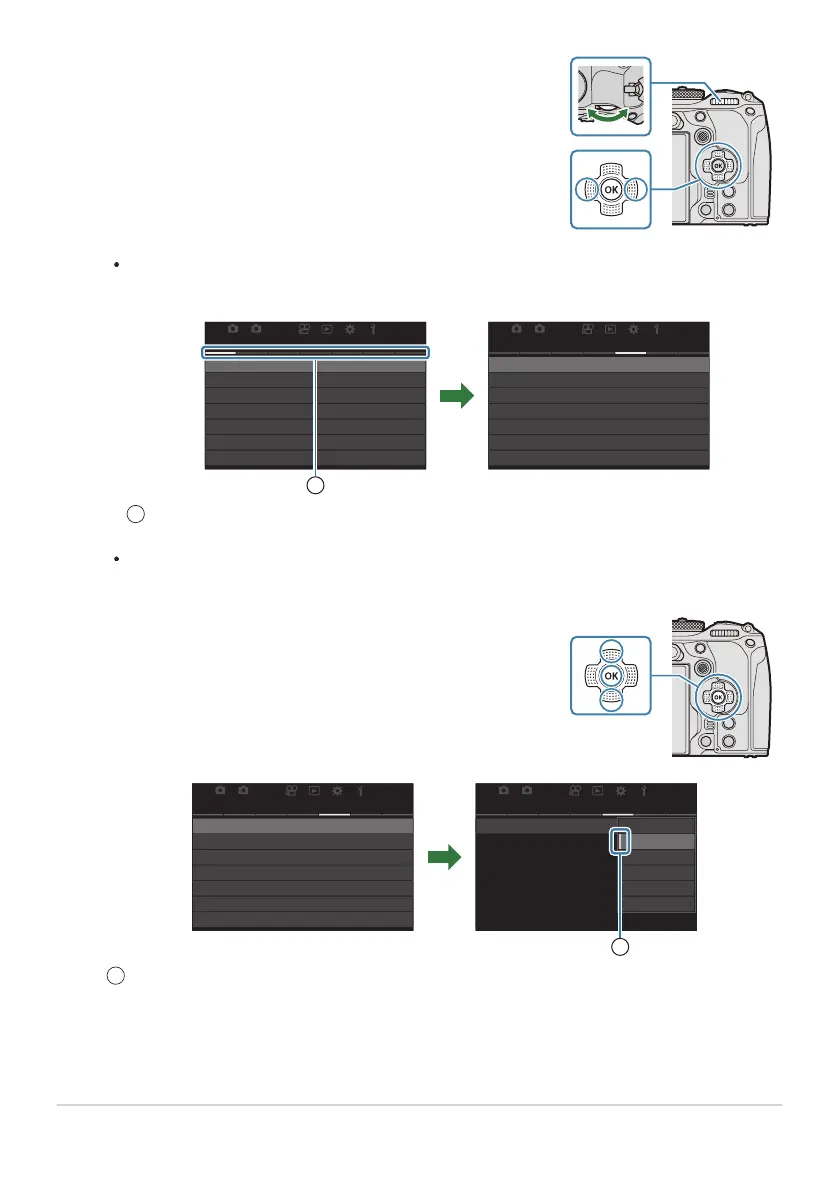
Use HI or the rear dial to select the desired page.
Highlight [nAF Mode] using the FG buttons and press the
OK button.
[nAF Mode] can be found on the 5th page, [5. Movie AF]. Press HI or rotate the rear
dial until the [5. Movie AF] is highlighted.
21
AF
My
21
AF
My
AF AF
K
AF Mode S-AF
1.
K
AF+MF
Starry Sky AF Setting
K
AF by half-pressing
6
Release Priority
AF
z
in MF mode
No
Off
n
AF Mode
C-AF
5.
n
C-AF Speed
n
C-AF Sensitivity
Movie AF
±
0
±
0
1
Page guide
You can tap the page guide to change the page.
21
AF
My
21
AF
My
AFAF
n
AF Mode
C-AF
5.
n
C-AF Speed
n
C-AF Sensitivity
±
0
±
0
n
AF Mode
C-AF
5.
n
C-AF Speed
n
C-AF Sensitivity
Movie AF
±
0
±
0
Movie AF
S-AF
C-AF
J
S-AF
J
C-AF+TR
Pre
J
1
The configured item will be displayed.
98
How to operate the menus
3.
1
4.
1


 To Next Page
 Loading...




