Bit Switches – 4
SM 81 D0C5/D0C6/D0C4/D0AP FAX UNIT
(D0C5/D0C6
/D0C4/D0AP)
4.6 BIT SWITCHES – 4
• Do not adjust a bit switch or use a setting that is described as "Not used", as this may
cause the machine to malfunction or to operate in a manner that is not accepted by
local regulations. Such bits are for use only in other areas, such as Japan.
Default settings for bit switches are not listed in this manual. Refer to the System Parameter List
printed by the machine.
4.6.1 G3 SWITCHES
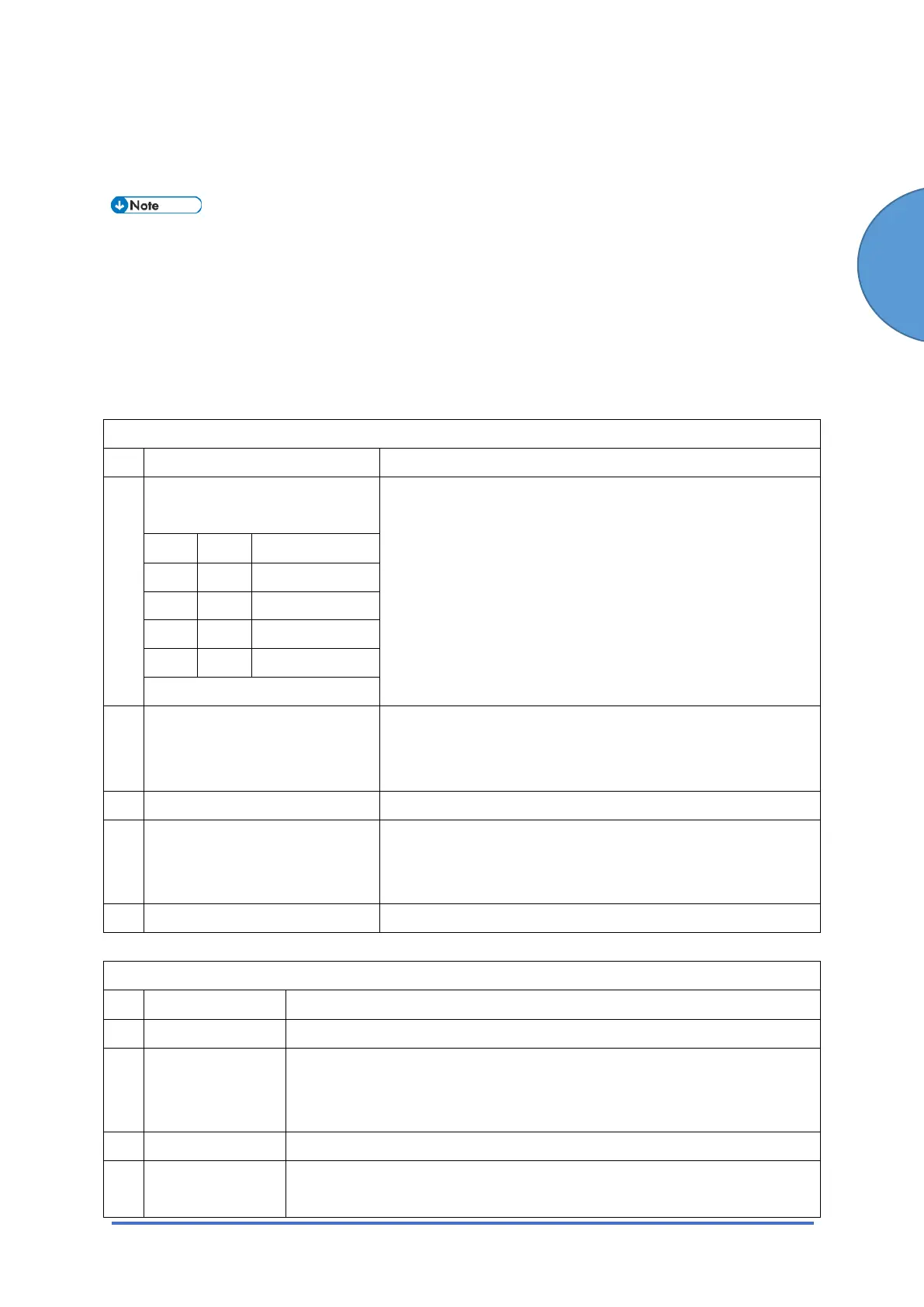
G3 Switch 00 (SP No. 1-105-001)
No Function Comments
0
1
Monitor speaker during
communication (tx and rx)
(0, 0): The monitor speaker is disabled all through the
communication.
(0, 1): The monitor speaker is on up to phase B in the T.3 0
protocol.
(1, 0): Used for testing. The monitor speaker is on all
through the communication. Make sure that you reset
these bits after testing.
Bit 1 Bit 0 Setting
0 0 Disabled
0 1 Up to Phase B
1 0 All the time
1 1 Not used
2 Monitor speaker during
memory transmission
0: Disabled 1: Enabled
1: The monitor speaker is enabled during memory
transmission.
3-5 Not used Do not change the settings.
6 Dedicated G3 line mode
selection
0: Off 1: On (Dedicated)
Set this bit to 1 when you wish to dedicate a line for G3.
7 Not used Do not change this setting.
G3 Switch 01 (SP No. 1-105-002)
No Function Comments
0-3 Not used Do not change the settings.
4 DIS frame length
0: 10 bytes 1: 4
bytes
1: The bytes in the DIS frame after the 4th byte will not be transmitted
(set to 1 if there are communication problems with PC-based faxes
which cannot receive the extended DIS frames).
5 Not used Do not change the setting.
6 Forbid
CED/ANsam
Do not change this setting (Default: 0: Off), unless a communication
problem is caused by a CED or ANSam transmission.



 To Next Page