Home
Ricoh
Printer
SAVIN D0AP
Page 232 (Left Cover (Printer))
Ricoh SAVIN D0AP - Left Cover (Printer)
1067 pages
Manual
Save Page as PDF
To Next Page
To Next Page
To Previous Page
To Previous Page
Loading...
Ext
er
i
or
Covers (Prin
ter Model
)
D0AP/D0C4/D0
C5/D0C
6/M0B
Q/M
0D1
4
-
28
SM
4.5.2
LEFT
COV
ER
(PRI
NTE
R)
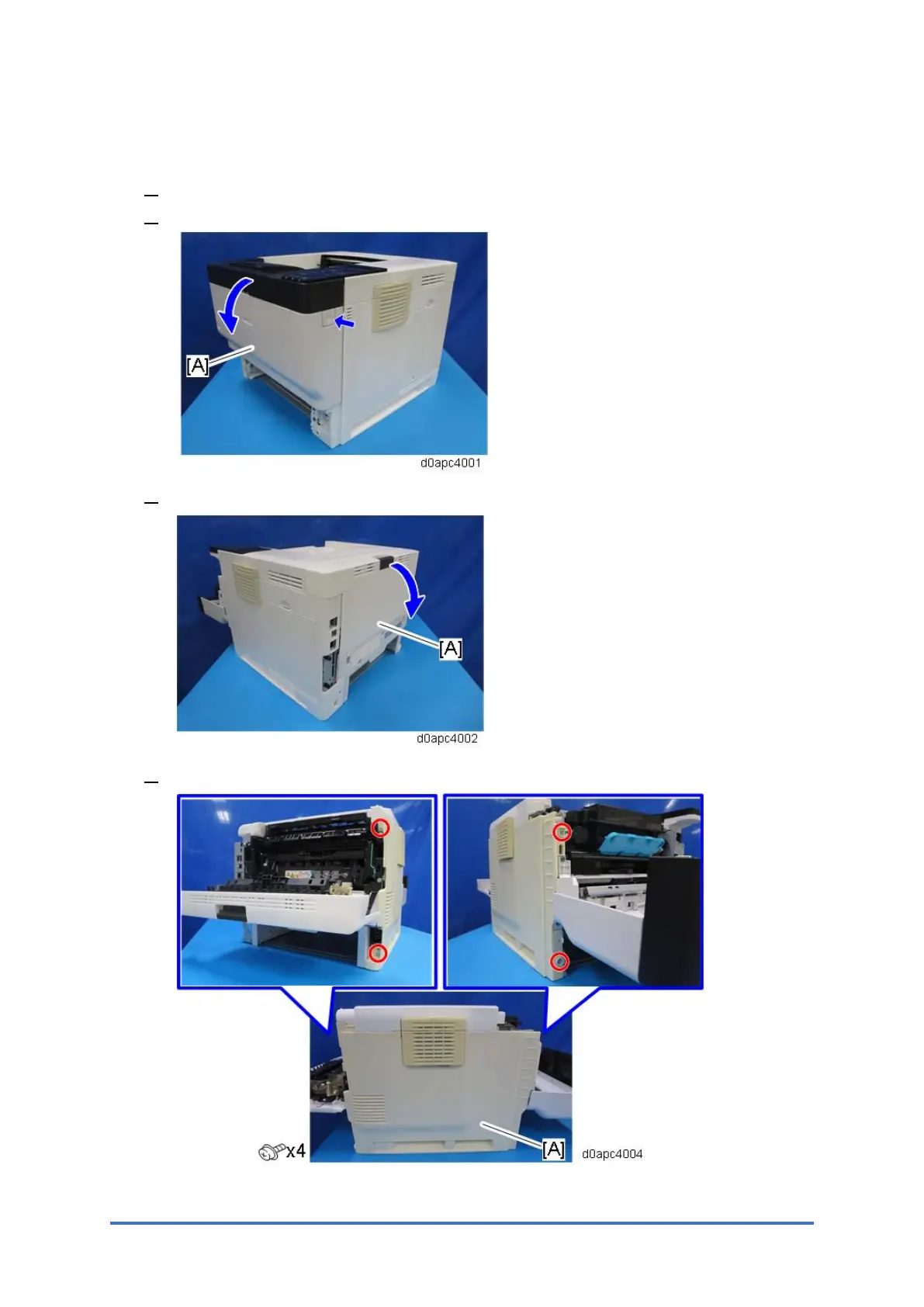
1.
R
emove
the
paper
cassette
.
2.
O
pen
th
e
fron
t
cove
r
[
A]
by
p
ressin
g
the
fron
t
cove
r
button
.
3.
O
pen
the
rear
cover
[
A].
4.
R
emove
the
left
cove
r
[A].
231
233
Table of Contents
Main Page
D0Ap/D0C4/D0C5/D0C6/M0Bq/M0D1
7
Table of Contents
7
Product Information
31
Machine Codes & Peripheral Configuration
33
Main Machine
33
Options
34
External Options
34
Internal Options
34
Controller Options
35
SD Card Options
35
Installation
37
Installation Requirements
39
Environment
39
Machine Space Requirements
40
Machine Dimensions
41
Power Requirements
42
Main Machine Installation (P 502/501)
43
Accessories
43
Installation Procedure
43
Removal of Packing Materials and Shipping Retainers
44
Loading Paper
45
Turning the Power on
47
Printing a Configuration Page
48
Moving the Machine
49
Main Machine Installation (IM 350F/350/430F)
51
Important Notice on Security Issues
51
Installation Procedure
51
Removal of Packing Materials and Shipping Retainers
51
Loading Paper
54
Connecting the Modular Cable (Only Using the Fax)
55
Turning the Power on
56
Moving the Machine
58
Main Machine Installation (IM 430Fb)
61
External/ Internal Options
71
Paper Feed Unit Pb1120 (D3Er-17)/ Pb1110 (D3Eq-17)
72
Number of Paper Feed Unit that Can be Installed
72
Accessories
74
Installation Procedure
74
Caster Table Type M34 (D3Ep-03)
76
Accessories
76
Installation Procedure
76
Installation Procedure
77
Accessories
77
Offline Stapler Type M34 (D3Ep-02)
77
Hard Disk Drive Option Type P18 (M543-01)
81
Accessories
81
Installation Procedure
81
Optional Counter Interface Unit Type M12 (B870-21)
86
Accessories
86
Installation Procedure
87
Accessories
90
Installation Procedure (2): Usb Cable Inside the Machine
96
Page Keeper Type M28 (D3Dq-17)
105
Accessories
105
Installation Procedure
105
Installation Procedure
115
Accessories
115
Enhanced Security Hdd Option Type M10 (D792-09)
115
After Installing the HDD
117
Controller Options
119
Ieee 1284 Interface Board Type M19 (D3C0-17)
120
Accessories
120
Installation Procedure
120
Ieee 802.11 Interface Unit Type M24 (M500-08)
122
Accessories
122
Installation Procedure
122
User Tool Settings for Ieee 802.11A/G/N (Printer Model)
124
User Tool Settings for Ieee 802.11A/G/N (Mf Model)
125
Sp Mode Settings for Ieee 802.11 Wireless Lan
127
Installation Procedure
128
Accessories
128
File Format Converter Type M19 (D3Br-04)
128
Usb Device Server Option Type M19A (D3Bc-33, -34)
130
Accessories
130
Interface Board Surface
130
What Do the LED Indicators Mean
131
Installation Procedure
131
Notes for Energy Save Mode Setting
136
Ip Address Setting
137
Extended Usb Board Type M19 (D3Bs-01)
139
Accessories
139
Installation Procedure
139
Sd Card Options
141
Notes on Using the Sd Merge Function
142
Overview
142
Sd Card Appli Move
142
Move Exec
143
Undo Exec
144
Xps Direct Print Option Type P18 (M543-11)/ M34 (D3En-18, -19, -20)2-107 2.22.1 Accessories
145
Installation Procedure
145
Ipds Unit Type P18 (M543-07, -08, -09)/ M34 (D3En-13, -14, -15)
148
Accessories
148
Installation Procedure
148
Ocr Unit Type M13 (D3Ac-23, -24, -25)
151
Accessories
151
Overview of Searchable Pdf Function
151
Installation Procedure
151
Recovery Procedure
153
Installation Procedure
154
Postscript3 Unit Type P18 (M543-04, -05, -06)/ M34 (D3En-10, -11, -12)2-116 2.25.1 Accessories
154
VM Card Type P18 (D3En-03, -04, -05)
157
Accessories
157
Installation Procedure
157
Data Overwrite Security Unit Type M19 (D3Bs-03)
159
Overview
159
Before You Begin the Procedure
159
Accessories
160
Seal Check and Removal
160
Installation Procedure
161
Configuring "Auto Erase Memory" (Performed by the Customer)
163
Security Settings
164
Security Function Installation
164
Using Auto Erase Memory (Printer Model)
165
Before You Begin the Procedure
165
Data Overwrite Security
165
Using Auto Erase Memory (MF Model)
166
Hdd Encryption
168
Before You Begin the Procedure
168
Enable Encryption Setting (Printer Model)
169
Enable Encryption Setting (MF Model)
170
Backing up the Encryption Key (Printer Model)
172
Backing up the Encryption Key (MF Model)
173
Encryption Key Restoration
174
Settings for @Remote Service
177
Points to Check before Making @Remote Settings
177
Execute the @Remote Settings
178
Auto Remote Firmware Update (Arfu) Settings
182
Via Web Image Monitor
187
Specifying the Time and Day of the Week to Prohibit Updating
187
Instructions for the Customers
189
Remoteconnect Support Settings (Mf Model Only)
190
Overview
190
How to Enable/Disable Remoteconnect Support
190
Uninstalling Remoteconnect Support
193
Remote Panel Operation Settings (Mf Model Only)
194
Overview
194
How to Enable/Disable Remote Panel Operation/Monitoring2-157
195
Preventive Maintenance
197
Preventive Maintenance Tables
199
Image Quality Standards
200
Paper Transfer Quality Standards
202
Replacement and Adjustment
203
Notes on the Main Power Switch
205
Characteristics of the Push Switch (DC Switch)
205
Shutdown Method
206
Forced Shutdown
207
General Cautions
208
Special Tools and Lubricants
209
Locations to Apply Grease
210
Drum Drive
210
Paper Feed Drive
212
Feed/Fusing Drive
214
Fusing Pressure/Release Motor Drive
216
Paper Feed Drive (Optional Bank)
220
Paper Feed Drive
221
Drum Drive
221
Locations to Apply Quick Drying Grease
221
Paper Feed Drive (Optional Bank)
222
Locations to Apply Grease in the Fusing Unit
223
Inside Fusing Unit
223
Locations to Apply Grease in the Scanner Unit
225
Inside Scanner Unit
225
Smc Report Storage
227
Exterior Covers (Printer Model)
230
Right Cover (Printer)
230
Left Cover (Printer)
232
Front Cover (Printer)
233
Operation Panel (Printer)
235
Upper Cover (Printer)
236
Rear Lower Cover (Printer)
236
Rear Cover (Printer)
237
Exterior Covers (Mf Model)
239
Right Cover (Mf)
239
Left Cover (Mf)
242
Front Cover (Mf)
243
Upper Cover (Mf)
245
Rear Lower Cover (Mf)
246
Rear Cover (Mf)
247
Smart Operation Panel (Mf Model)
249
Operation Panel Unit
249
Internal Parts
254
Bottom Cover
254
Spdf (Mf Model Only)
256
Spdf Unit
256
When Installing the SPDF
258
Original Feed Unit
259
Spdf Friction Pad
259
Spdf Rear Cover
260
Spdf Relay Board
262
Spdf Drive Motor (M6)
262
Spdf Feed Sensor (S17)
263
Spdf
265
Feed Cover Sensor (S15), Original Set Sensor (S14)
266
Spdf Registration Sensor (S16)
266
Spdf Feed Clutch (Cl8)
268
Cis Unit
269
Scanner (Mf Model Only)
272
Scanner
272
Scanner Unit (with Spdf)
273
Platen Cover Sensor (S13)
276
Scanner Hp Sensor (S12)
278
Scanner Motor (M5)
279
Scanner Carriage
281
Reinstalling the Scanner Carriage
283
Led Optics
284
Led Head
284
Quenching Lamp
288
Pcdu
290
ID Chip Connectors
290
Toner Cartridge
292
Image Transfer
293
Image Transfer Roller
293
Discharge Plate
294
Image Creation Thermistor (Th5)
296
Fusing
297
Fusing Unit
297
Fusing Upper Cover
298
Fusing Thermistor (Th1)
300
Fusing Thermostat (Center, End) (Th4, Th3)
300
Fusing Lamp
300
Hot Roller Stripper
301
Hot Roller
302
Pressure Roller
305
Fusing Thermopile (Th2)
306
Fusing Pressure/Release Motor (M2)
307
Fusing Nip Pressure Position Sensor (S7)
307
Separation Roller
308
Paper Feed Roller
308
Paper Feed
308
Bypass Feed Roller
309
Paper End Sensor (S6), Paper Near-End Sensor (S4)
311
Bypass Feed Unit
314
Bypass Friction Pad
315
Bypass Paper End Sensor (S2)
316
Bypass Tray Sensor (S3)
317
Paper Size Switch (Sw4)
317
Registration Sensor (S5)
318
Registration Roller
320
Paper Exit/ Duplex
322
Paper Exit Full Sensor (S10)
322
Paper Exit/Reverse Sensor (S1)
322
Exit/Reverse Motor (M1)
324
Duplex Entrance Sensor (S8)
324
Exit Junction Gate Solenoid (Sol1)
325
Drive Units
326
Toner Supply Clutch (Cl2)
326
Bypass Feed Clutch (Cl4)
328
Bypass Lift Clutch (Cl3)
330
Registration Clutch (Cl5)
331
Paper Feed Clutch (Cl6)
331
Duplex Clutch (Cl1)
332
Relay Clutch (Cl7)
332
Drum Motor (M3)
335
Feed/Fusing Motor (M4)
337
Electrical Components
339
Scb (Mf Model)
339
NVRAM on the SCB
341
Hdd (Mf Models)
346
Scb with the Controller Box (Mf Model)
346
Fcu Board (Fax Model)
348
Speaker (Fax Model)
353
Controller Board (Printer Model)
354
NVRAM on the Controller Board
356
Bcu (Printer Model)
356
NVRAM on the BCU
359
Bcu with the Bracket (Printer Model)
360
Psu
362
Toner End Sensor (S9)
364
Hvps
364
Hvps with the Bracket
365
DC Switch (Sw4)
365
Temperature/Humidity Sensor (S11)
366
Front Interlock Switch (Sw1)
366
Rear Interlock Switch (Sw2)
366
Nfc Board
367
Fans/ Filters
369
Pcdu Cooling Fan (Right) (Fan1)
369
Pcdu Cooling Fan (Left) (Fan2)
370
Psu Cooling Fan (Fan3)
371
Air Filters
371
System Maintenance
373
Service Program Mode
375
Sp Tables
375
Enabling and Disabling Service Program Mode
375
For Printer Model
376
Exiting SP Mode
376
Types of Sp Modes
376
For MF Models
377
Service Mode Lock/Unlock
378
Test Pattern Printing
380
Firmware Update by Sd Card
381
Overview
381
Preparation
381
D0Ap/D0C4/D0C5/D0C6/M0Bq/M0D1 Appendices
667
Specifications
671
General Specifications
673
Main Machine
673
Printer
675
Scanner
676
Paper Feed
678
Supported Paper Sizes
678
Paper Exit
679
Scanner and Lan Fax Drivers
681
Utility Software
682
Offline Stapler Type M34
683
Optional Equipment
683
Paper Feed Unit Pb1120/Pb1110
683
Preventive Maintenance Tables
685
Main Machine (P 501/ IM 430Fb)
687
Maintenance Tables
687
Main Machine (P 502/ IM 350F/ IM 350/ IM 430F)
688
Paper Feed Unit Pb1120/ Pb1110
690
Sp Mode Tables (Common for both Mf Model and Printer Model)
691
Others
693
Remarks
693
Input and Output Check
695
Input Check
695
Output Check
696
Printer Sp Mode
700
Sp1-XXX (Service Mode)
700
Sp Mode Tables (for Printer Model)
711
Sp1-XXX (Feed)
713
Sp2-XXX (Drum)
728
Sp3-XXX (Process)
730
Sp4-XXX (Scanner)
731
Sp5-XXX (Mode) - Engine
732
Sp5-XXX (Mode) - Controller
736
Sp6-XXX (Peripherals)
750
Sp7-XXX (Data Log) - Engine
751
Sp7-XXX (Data Log) - Controller
757
Sp8-XXX (Data Log 2) - Controller
763
Sp Mode Tables (for Mf Model)
775
Sp1-XXX (Feed)
777
Sp2-XXX (Drum)
792
Sp3-XXX (Process)
796
Sp4-XXX (Scanner)
797
Sp5-XXX (Mode) - Engine
802
Sp5-XXX (Mode) - Controller
806
Sp6-XXX (Peripherals)
837
Sp7-XXX (Data Log) - Engine
839
Sp7-XXX (Data Log) - Controller
846
Sp8-XXX (Data Log 2) - Controller
857
Scanner Sp Mode
891
Sp1-XXX (System and Others)
891
Sp2-XXX, Sp3-XXX (Scanning-Image Quality)
892
Software Configuration
895
Auto Pdl Detection Function
897
Behavior of Usb Printer Detection
897
Conditions for Detection of the PDL
897
Overview
897
Printing Features
897
PDL Detection by the Printer System, PCL Interpreter and PS Interpreter
898
PDL Selection and Switching
898
Triggers
899
Printer Bit Switch Description
900
Some Possible Problems
900
Print Images Rotation
901
Printer Bit Switch Description
901
Pjl Ustatus
902
Printer Bit Switch Description
902
Adjustment
904
User Code Authentication to Restrict Color Printing
904
Display Settings of Recently Used Scan Destination
907
Scanner Features
907
The Setting of Smtp Authentication in Scan to Email
907
Typical Example
908
The Qualification Switching of Scan to Folder
909
How to Disable the Document Server Function
911
Management Features
911
How to Restrict Access to the Wim Job Menu
912
How to Restrict Web Image Monitor Access to the Document Server
912
Security Features
912
(D0C5/D0C6/D0C4/D0Ap) Fax Unit
916
Accessories
922
Fax Unit Options
922
Handset Hs1010 (M444-38) (Only for Na)
922
Installation
922
Installation Procedure
923
Configuring the Handset
924
Fax Connection Unit Type M34 (D3Em-03)
925
Overview of Fax Connection Unit
925
Installing the Fax Connection Unit in the Client-Side and Remote Machines
926
Registering the Client Machine(S)
927
Registering the Remote Machine
928
Configuring the Remote Reception Settings
930
Fcu Board
932
Replacement and Adjustment
932
Replacement Procedure
932
Error Codes
939
Troubleshooting
939
Error Code - 01
957
Error Code - 02
957
Error Code - 03
957
Error Code - 04
957
Error Code - 05
957
Fax Connection Unit Error Codes
957
Error Code - 06
958
Error Code - 07
958
Error Code - 09
958
Ifax Troubleshooting
960
Cannot Send by IP Address/Host Name
962
Cannot Send Via Voip Gateway
962
Ip-Fax Transmission
962
Ip-Fax Troubleshooting
962
Cannot Send by Alias Fax Number
963
Cannot Receive Via IP Address/Host Name
964
Ip-Fax Reception
964
Cannot Receive by Alias Fax Number
965
Cannot Receive by Voip Gateway
965
Beforehand
967
Service Tables
967
Service Tables
968
Sp1-XXX (Bit Switches)
968
Sp2-XXX (Ram)
968
Sp3-XXX (Machine Set)
969
Sp4-XXX (Rom Version)
969
Sp5-XXX (Ram Clear)
970
Sp6-XXX (Report)
970
Sp7-XXX (Tests)
971
Bit Switches - 1
972
System Switches
972
Bit Switches - 2
983
I-Fax Switches
983
Printer Switches
988
Bit Switches - 3
994
Communication Switches
994
Bit Switches - 4
1002
G3 Switches
1002
Bit Switches - 5
1010
Ip Fax Switches
1010
Ram Addresses
1020
Dedicated Transmission Parameters
1031
Fax Parameters
1031
Parameters
1031
Programming Procedure
1031
E-Mail Parameters
1035
Fcu
1038
General Specifications
1038
Specifications
1038
Capabilities of Programmable Items
1039
(D3Er/D3Eq) Paper Feed Unit Pb1120/ Pb1110
1045
Detailed Descriptions
1049
Mechanical Components
1049
Overview
1049
Paper Feed Operation
1050
Tray Paper Detection
1052
Side-To-Side Registration Adjustment in the Optional Paper Tray
1054
Replacement and Adjustment
1055
Right Cover
1055
Controller Board (Pcb1)
1057
Bank Drive Motor (M1)
1058
Bank Cooling Fan (Fan1)
1059
Paper Size Switch (Sw1)
1060
Paper Feed Clutch (Cl1), Paper Transport Clutch (Cl2)
1061
Paper End Sensor (S1)
1063
Paper Near-End Sensor (S2), Paper Transport Sensor (S3)
1064
Paper Feed Roller
1065
Separation Roller
1066
Related product manuals
Ricoh SP 110
2 pages
Ricoh SP 210
24 pages
Ricoh SP 200
84 pages
Ricoh SP204SF
204 pages
Ricoh SP 213w
24 pages
Ricoh SP 220NW
144 pages
Ricoh SP 211SU
268 pages
Ricoh SP 330DN
208 pages
Ricoh SP 112SU
92 pages
Ricoh SP 3400N
288 pages
Ricoh SP 210SF
268 pages
Ricoh SP 211SF
268 pages



 To Next Page