USB Device Server Option Type M19A (D3BC-33, -34)
SM 2-93 D0AP/D0C4/D0C5/D0C6/M0BQ/M0D1
No. Item Description
Do not use this port with other options.
When installing the USB device server option, make sure that the labels 'USB-A' and 'Ethernet'
are upside down.
What Do the LED Indicators Mean?
When the USB device server option is correctly installed and recognized by the main machine,
the LED indicators light up under the following conditions.
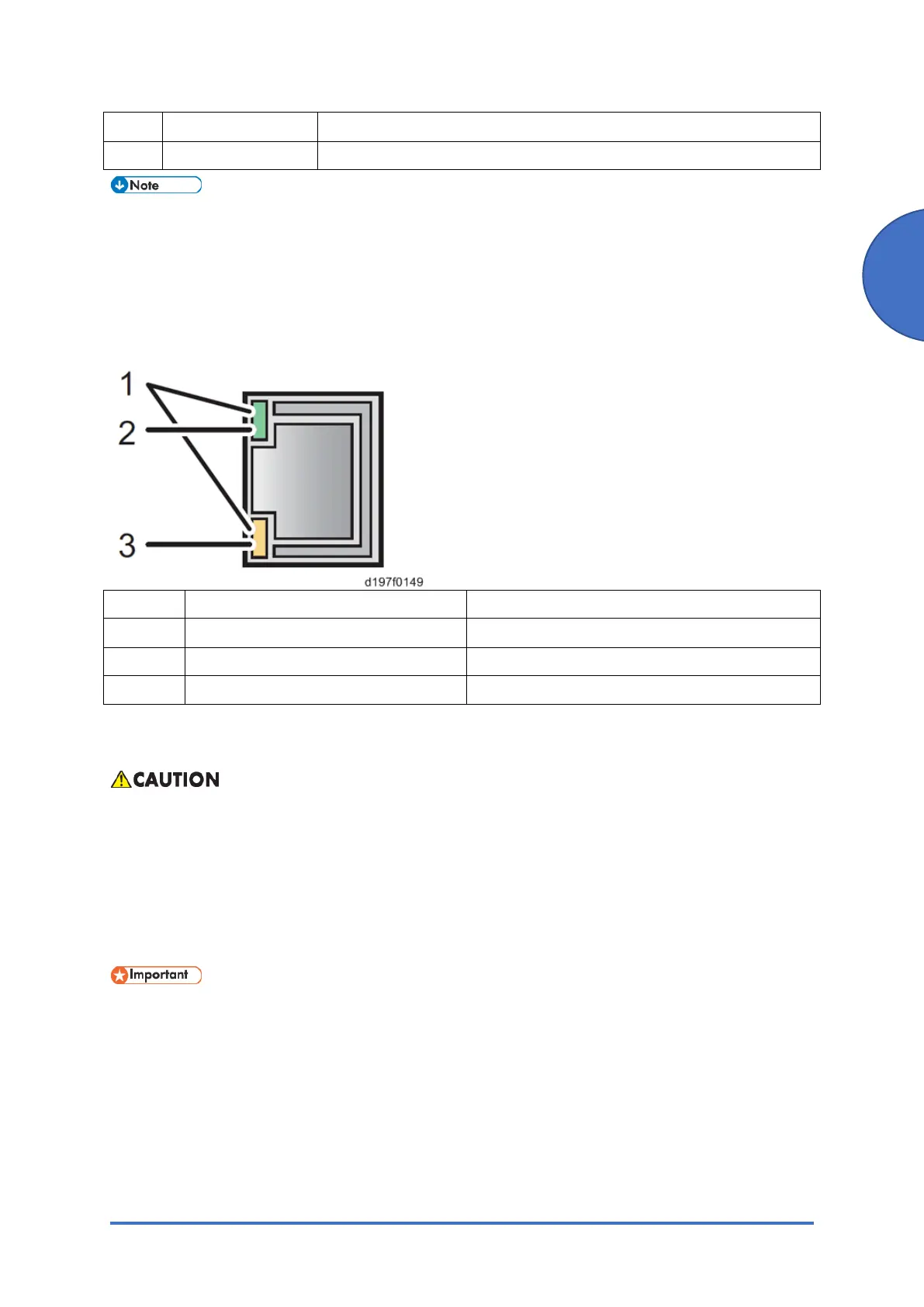
No. Color Lights Up When:
1 Green and Yellow 1000BASE-T operates
2 Green 10BASE-T operates
3 Yellow 100BASE-TX operates
2.18.2 INSTALLATION PROCEDURE
• To prevent injury from electrical shock or damage to the machine, before installation
always, turn the main machine power off, and then unplug the machine power supply
cord from the power source.
• To prevent damage to the circuits on the boards, always touch a metal surface to
discharge static charge from your body before you handle a board.
• Never put your hand or a tool into the slot when you install an option.
• The USB Device Server Option has an IP address stored on the PCB. This is different
from the machine's IP address. The IP address and other network settings of the USB
Device Server Option must be configured after installing this option.
1. Loosen the two screws and remove the slot cover. The removed cover will not be reused.
Printer model:


 To Next Page