SD Card Appli Move
D0AP/D0C4/D0C5/D0C6/M0BQ/M0D1 2-106 SM
2.21.4 UNDO EXEC
"Undo Exec" (SP5-873-002) lets you move application programs from an SD card in SD Card
Slot 1 (upper) back to the original SD card in SD Card Slot 2 (lower). You can use this program
when, for example, you have mistakenly copied some programs by using Move Exec
(SP5-873-001).
• Do not turn ON the write protect switch of the system SD card or application SD card
on the machine. If the write protect switch is ON, a download error (e.g. Error Code 44)
will occur during a firmware upgrade or application merge.
1. Turn the power O F F.
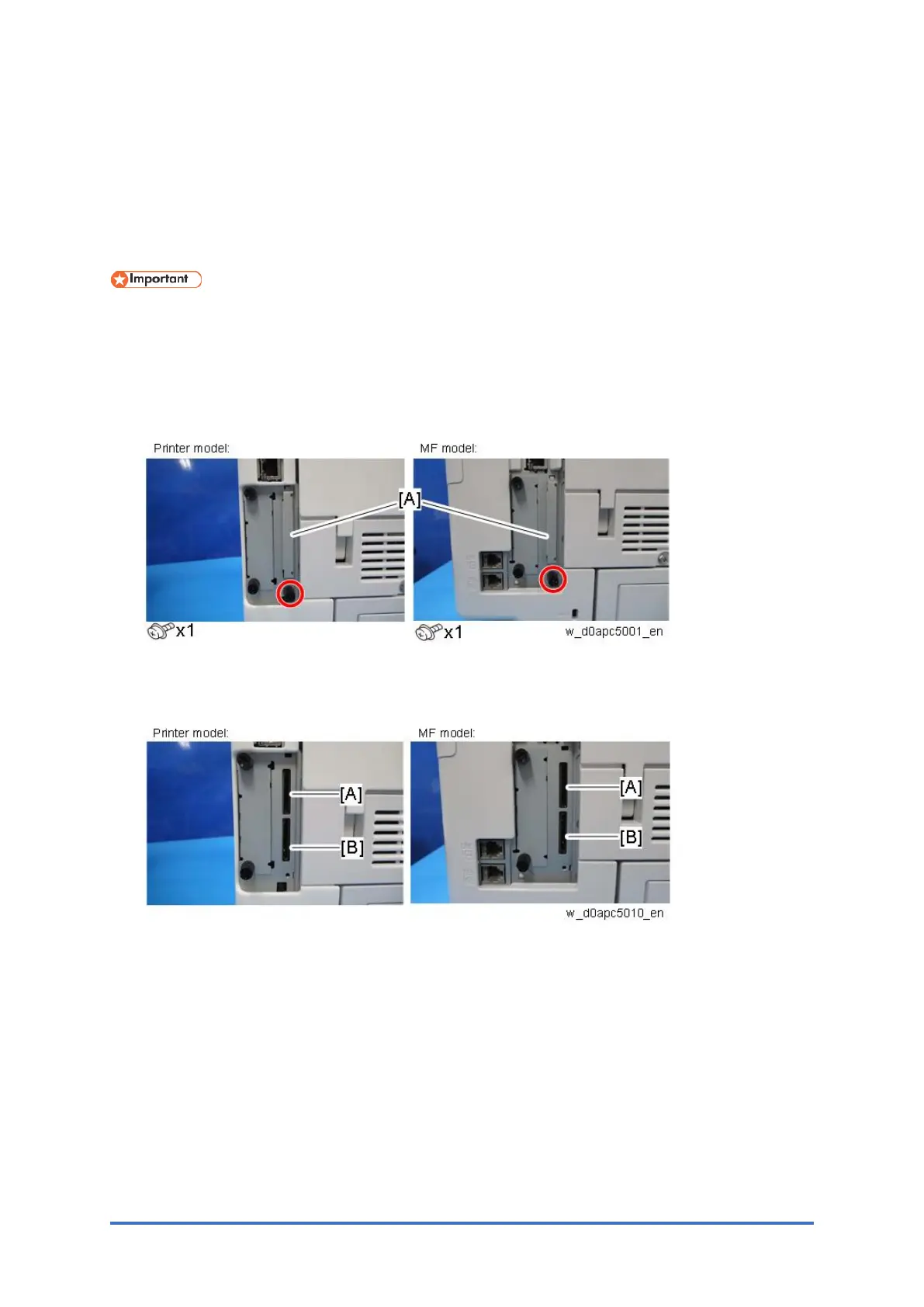
2. Remove the SD card slot cover [A].
3. Insert the integrated SD card into Slot 1 [A] (Upper).
4. Insert the SD card which became empty after merging into Slot 2 [B] (Lower).
5. Turn the power ON.
6. Enter the SP mode.
7. Select SP5-873-002 (SD Card Appli Move: Undo Exec).
8. Follow the messages shown on the operation panel.
9. Turn the power O F F.
10. Remove the SD card from SD Card Slot 2.
11. Attach the SD card slot cover.
12. Turn the power ON.
13. Check that the application has been deleted.


 To Next Page