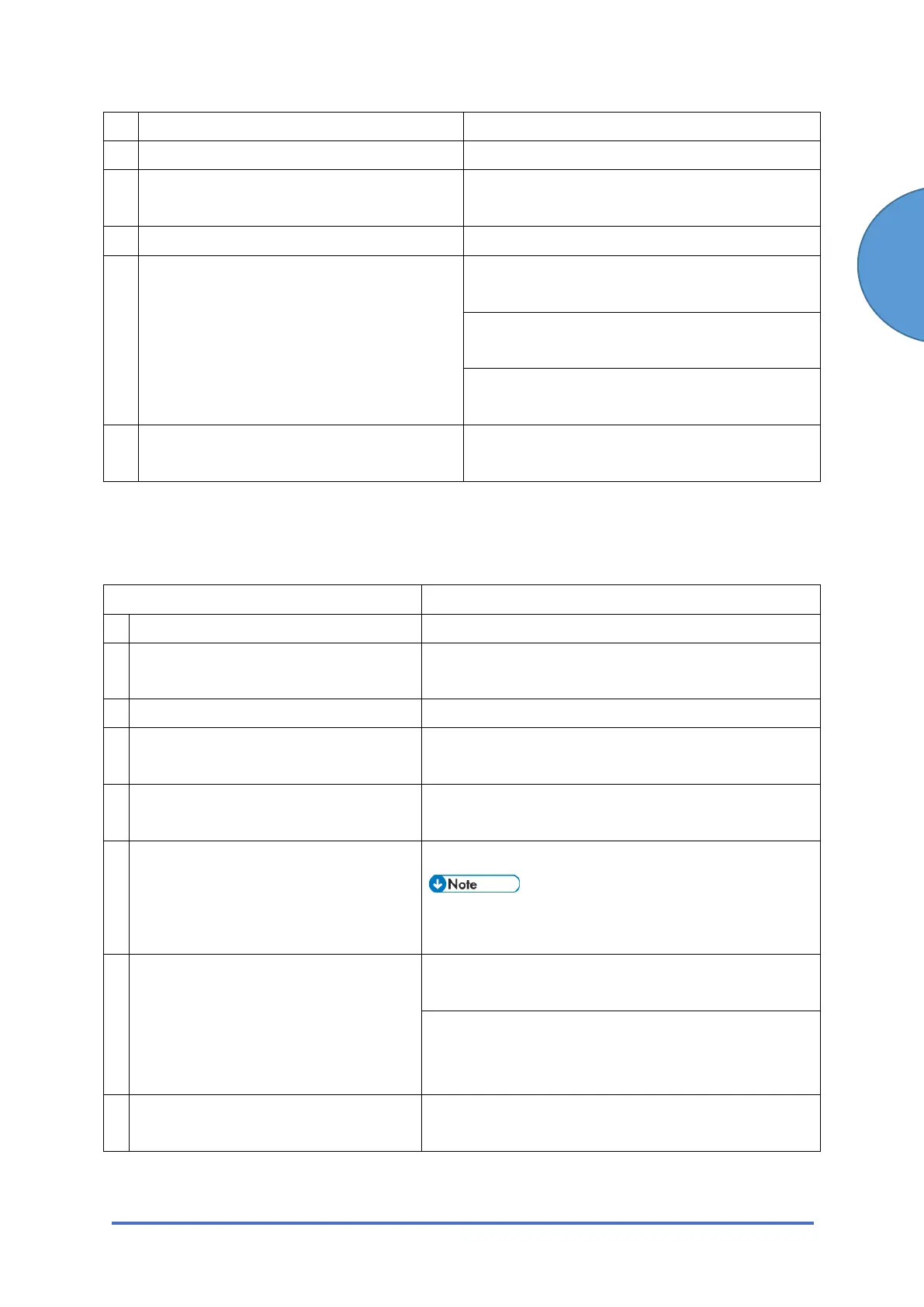
IP-Fax Troubleshooting
SM 43 D0C5/D0C6/D0C4/D0AP FAX UNIT
(D0C5/D0C6
/D0C4/D0AP)
11 Alias number of local fax registered? Register the Alias number of the local fax.
12 Remote fax registered in Gatekeeper? Contact the network administrator.
13 Remote fax a T.3 8 terminal? Check whether the remote fax is a T38
terminal.
14 Remote fax switched off or busy? Contact the network administrator.
15 Network bandwidth too narrow? Request the system administrator to increase
the bandwidth.
Raise the delay level.
IPFAX SW 01 Bit 0 to 3
Lower the modem transmission baud rate.
IPFAX SW 05
16 Remote fax cancelled transmission? Check whether the remote fax cancelled the
transmission.
3.4.2 IP-FAX RECEPTION
Cannot Receive via IP Address/Host Name.
Check Point Action
1 LAN cable connected? Check the LAN cable connection.
2 Firewall/NAT is installed? Cannot breach the firewall. Send by using another
method (Fax, Internet Fax)
3 IP address of local fax registered? Register the IP address.
4 Port number specified at remote
sender fax (if required)?
Request the sender to specify the port number.
5 Specified port number correct (if
required)?
Request the sender to check the port number.
6 DNS server registered when
hostname specified on sender side?
Contact the network administrator.
• The sender machine displays this error
code if the sender fax is a Ricoh model.
7 Network bandwidth too narrow? Request the system administrator to increase the
bandwidth.
Lower the start modem reception baud rate on the
receiving side.
IPFAX SW06
8 Remote fax canceled transmission? Check whether the remote fax canceled the
transmission.



 To Next Page