Paper Feed
D0AP/D0C4/D0C5/D0C6/M0BQ/M0D1 4-104 SM
4.15 PAPER FEED
4.15.1 PAPER FEED ROLLER
Before replacing the paper feed roller, reset the PM counter.
1. Turn the power ON and enter the SP mode.
2. Execute the SP7-804-005 (Reset PM Counter: Feed Tray) to reset the PM counter.
3. Turn the power O F F.
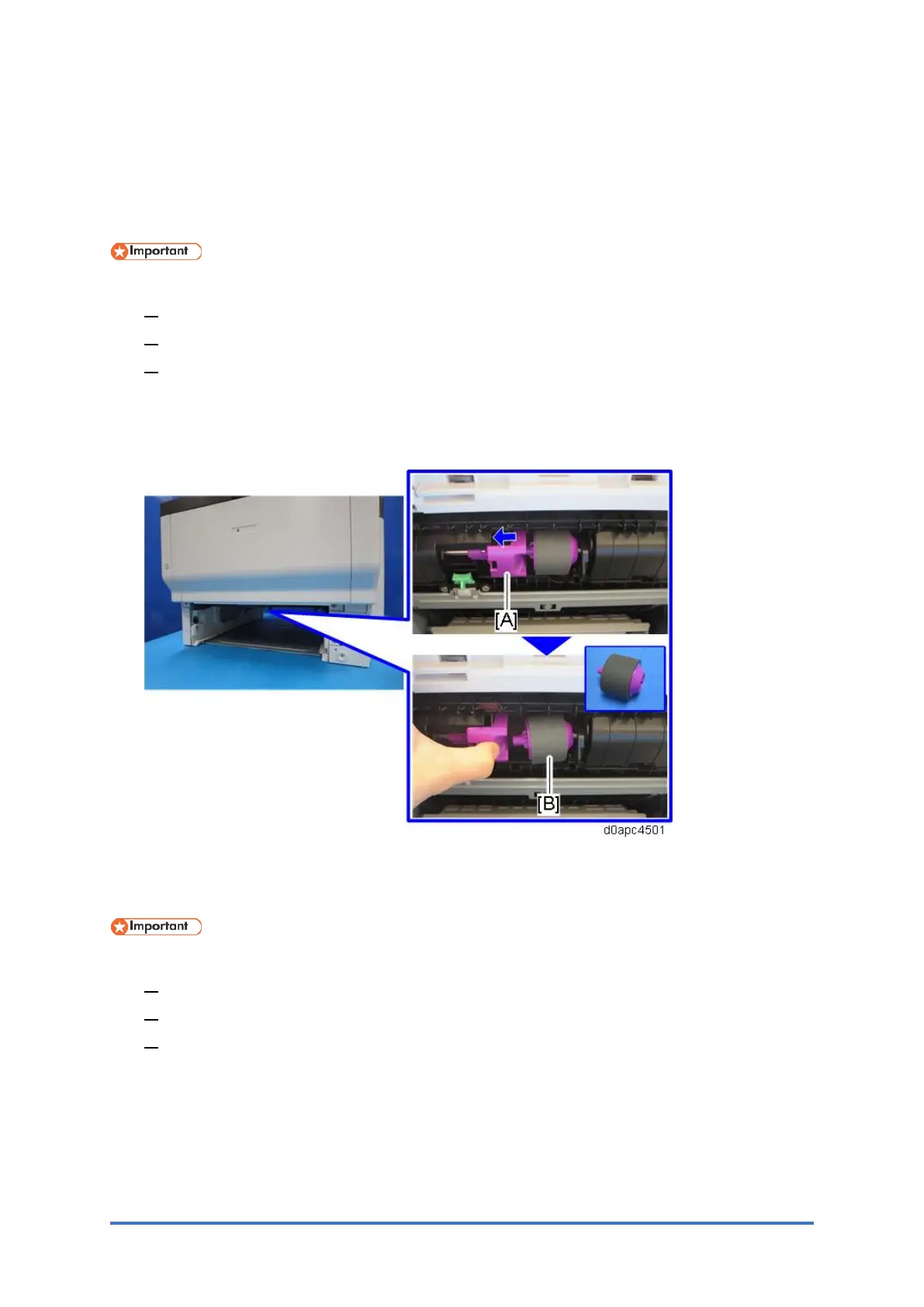
1. Remove the paper tray.
2. Slide the lever [A] to the left to remove the paper feed roller [B].
4.15.2 SEPARATION ROLLER
Before replacing the separation roller, reset the PM counter.
1. Turn the power ON and enter the SP mode.
2. Execute the SP7-804-006 (Reset PM Counter: Spr. Tray) to reset the PM counter.
3. Turn the power O F F.
1. Pull out the paper tray.



 To Next Page