OCR Unit Type M13 (D3AC-23, -24, -25)
D0AP/D0C4/D0C5/D0C6/M0BQ/M0D1 2-114 SM
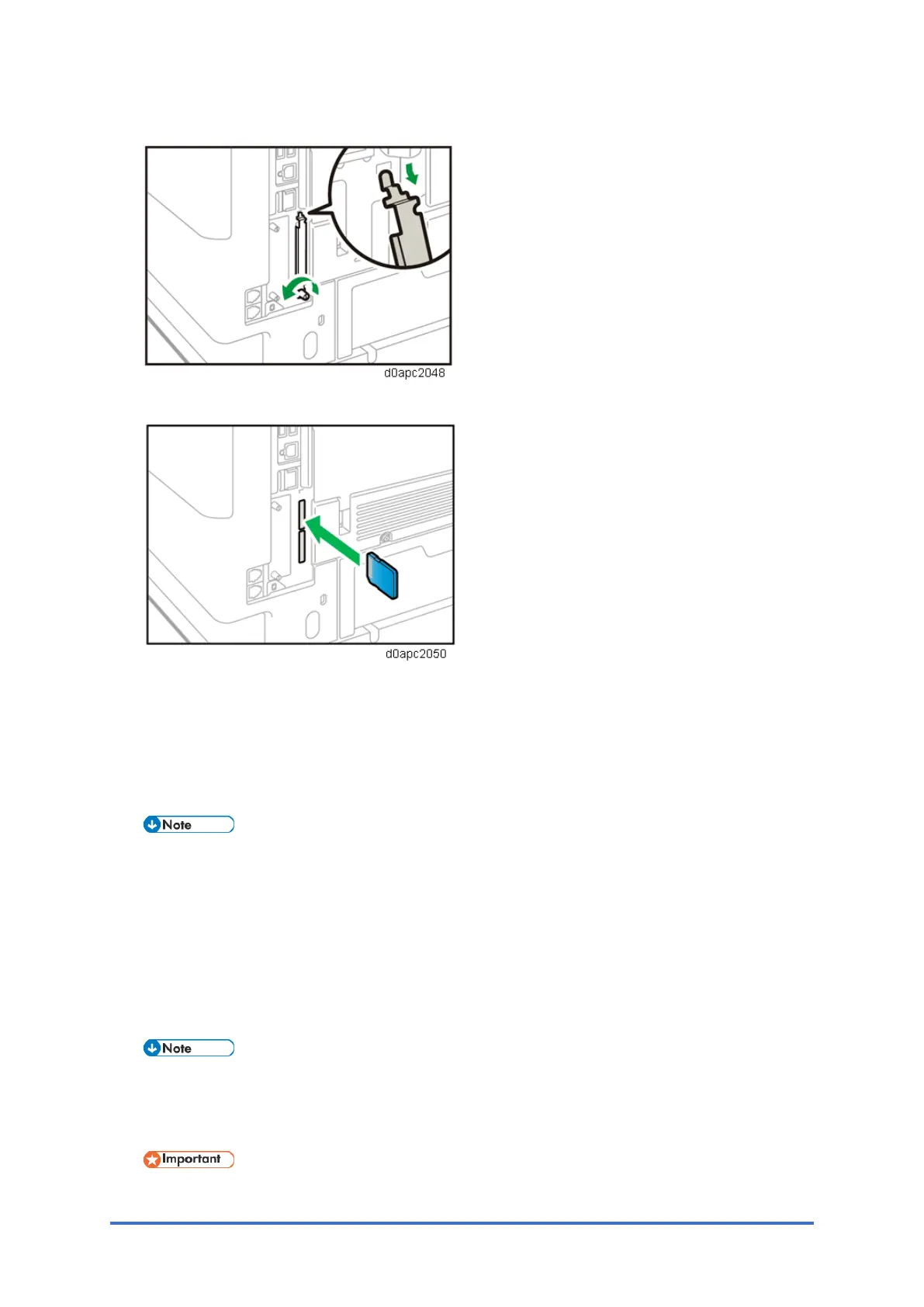
1. Loosen the screw and remove the SD card slot cover.
2. Insert the SD card into the upper slot.
3. Plug in the power cord, and then turn on the machine.
4. Enter the SP mode, and then press "Enter" in SP5-878-004 (Option Setup: OCR
Dictionary).
The SD card ID is saved in the NVRAM, and the machine ID is recorded on the SD card.
5. When "operation complete" is displayed, press "Close".
• If the installation is not successful, "Failed" is displayed.
• If the installation fails, perform the following steps.
1. Check whether it is a used SD card.
2. Turn the power OFF and repeat Steps 1 to 5.
6. Power cycle the machine.
7. Press "Enter" in SP5-878-004 (Option Setup: OCR Dictionary).
Dictionary data is copied to the HDD.
• In the first execution, the SD card and the machine are linked.
• In the second execution, the OCR dictionary is copied onto the HDD.
8. Turn off the machine, and then remove the SD card.
• Store the SD card in a safe location.



 To Next Page