Printer SP Mode
SM 3-9 D0AP/D0C4/D0C5/D0C6/M0BQ/M0D1
Tables
MFP/Printer
bit
5
DFU - -
bit
6
DFU - -
bit
7
DFU - -
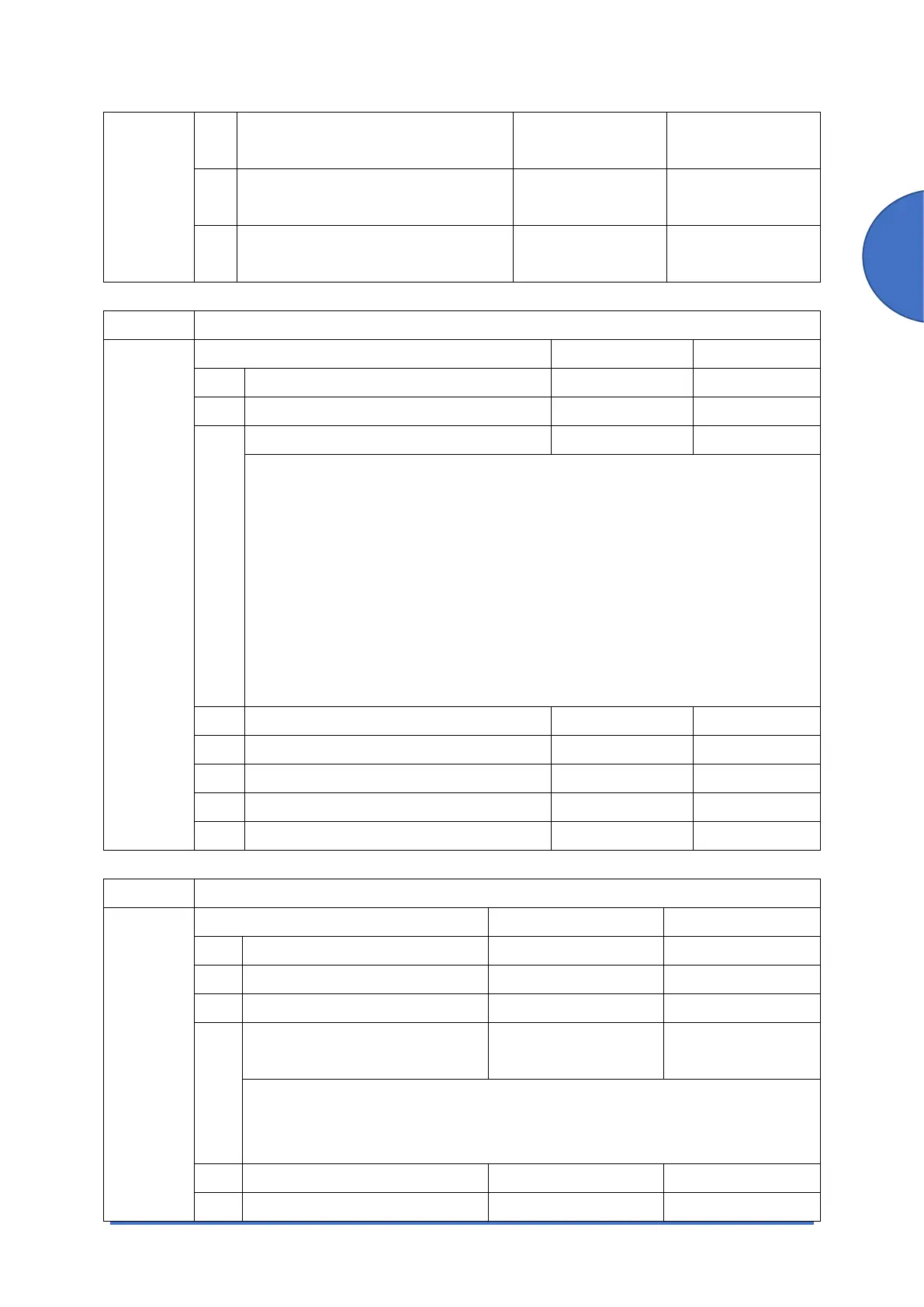
1001 [Bit Switch]
1-001-003 Bit Switch 3 Settings 0 1
bit 0 DFU - -
bit 1 DFU - -
bit 2 Legacy HP compatibility Disabled Enabled
Uses the same left margin as older HP models such as HP4000/HP8000.
This setting enables the starting position of the graphics in the job to be
changed.
If this BitSw is enabled, the left margin command of "<ESC>*r0A" will be
conducted as "<ESC>*r1A".
PCL command are below:
- <Esc> *r0A ->Start Graphics at X coordinate of Zero
- <Esc> *r1A ->Start Graphics at Current Cursor
Note: This is available for PCL5e/c only.
bit 3 DFU - -
bit 4 DFU - -
bit 5 DFU - -
bit 6 DFU - -
bit 7 DFU - -
1001 [Bit Switch]
1-001-004
Bit Switch 4 Settings 0 1
bit 0 DFU - -
bit 1 DFU - -
bit 2 DFU - -
bit 3 Paper path for IPDS simplex
pages
Simplex paper path Duplex paper path
This setting enables you to route the IPDS simplex job through the duplex unit.
Note: When this BitSw is set to duplex paper path, the simplex page might be
printed on the reverse side.
bit 4 DFU - -
bit 5 DFU - -



 To Next Page