Printer SP Mode
SM 3-13 D0AP/D0C4/D0C5/D0C6/M0BQ/M0D1
Tables
MFP/Printer
will be garbled unless this switch is enabled (=0).
bit 6 Print option configuration (rsh, rcp, ftp) Enabled Disable
This BitSw enables the specification of the configuration of the print option
using rcp/rsh/ftp.
bit 7 Enable/Disable print from USB/SD's
Preview function (Only MF model)
Enabled Disabled
Determines whether the Print from USB/SD function will have the Preview
function.
Enabled (=0): Print from USB/SD will have the Preview function.
Disabled (=1): Print from USB/SD will not have the Preview function.
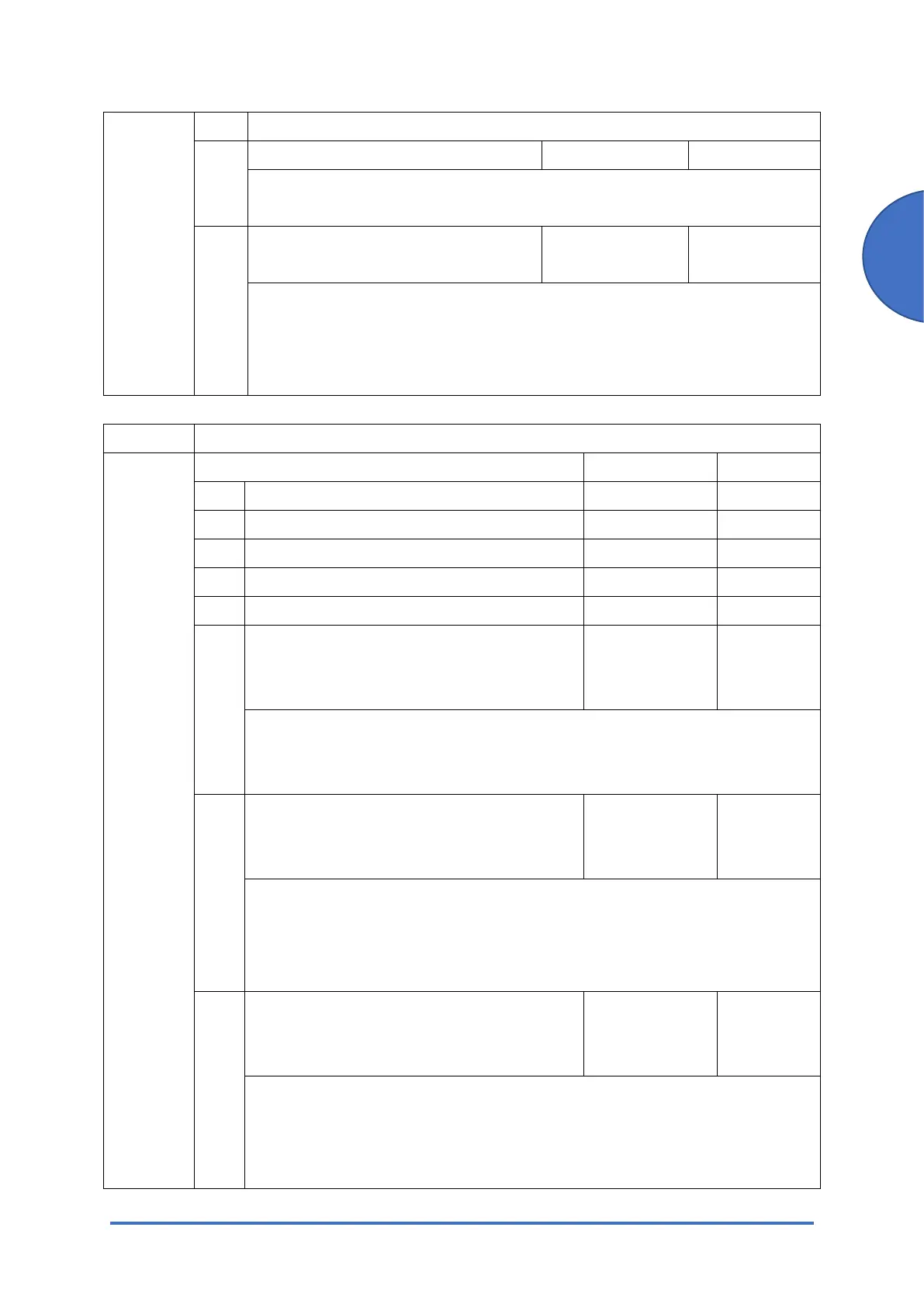
1001 [Bit Switch]
1-001-010
Bit Switch A Settings 0 1
bit 0 DFU - -
bit 1 DFU - -
bit 2 DFU - -
bit 3 DFU - -
bit 4 DFU - -
bit 5 Store and Skip Errored Job locks the queue
(Only MF model)
Queue is not
locked after
SSEJ
Queue
locked after
SSEJ
If this is 1, then after a job is stored using Store and Skip Errored Job (SSEJ),
new jobs cannot be added to the queue until the stored job has been
completely printed.
bit 6 Allow use of Store and Skip Errored Job if
connected to an external charge device
(Only MF model)
Does not allow
SSEJ with
ECD
Allows
SSEJ with
ECD
If this is 0, Store and Skip Errored Job (SSEJ) will be automatically disabled if
an external charge device is connected.
Note: We do not officially support enabling this switch (1). Use it at your own
risk.
bit 7 Job cancels remaining pages when the
paid-for pages have been printed on an
external charge device (Only MF model)
Job does not
cancel
Job cancels
When setting 1 is enabled, after printing the paid-for pages on an external
charge device, the job that includes any remaining pages will be canceled.
This setting will prevent the next user from printing the unnecessary pages
from the previous user's print job.



 To Next Page