1-20
Chapter 1. Overview
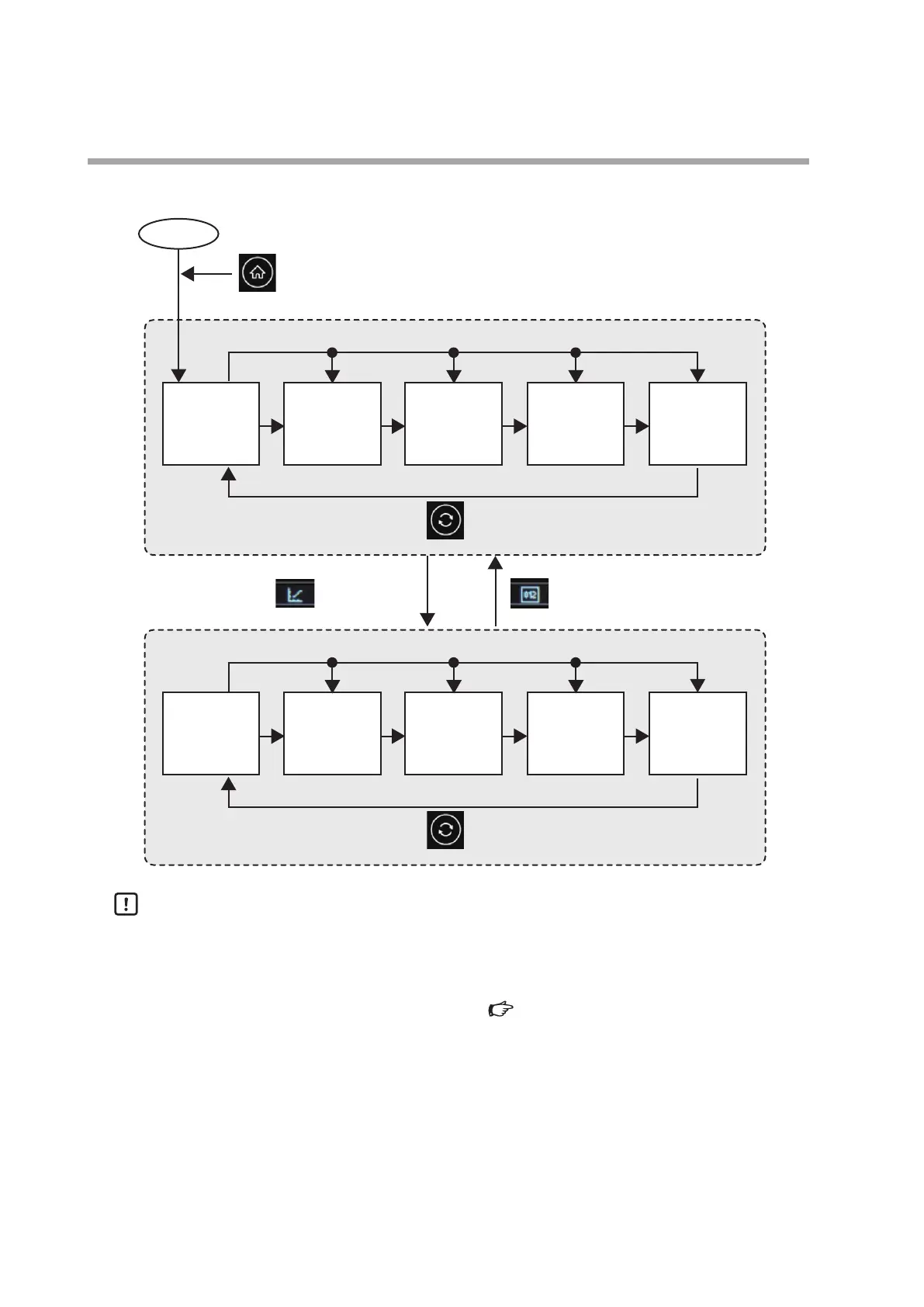
For 4 loops
Power-on
Home button
The home screen is the multi-loop monitor screen.
Touch the display of each loop.
Change button
Graph icon Numeric icon
Multi-loop
monitor screen
(LOOP1 to 4)
1-loop monitor
screen
(LOOP1)
1-loop monitor
screen
(LOOP2)
Touch the PV No. of each loop.
Change button
Multi-loop graph
screen
(LOOP1 to 4)
1-loop graph
screen
(LOOP1)
1-loop graph
screen
(LOOP2)
1-loop monitor
screen
(LOOP3)
1-loop graph
screen
(LOOP3)
1-loop monitor
screen
(LOOP4)
1-loop graph
screen
(LOOP4)
Handling Precautions
• The screen transitions when the loop type is "Internal cascade +2 loops" are
identical to those for 3 loops.
• The screen set by the user can be displayed when the power is turned ON or
the home button is pressed. Screen transitions of the user HOME screen
(p.1-21)



 To Next Page