Utility Stitches
Various Stitches
107
3
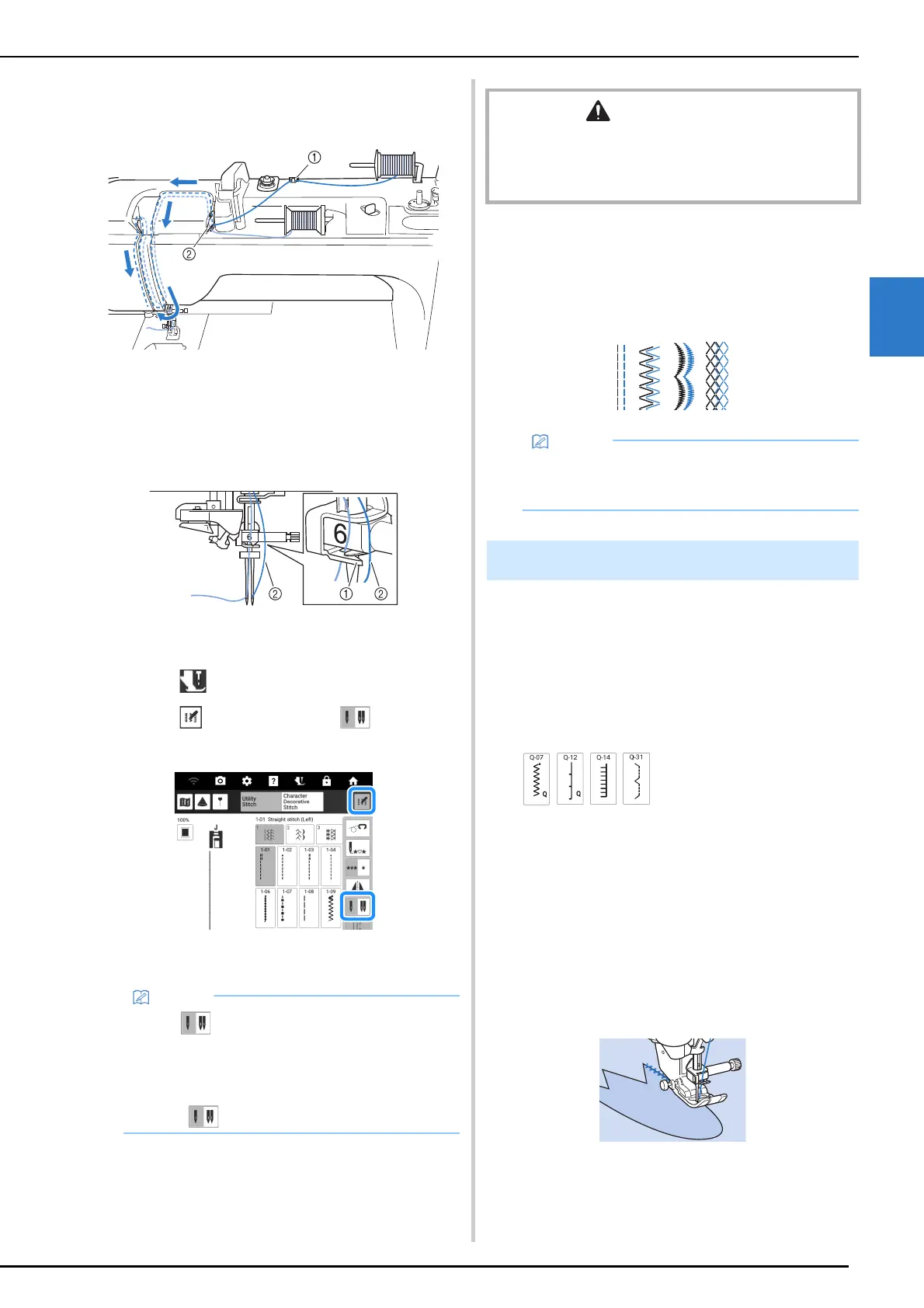
5 Thread the machine as shown in the
illustration.
a Thread guide
b Thread guide plate
6 Without passing the thread through the
needle bar thread guide, thread the
needle on the right side manually.
a Needle bar thread guide
b Additional upper thread
7 Touch to unlock all keys and buttons.
8 Touch , and then touch to select
the twin needle mode.
Twin needle mode is set. Only stitch patterns that
allow twin needle sewing can be selected.
9 Select a stitch pattern.
* Refer to “Stitch Chart” on page 273 for stitch
patterns that can use a twin needle.
10 Start sewing.
Appliqué
1
Use two-sided stabilizer material to
secure the appliqué piece to the base
fabric.
2 Select a stitch.
* For details on stitch patterns, refer to “Stitch Chart”
on page 273.
3 Attach the presser foot.
4 Turn the handwheel toward you
(counterclockwise), and then begin
sewing around the edge of the appliqué,
making sure that the needle drops just
outside of the appliqué.
When sewing around corners, stop the machine with
the needle in the fabric just outside of the appliqué,
raise the presser foot lever, and then turn the fabric as
needed to change the sewing direction.
• If the key is light gray after selecting the
stitch, the selected stitch cannot be sewn in
the twin needle mode. In addition, the twin
needle cannot be used with functions that
cannot be set to twin needle mode (functions
where does not appear).
CAUTION
• Be sure to set the twin needle mode when using the twin
needle. Using the twin needle while the machine is in
single needle mode could cause the needle to break and
cause injury.
• To change direction when sewing with the twin
needle, raise the needle from the fabric, raise
the presser foot lever, and then turn the fabric.
Sewing Technique



 To Next Page