Key Functions (My Design Center)
231
My Design Center
6
1 Touch .
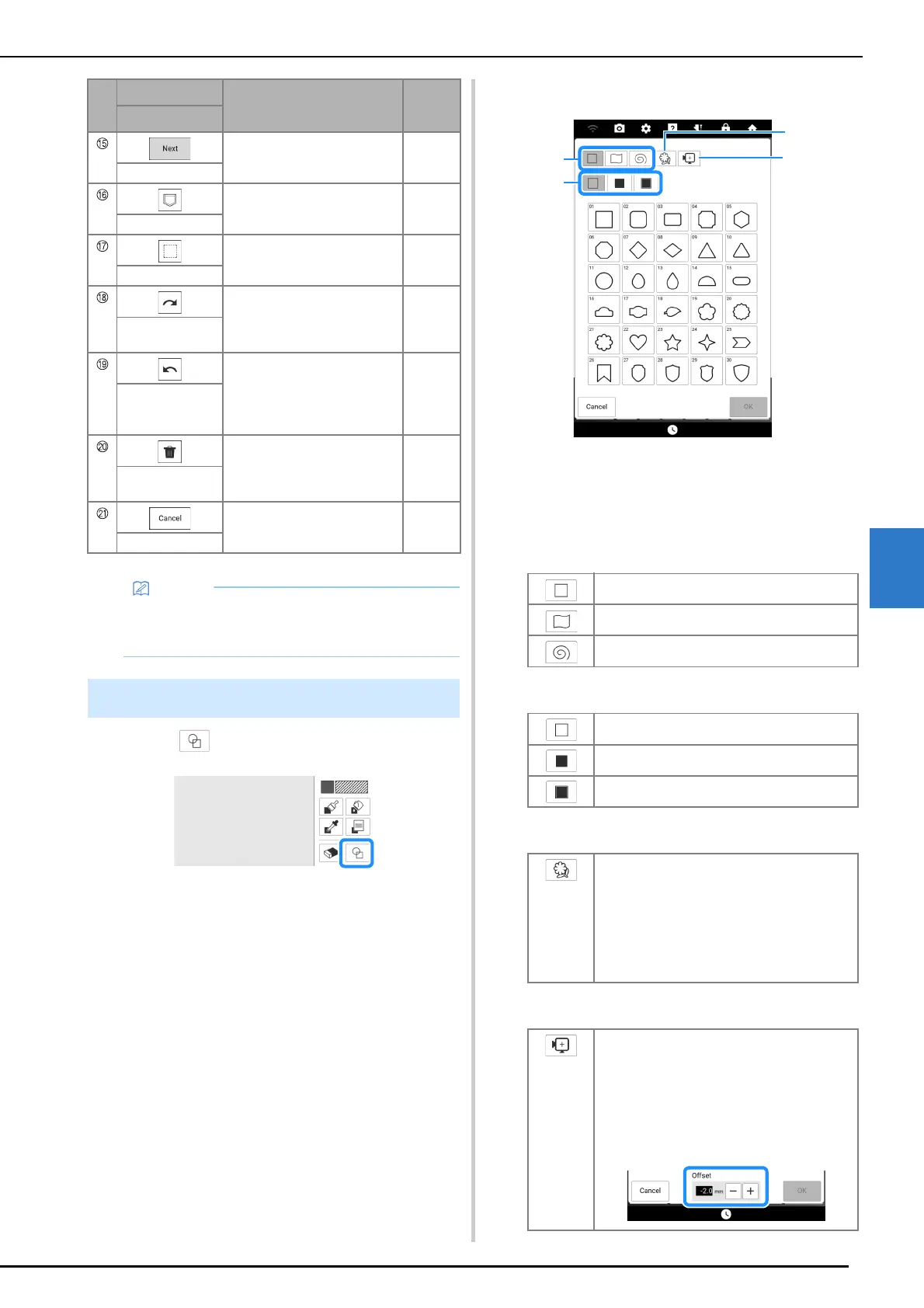
2 Select a stamp type and stamp shape.
a Stamp shapes
b Stamp types
c Saved outlines
d Frame embroidering areas
•Stamp shapes
• Stamp types (Only for Basic shapes)
• Saved outlines
• Frame embroidering areas
Proceed to the stitch settings
screen. (page 238)
—
Next key
Save the pattern drawing data. —
Memory key
Select a section for editing. 235
Select key
Redo the operation that was
undone with the undo key. Each
touch of this key will redo one
operation.
—
Redo key
Undo the last operation that
was performed and return to
the previous state. Each touch
of this key will undo one
operation.
—
Undo key
Clear all the lines and shapes
and start from the beginning.
The background image is also
cleared.
—
All Clear key
Exit from My Design Center. All
lines and shapes are erased
when you touch this key.
—
Cancel key
• For information on the file extensions for
pattern drawing data, refer to “Specifications”
on page 271.
Using the Stamp Key
No.
Display
Explanation
Reference
Name
Basic shapes
Closed shapes
Open shapes
Outline
Fill stitch
Outline and fill stitch
Embroidery pattern outlines can be registered
as stamp shapes. When registering stamp
shapes, select from the last 20 embroidery
patterns used. If more than 20 shapes are
registered, the oldest one is automatically
erased. For details on registering a stamp
shape, refer to “Decorative Stitching Around a
Pattern” on page 249.
Select an embroidering area in order to
arrange the pattern to fit an embroidery frame.
If an offset value is specified, a shape offset to
the inside is displayed. When making a frame
pattern using a motif stitch, etc., specify an
offset value according to the pattern size so the
pattern can fit within the embroidering area for
the selected embroidery frame.



 To Next Page