Using the Memory Function (Embroidery)
168
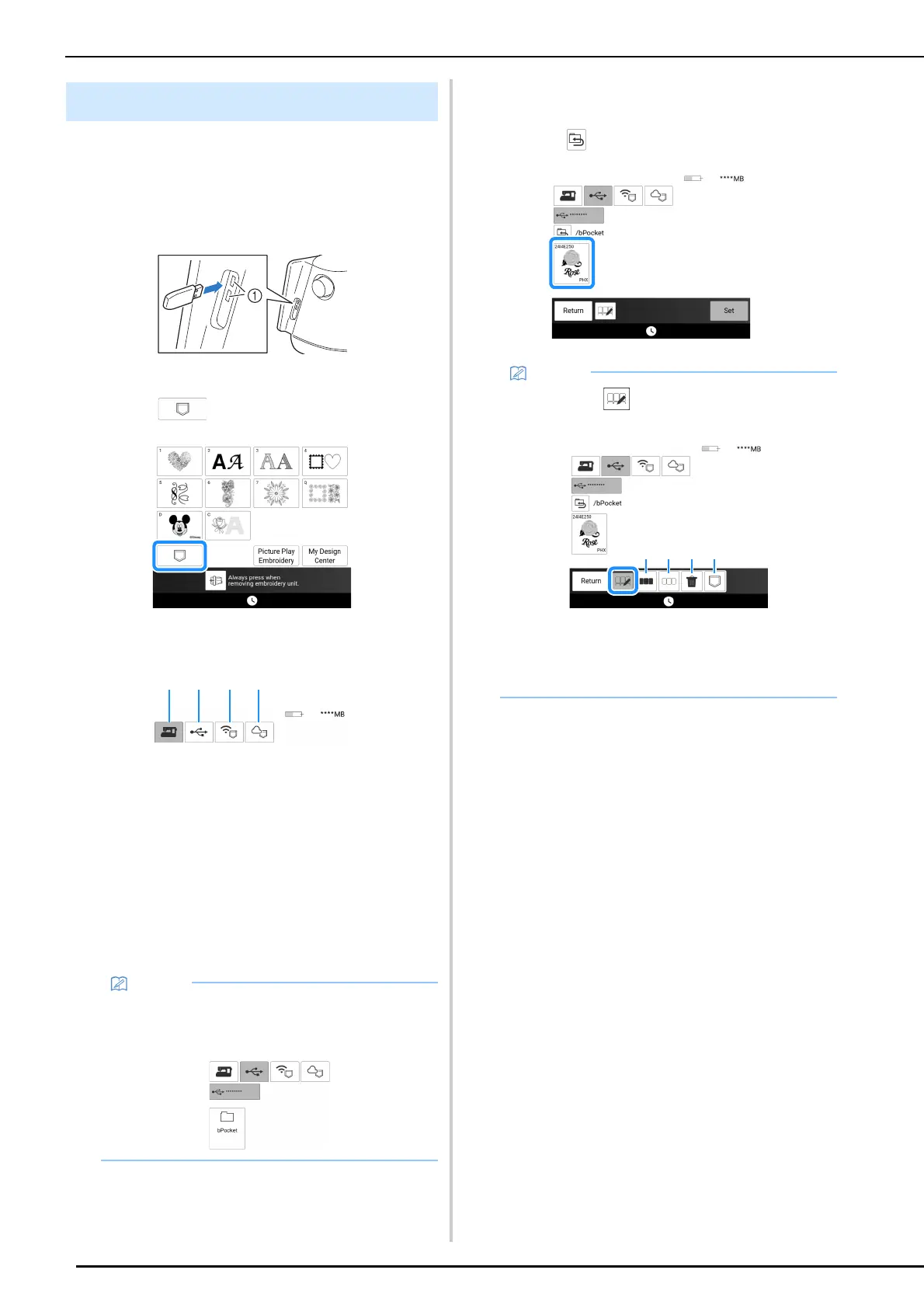
1 When retrieving the embroidery pattern
from a USB media, insert the USB media
into the USB port on the machine.
* For details on supported file extensions, refer to
“Specifications” on page 271.
a USB ports
2 Touch .
3 Touch the desired source.
a Retrieve from the machine’s memory.
b Retrieve from a USB media.
If two USB media are connected to the machine,
check the USB media names that are displayed,
and then touch the name of the USB media that
you wish to use.
c Retrieve embroidery patterns uploaded to the
wireless function pocket via wireless network.
For the detailed procedure, refer to the manual for
PE-DESIGN (version 11 or later) or Design
Database Transfer.
d Retrieve from Artspira App. (page 225)
4 Touch the key of the pattern you want to
retrieve.
* Touch to return to the previous folder.
5 Touch [Set].
Retrieving Embroidery Patterns
• If the embroidery pattern to be retrieved is in a
folder of the USB media, touch the key for that
folder.
• By touching , the selected patterns can be
deleted or saved to the machine’s memory.
a Select all patterns.
b Deselect all patterns.
c Delete the selected patterns.
d Save the selected patterns to the machine.



 To Next Page