Adjusting Thread Tension
166
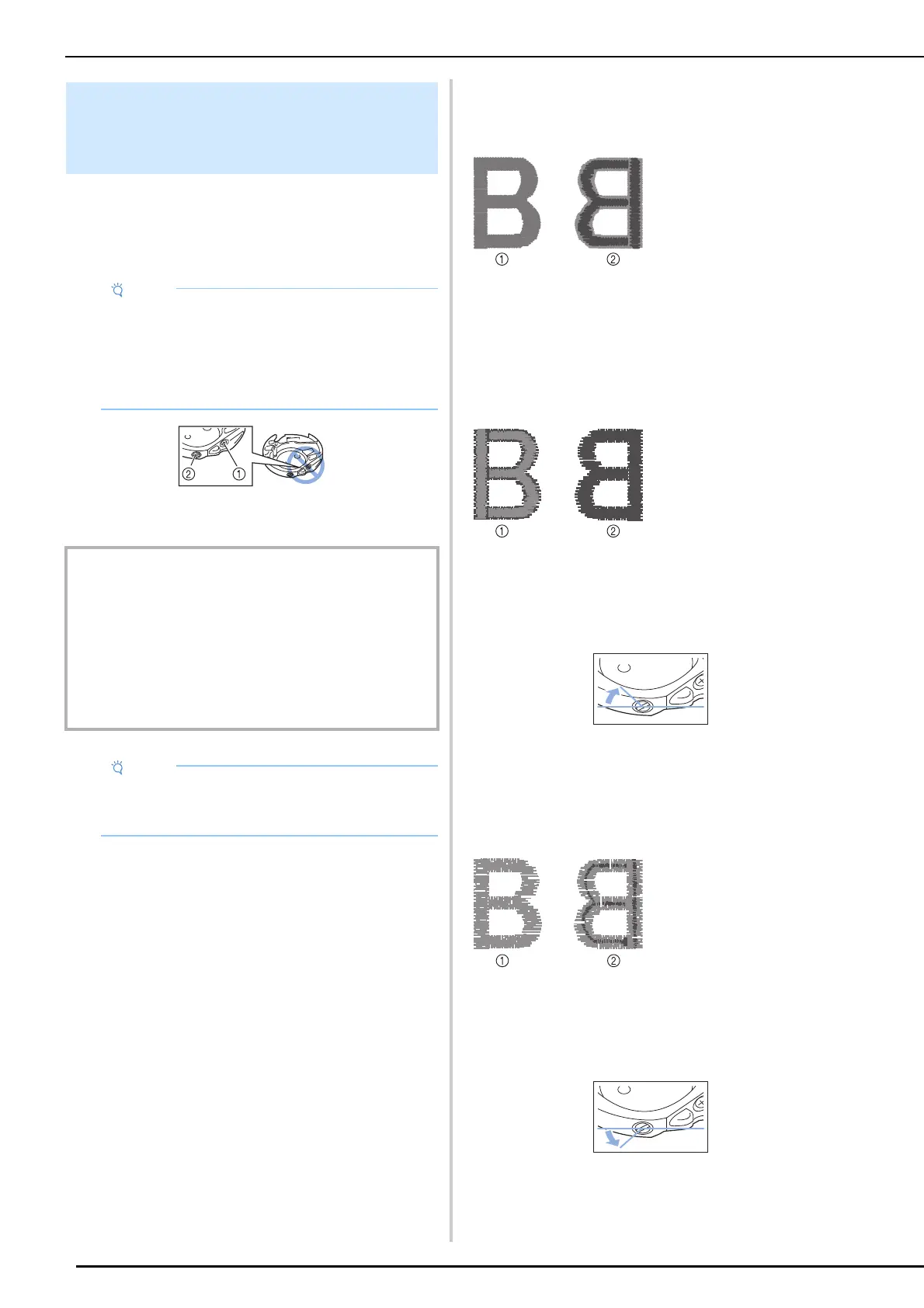
To adjust the bobbin tension for embroidery
function, using the alternate bobbin case (with no
color on the screw), turn the slotted screw (-) with
a (small) screwdriver.
a Do not turn the phillips screw (+).
b Adjust with a screwdriver (small).
Correct Tension
Upper thread slightly appears on the wrong side of
fabric.
* Light gray color represents upper thread.
* Dark gray color represents bobbin thread.
Bobbin Thread is Too Loose
Bobbin thread appears slightly on the right side of
fabric.
If this occurs, turn the slotted screw (-) clockwise,
being careful not to over-tighten the screw,
approximately 30-45 degrees to increase bobbin
tension.
Bobbin Thread is Too Tight
Upper thread on the right side of fabric seems to
be lifting/looping and bobbin thread is not seen on
the wrong side of fabric.
If this occurs, turn the slotted screw (-)
counterclockwise, being careful not to over-loosen
the screw, approximately 30-45 degrees to
decrease bobbin tension.
Adjusting the Alternate Bobbin
Case (with No Color on the
Adjusting Screw)
• The bobbin case that is used differs depending
on the embroidery bobbin thread that is used.
Only the alternate bobbin case allows the
bobbin thread tension to be adjusted. For
details, refer to “Embroidering Attractive
Finishes” on page 132.
IMPORTANT
• Do not adjust the position of the phillips (+) screw on the
alternate bobbin case as this may result in damage to
the bobbin case, rendering it unusable.
• If the slotted screw (-) is difficult to turn, do not use force.
Turning the screw too much or providing force in either
(rotational) direction may cause damage to the bobbin
case. Should damage occur, the bobbin case may not
maintain proper tension.
• When adjusting the alternate bobbin case, be
sure to remove the bobbin from the alternate
bobbin case.
a Right side
b Wrong side
a Right side
b Wrong side
a Right side
b Wrong side



 To Next Page