Projecting the Guidelines onto the Fabric
Sewing Basics
65
2
3 Touch the key of the stitch pattern you
want to retrieve.
* Touch to return to the previous folder.
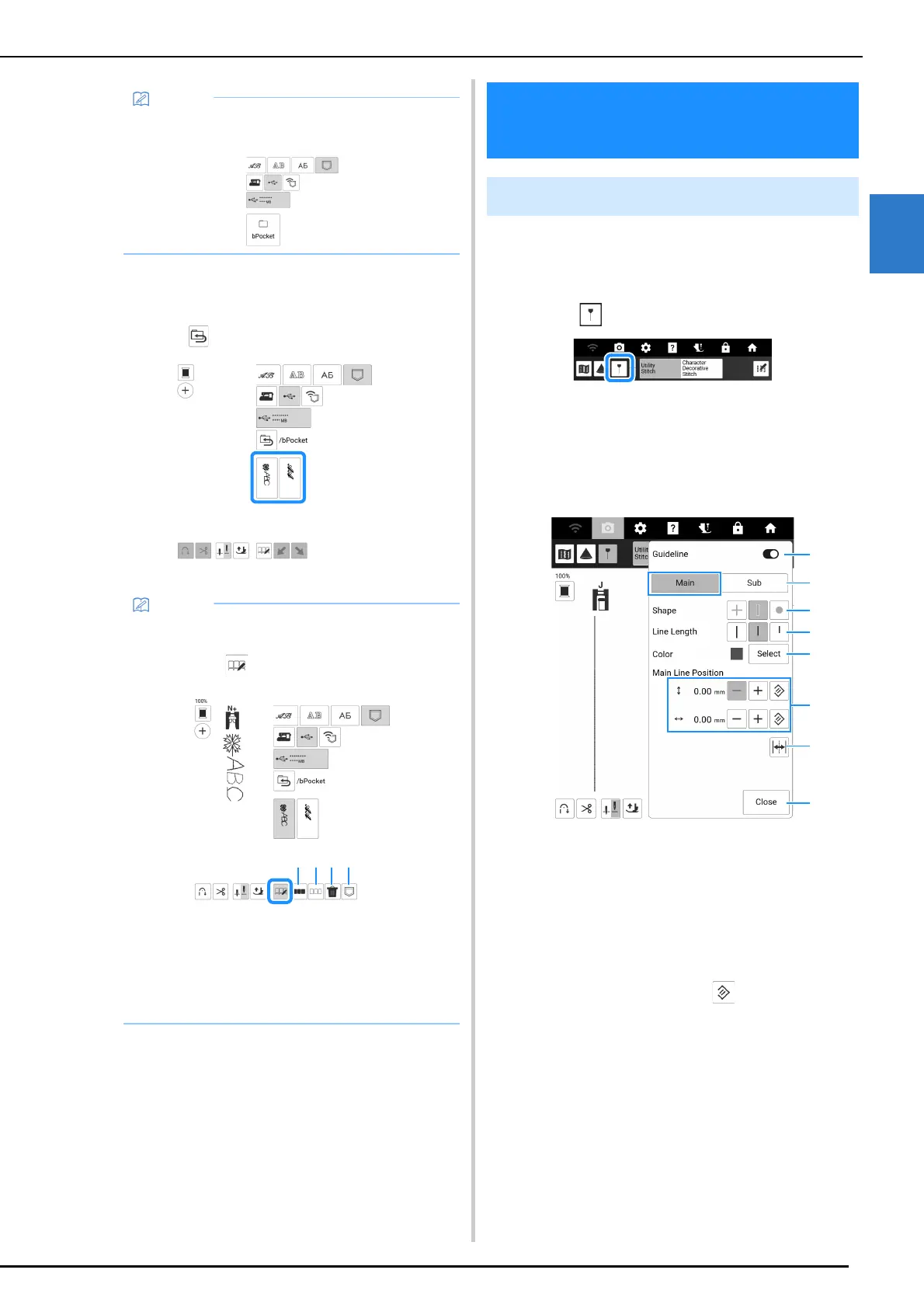
With the guideline function, sewing can easily be
done by following the lines and marks projected
onto the fabric.
1 Touch .
The guideline settings screen appears.
2 Specify the guideline settings.
Main Guideline
a Set the guideline function to on or off.
b Select the guideline whose settings are to be
specified.
c Select a cross, a line or a point as the shape of the
guideline marker.
d Select the length of the main guideline.
e Select the color of the main guideline.
f Specify the position of the main guideline. In order
to reset the position, touch .
g Touch to flip the main guideline position on the
center needle position.
h Touch to finish specifying the guideline settings.
• If the stitch pattern to be retrieved is in a folder
of the USB media, touch the key for that folder.
• You can delete the saved stitch patterns or
save to machine’s memory from USB media
by touching .
a Touch to select all displayed stitch patterns.
b Touch to deselect all selected stitch
patterns.
c Touch to delete the selected stitch patterns.
d Touch to save the selected stitch patterns in
the machine’s memory.
Projecting the Guidelines
onto the Fabric
Specify the Guidelines



 To Next Page