Adjustments during the Embroidery Process
Basic Embroidery
163
4
1 If the upper thread is broken or runs out,
redo the upper threading.
2 Touch .
3 Press (Presser foot lifter button) to
lower the embroidery foot.
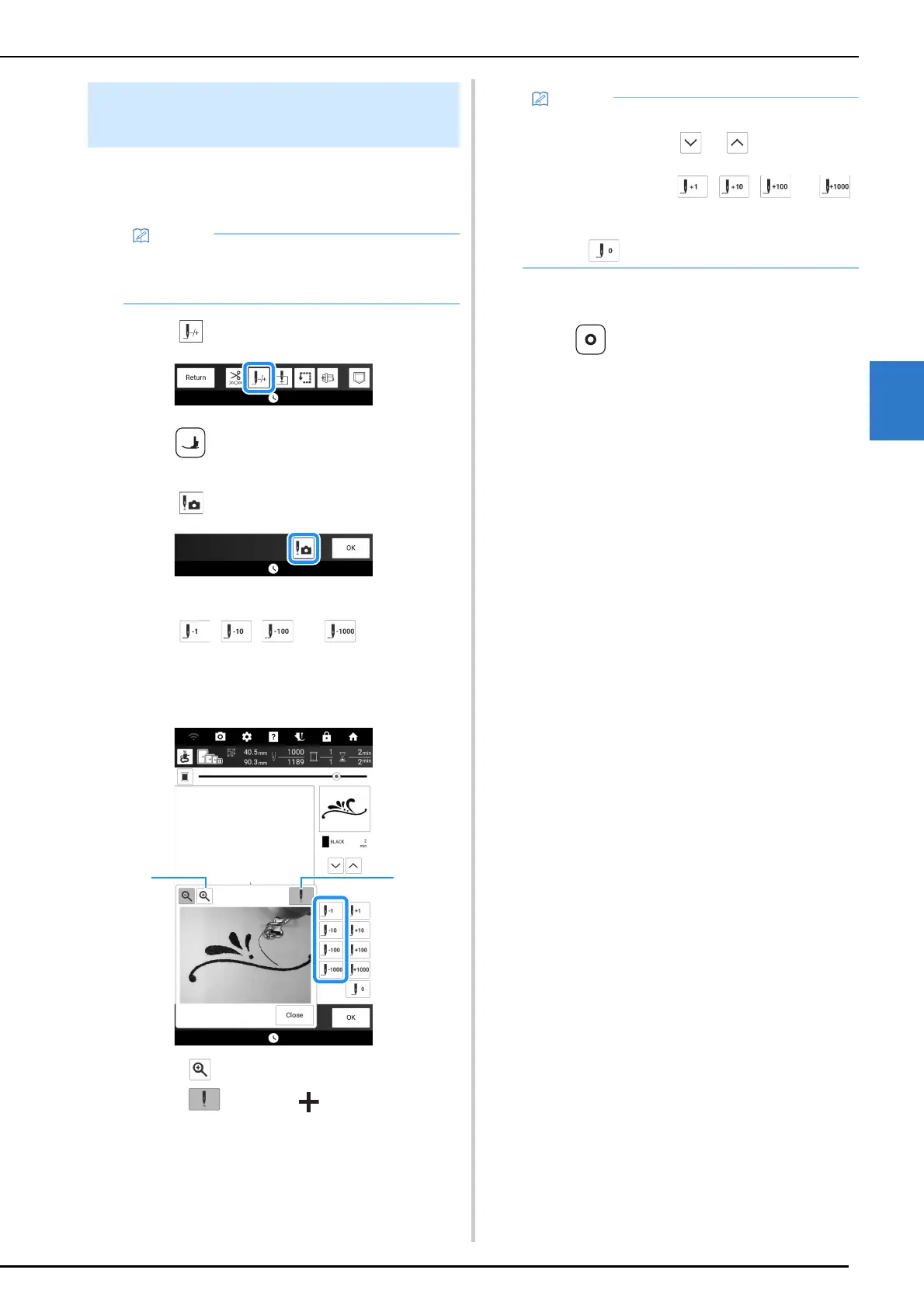
4 Touch .
The camera view window appears.
5 Touch , , , or to move the
needle back the correct number of
stitches before the spot where the thread
broke.
a Touch to enlarge the image in the screen.
b Touch to remove “ ” from the screen.
6 Touch [Close] and then touch [OK].
7 Press (Reinforcement stitch button)
to sew reinforcement stitches at the
beginning of sewing, and then press the
“Start/Stop” button to continue
embroidering.
If the Thread Breaks during
Embroidering
• If the bobbin thread is broken, follow the
directions of “If the Bobbin Runs out of
Thread” on page 162.
• If you cannot move back to the spot where the
thread broke, touch or to select the
color and move to the beginning position of
that color, then use , , , or
to move ahead to slightly before where the
thread broke.
• Touch to restart from the beginning.



 To Next Page