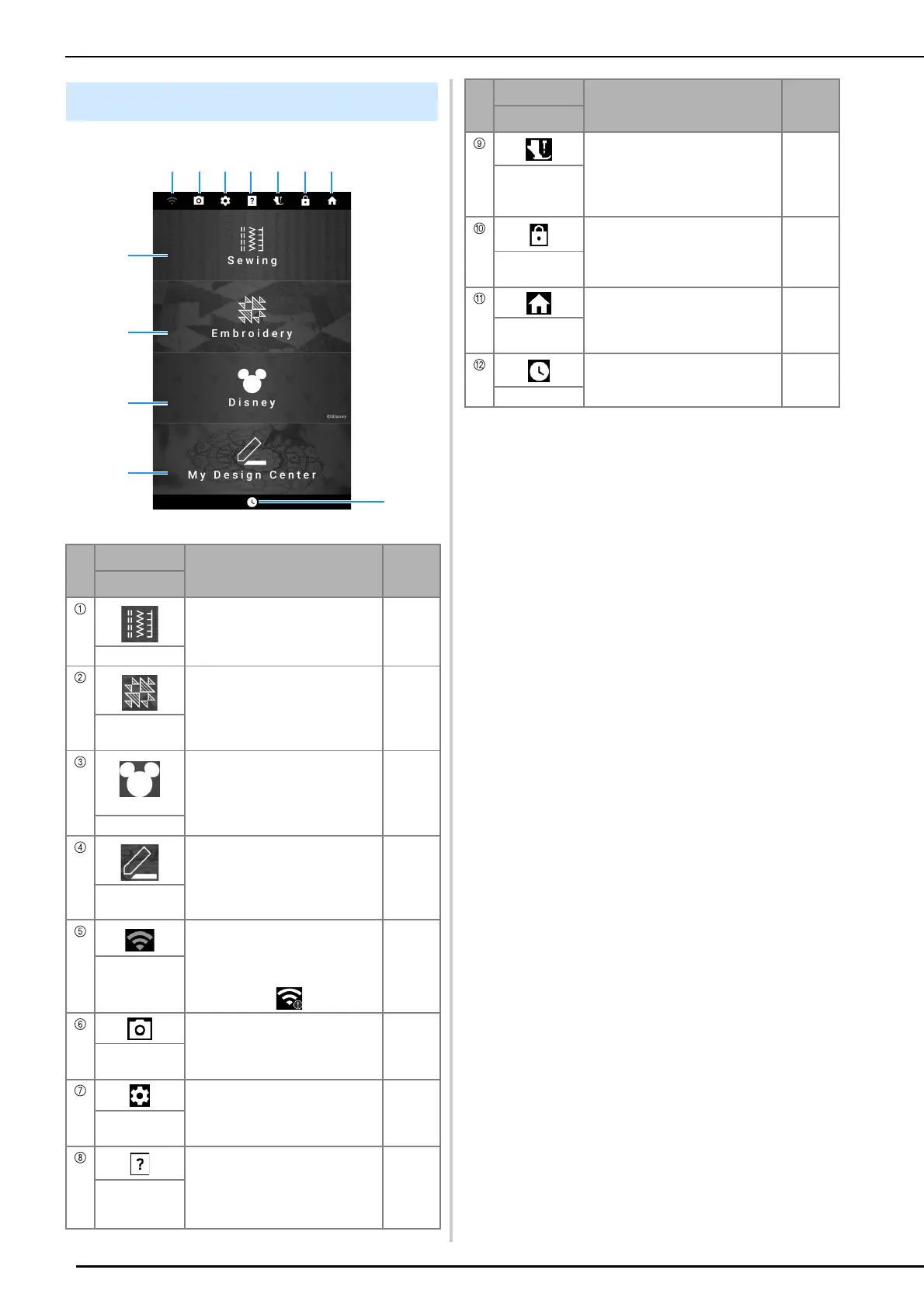
LCD Screen
18
Home Page Screen
No.
Display
Explanation
Reference
Name
Select a utility stitch or character/
decorative stitch pattern.
19, 51
Sewing key
Select an embroidery pattern. 134
Embroidery
key
©Disney
Touch this key to embroider Disney
patterns.
—
Disney key
Create an original embroidery
pattern.
227
My Design
Center key
Specify the wireless LAN settings.
Also, this key shows the machine’s
wireless LAN signal strength.
If there is a new update file, the
key appears as .
32, 259
Wireless LAN
key
Touch this key to check the needle
location.
74
Camera view
key
Change the machine settings. 22
Machine
settings key
See explanations on how to use
the machine. Use the QR code that
appears in the screen to access
instructional videos for the
machine.
29
Machine help
key
Touch this key before changing the
needle, the presser foot, etc. This
key locks all key and button
functions to prevent operation of
the machine.
36, 40,
48
Presser foot/
Needle
exchange key
Lock the screen. Touch this key
again to unlock the screen.
—
Screen lock
key
Cancel all operations previously
performed and return to the home
page screen.
—
Home page
screen key
Set the time/date. 16
Time/Date key
No.
Display
Explanation
Reference
Name



 To Next Page