Adjusting Thread Tension
Basic Embroidery
165
4
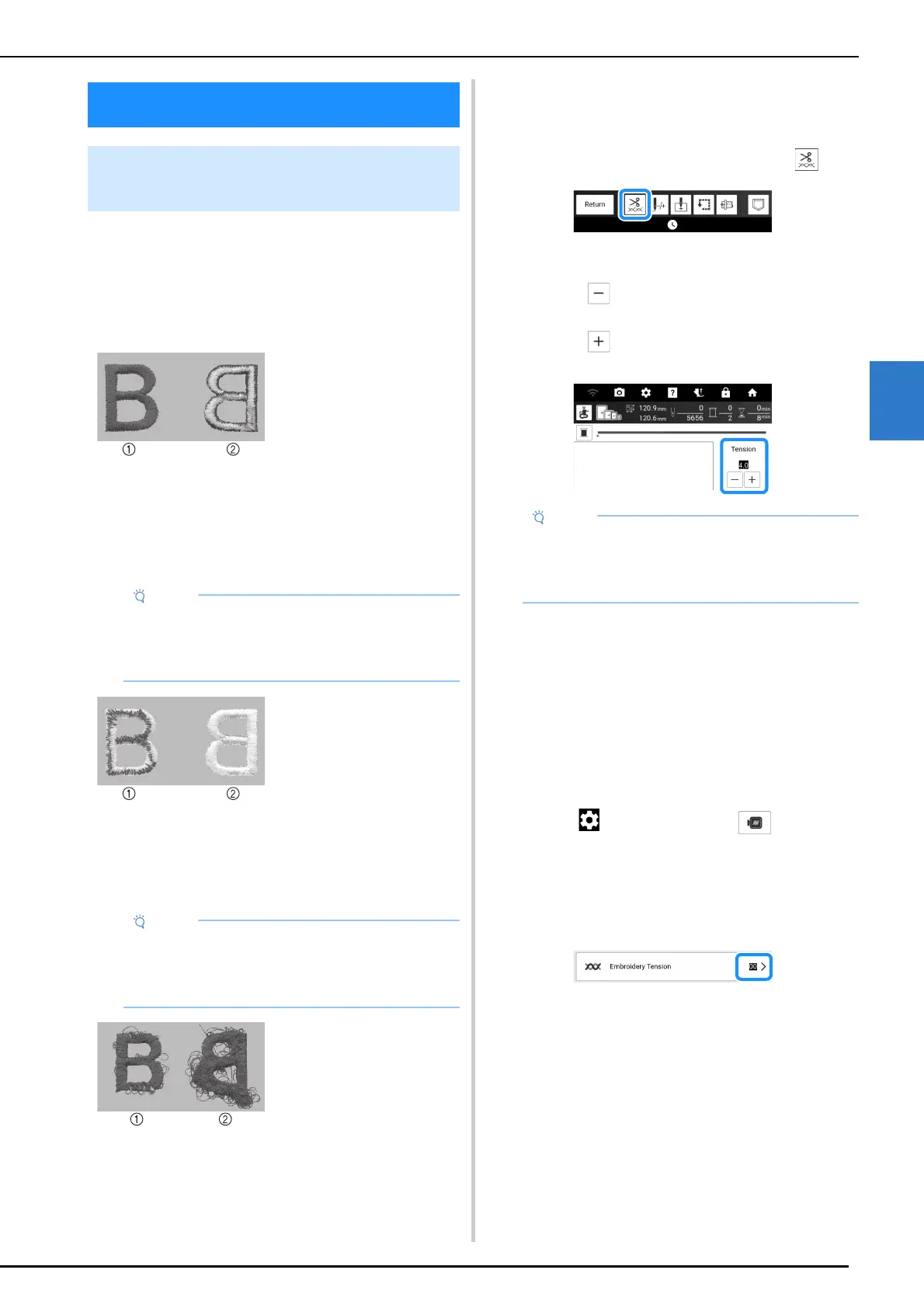
Adjust thread tension according to the situation.
Correct Thread Tension
Upper thread slightly appears on the wrong side of
fabric.
Upper Thread is Too Tight
Bobbin thread appears slightly on the right side of
fabric. In this case, loosen the upper thread
tension.
Upper Thread is Too Loose
Loops appear on the right side of the fabric. In this
case, tighten the upper thread tension.
Adjusting the Tension of the
Upper Thread
1
On the embroidery screen, touch .
2 Adjust the upper thread tension.
* Touch to loosen the upper thread tension.
(The tension number will decrease.)
* Touch to tighten the upper thread tension.
(The tension number will increase.)
Adjusting Overall Upper Thread
Tension
When embroidering, if the overall tension of the
upper thread is too tight or too loose, adjust it from
the setting screen.
If an individual embroidery pattern needs additional
fine tuning, refer to “Adjusting Thread Tension” on
page 165.
1 Touch , and then touch .
2 In the [Embroidery Tension], adjust the
upper thread tension.
* Increase to tighten the upper thread tension.
* Decrease to loosen the upper thread tension.
Adjusting Thread Tension
Adjusting the Tension of the
Upper Thread
a Right side
b Wrong side
• If the bobbin thread was incorrectly threaded,
the upper thread may appear to be too tight. In
this case, refer to “Setting the Bobbin” on
page 40 and rethread the bobbin thread.
a Right side
b Wrong side
• If the upper thread was incorrectly threaded,
the upper thread may appear to be too loose.
In this case, refer to “Upper Threading” on
page 42 and rethread the upper thread.
a Right side
b Wrong side
• If the thread tension setting is made extremely
loose, the machine may stop during
embroidering. Increase the thread tension
slightly, and begin embroidering again.



 To Next Page