Editing Patterns
150
Creating Repeated Patterns
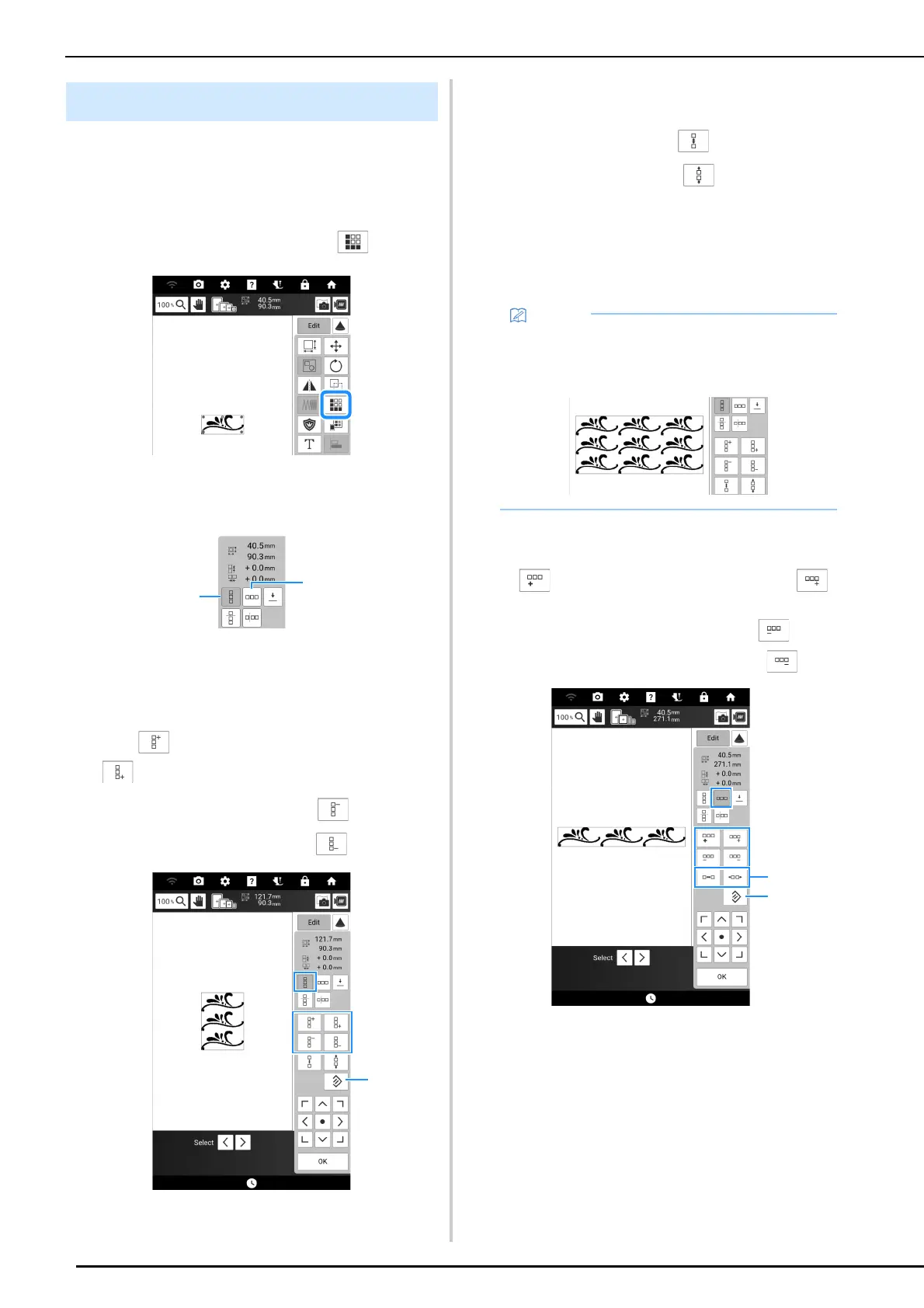
Using the border function, you can create repeated
patterns.
1 Touch [Edit], and then touch .
2 Select the direction in which the pattern
will be repeated.
a Vertical direction
b Horizontal direction (page 150)
The pattern direction indicator will change
depending on the direction selected.
3 Use to repeat the pattern above and
to repeat the pattern below.
* To delete above pattern, touch .
* To delete below pattern, touch .
a Key to cancel pattern repeating
4 Adjust the spacing of the repeated
pattern.
* To widen spacing, touch .
* To tighten spacing, touch .
5 Complete repeated patterns by repeating
steps
2 through 4.
6 Touch [OK].
Horizontal Direction
Use to repeat the pattern to the left and
to repeat the pattern on the right.
* To delete patterns from the left, touch .
* To delete patterns from the right, touch .
a Spacing keys
b Key to cancel pattern repeating
Designing Repeated Patterns
• When there are two or more patterns, all
patterns will be grouped together as one
pattern in the red frame.



 To Next Page