Editing Patterns
152
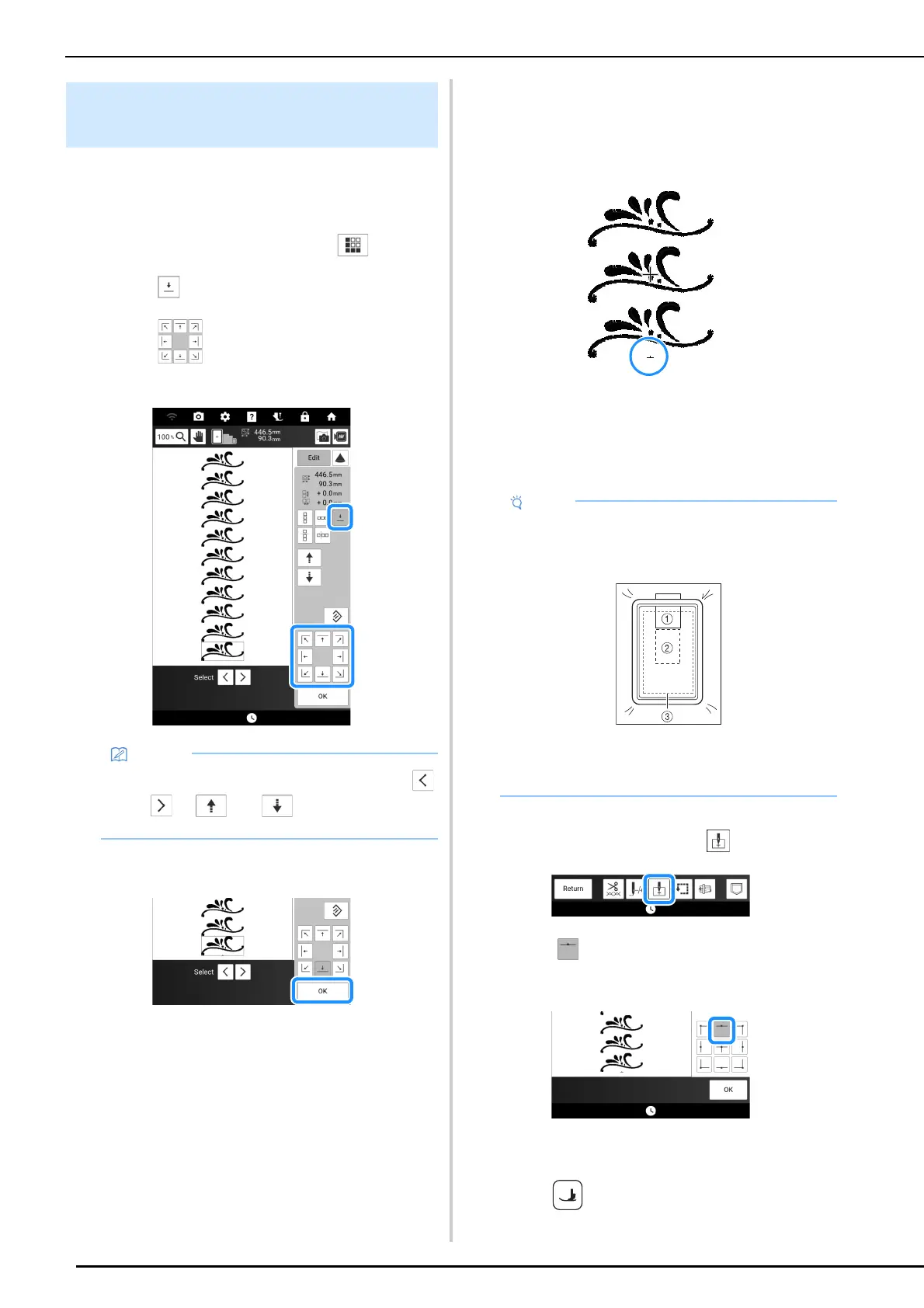
By embroidering thread marks, you can easily
align patterns when rehooping the fabric to
embroider a series.
1 Touch [Edit], and then touch .
2 Touch .
3 Touch to select the thread mark to
be sewn.
4 Touch [OK], then [Embroidery].
5 Press the “Start/Stop” button to begin
embroidering.
When embroidering is finished, the thread mark is
embroidered with the last thread color.
6 Remove the embroidery frame.
7 Rehoop the fabric in the embroidery
frame.
8 Attach the embroidery frame to the
machine, and then touch .
9 Touch to set the starting point to the
top center of the pattern.
10 Touch [OK].
11 Press (Presser foot lifter button) to
lower the embroidery foot.
Embroidering the Pattern
Repeatedly
• When there are two or more elements, use
and or and to select a pattern
that you want to assign a thread mark(s) to.
• Adjust the position of the fabric so that the
embroidering area for the next pattern is within
the embroidering area.
a Pattern embroidered first
b Position of pattern to be embroidered next
c Embroidering area



 To Next Page