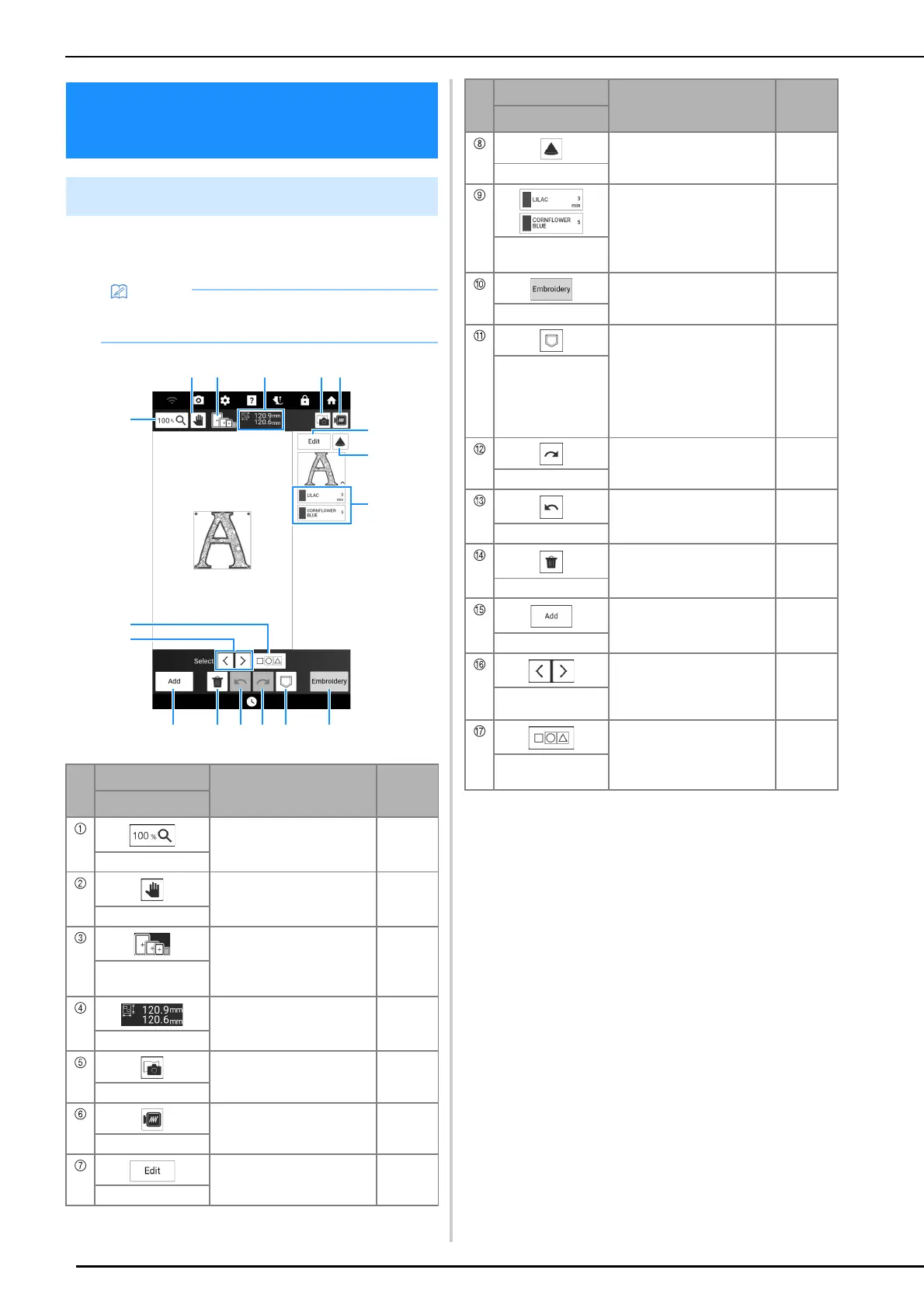
Key Functions (Embroidery)
142
Using these keys, you can edit the pattern as you
like.
Key Functions
(Embroidery)
Embroidery Edit Screen
• If a key display is grayed out, you cannot use
that function with the selected pattern.
No.
Display
Explanation
Reference
Name
Touch this key to select the
magnification ratio.
—
Magnify key
Touch this key to move the
canvas when it is magnified.
—
Hand tool key
Shows the embroidery
frames that can be used for
the selected pattern.
128
Available
embroidery frames
This shows the size of the
entire combined pattern.
—
Pattern size
Touch this key to scan the
fabric to align the embroidery
position.
157
Fabric scan key
Touch this key for a preview
of the embroidered image.
153
Preview key
Touch this key to display the
[Edit] window.
143
Edit key
Touch this key to use the
projector to project the
pattern.
154
Projector key
This shows the color
sequence and stitching times
of each step of the pattern
currently selected.
140
Thread color
sequence
Touch this key to call up the
embroidery screen.
—
Embroidery key
Touch this key to save a
pattern in the machine’s
memory or USB media. The
pattern can also be
transferred to a computer via
a wireless network
connection.
167
Memory key
Touch this key to redo the
last operation that was
undone.
—
Redo key
Touch this key to undo the
last operation.
—
Undo key
Touch this key to delete the
selected pattern (the pattern
outlined by the red box).
—
Delete key
Touch this key to add another
pattern to the editing pattern.
147
Add key
Touch this key to change a
selected pattern when
multiple patterns are in the
screen.
147
Select key
Touch this key to allow
multiple patterns on the
screen to be selected at the
same time.
148, 149
Multiple selection
key
No.
Display
Explanation
Reference
Name



 To Next Page