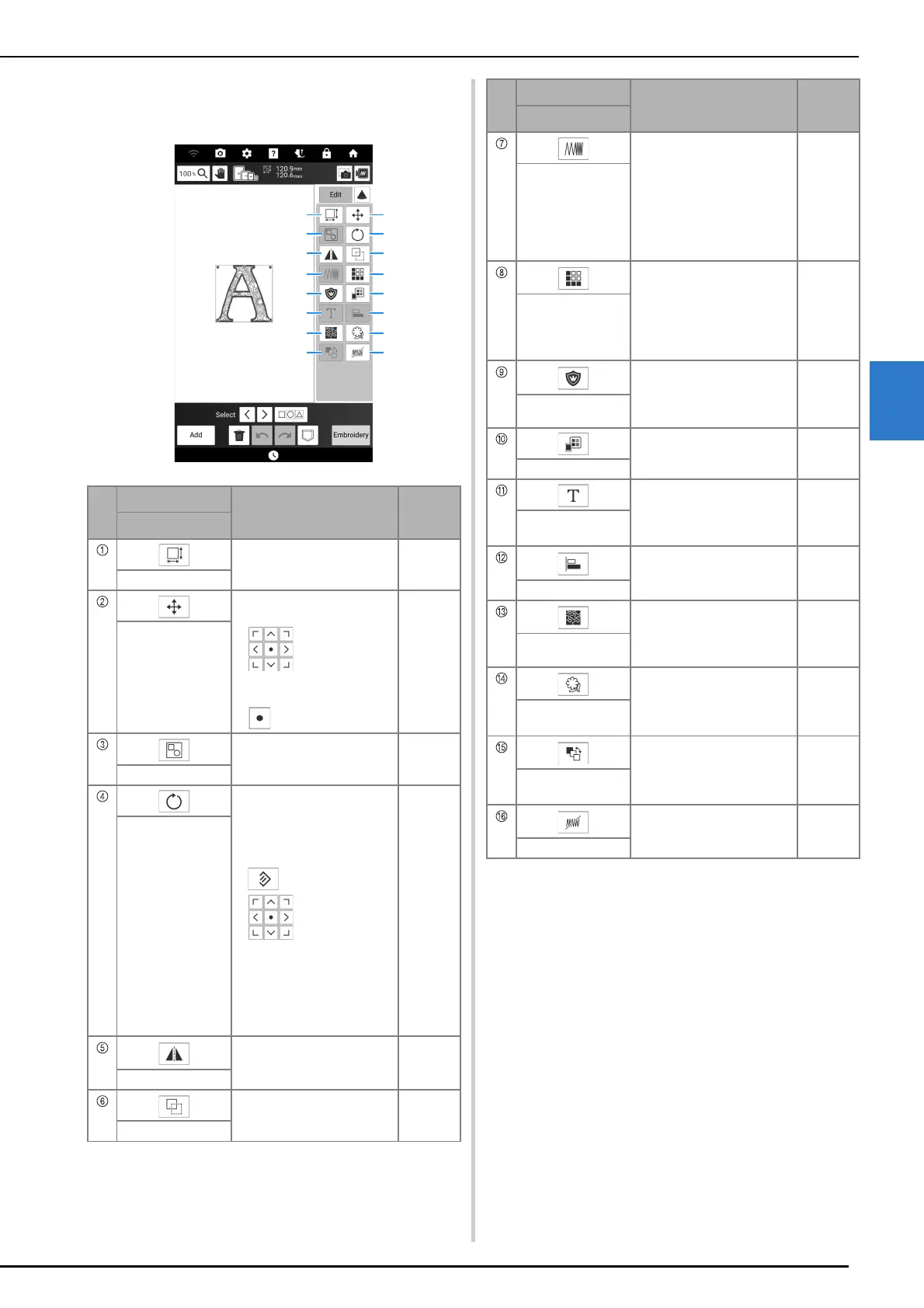
Key Functions (Embroidery)
Basic Embroidery
143
4
[Edit] Window
Touch [Edit] to display the [Edit] window.
No.
Display
Explanation
Reference
Name
Touch this key to change the
size of the pattern.
146
Size key
Touch this key to display the
pattern moving window.
• : Move the pattern
in the direction shown by
the arrow.
• : Center the pattern.
—
Move key
Touch this key to group the
selected multiple patterns.
—
Group/ungroup key
Touch this key to display the
pattern rotating window.
Select the key indicating the
desired direction and angle
for rotating the pattern.
• : Reset the rotation.
• : Move the pattern
in the direction shown by
the arrow.
You can also rotate the
pattern by dragging the red
point at the corners of the
pattern.
—
Rotate key
Touch this key to change the
pattern to a horizontal mirror
image.
—
Flip Horizontal key
Touch this key to duplicate
the pattern.
—
Duplicate key
Touch this key to change the
density. This setting is
available for some alphabet
character patterns, frame
patterns and so on. Other
patterns are available after
enabling patterns to change
the density. (page 146)
—
Density key
Touch this key to create and
edit repeated patterns.
150
Border function
(Designing
repeated patterns)
key
Touch this key to create an
appliqué piece by
embroidering an outline
around the selected pattern.
184
Appliqué piece key
Touch this key to change the
colors of the displayed
pattern.
169
Thread palette key
Touch this key to edit
character patterns.
144
Edit character
patterns key
Touch this key to align the
selected multiple patterns.
149
Alignment key
Touch this key to create
stippling, echo quilting, or
decorative fill around a
pattern.
194
Stippling key
Touch this key to extract the
outline of a pattern. The
extracted pattern can be
used with My Design Center.
249
Outline extraction
key
Touch this key to change the
embroidering order of
combined patterns.
172
Embroidering order
key
Touch this key to specify not
to embroider the selected
thread color.
171
No sew setting key
No.
Display
Explanation
Reference
Name



 To Next Page