Picture Play Embroidery Function
183
Advanced Embroidery
5
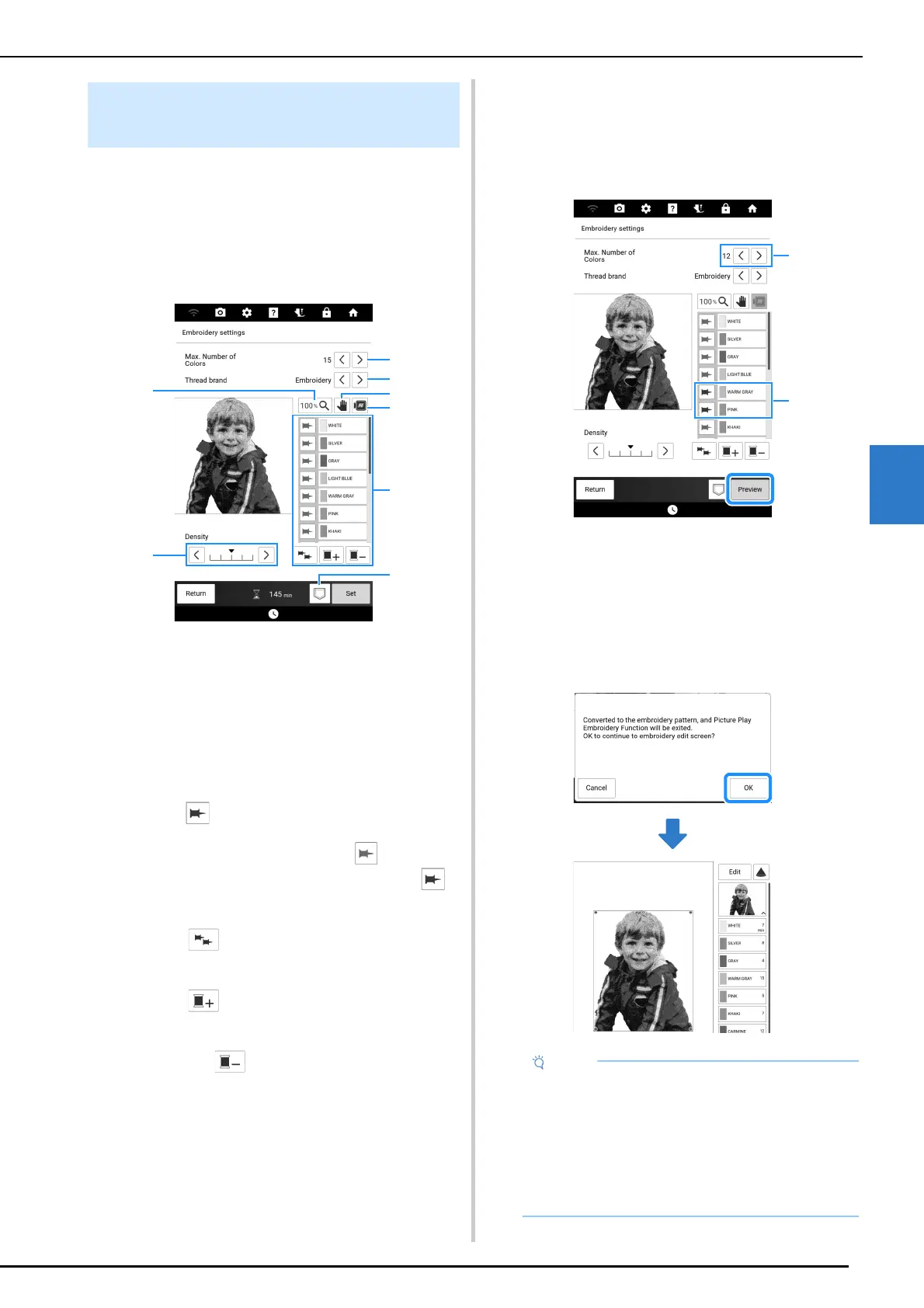
1 Check the conversion results, and then, if
it is acceptable, touch [Set] to continue
with step
3. If necessary, specify the
maximum number of thread colors, the
thread colors that must be used, and the
thread density.
a Specify the maximum number of thread colors.
b Specify the thread brand.
c Change the magnification ratio for displaying the
image.
d This indicates that a magnified image can be
repositioned (no action is required).
e Preview the converted embroidery data.
f Specify the thread color list. The thread colors
being used can be changed.
When (pin thread color key) is blue, the thread
color on the key beside it is kept for converting the
image to embroidery data. Touch (gray) to
keep the thread color beside the key. Touch
(blue) to no longer keep the thread color beside the
key.
Touch to keep the thread colors of all thread
spools. Touch the key again to no longer keep all
thread colors.
Touch , select a thread color, and then touch
[OK] to add the selected thread color to the list.
Select a thread color in the thread color list, and
then touch to remove the selected thread
color.
g Adjust the thread density.
h Save the embroidery pattern.
2 For this example, we will convert the
image with a maximum number of 12
colors and keep two thread colors. Touch
[Preview] to apply the settings to the
pattern.
a Maximum number of thread colors.
b Kept thread colors (blue pins)
3 Check the conversion results, and then
touch [Set].
The following message appears. Touch [OK] to
display the converted pattern in the embroidery
edit screen.
Selecting Appropriate Thread
Colors and Density
• Since converted embroidery pattern has a
high thread density, it may shrink when it is
embroidered. Hoop the fabric firmly secured in
the embroidery frame before embroidering.
For Picture Play embroidery function, we
recommend using the separately sold
magnetic frame, which offers more strength for
holding fabric taut.



 To Next Page