Picture Play Embroidery Function
182
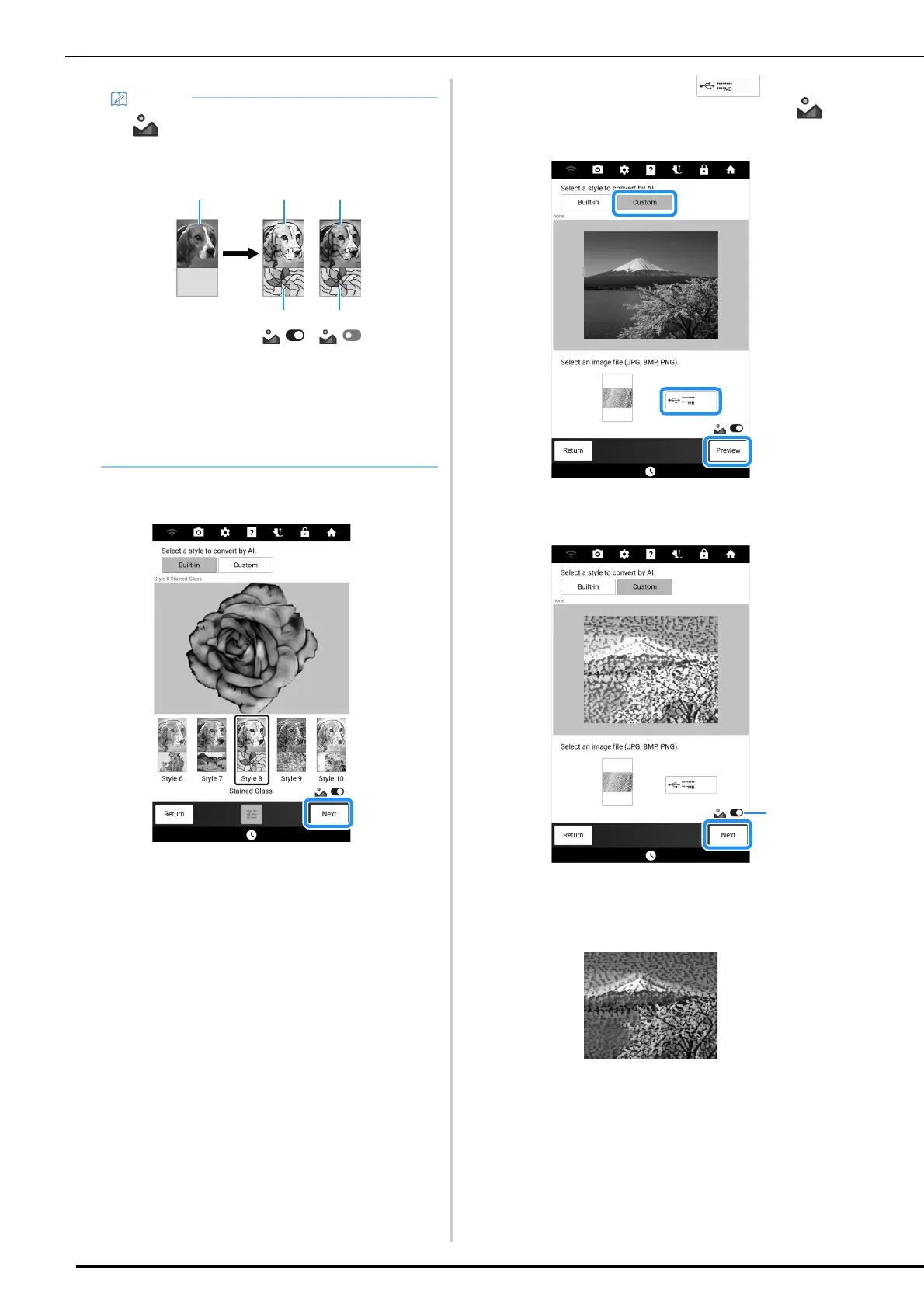
2 Check the image, and then touch [Next].
Proceed to “Selecting Appropriate Thread Colors
and Density” on page 183.
Using the [Custom] Style
By selecting any desired image as the style image,
you can create a unique style conversion image.
For this example, a photo of a mountain will be
converted.
1 Save to USB media the image to be used
as the style as well as the photo to be
converted into the embroidery data.
2 Adjust the imported Image. (page 177)
3 Touch [Custom]. Touch , and
then select the saved image. Switch
on or off. And then touch [Preview].
4 Check the image, and then touch [Next].
a When switched off, style conversion is applied
using the colors from the original photo. For
details, refer to “Using the [Built-in] Style” on
page 181.
Proceed to “Selecting Appropriate Thread Colors
and Density” on page 183.
• If is switched off, style conversion is
applied using the colors from the original
photo.
a Sample image (without style conversion)
b Style image
c Sample image (with style conversion using
the colors from the style image)
d Sample image (with style conversion using
the colors from the original photo)



 To Next Page