Stitch Settings
Sewing Basics
63
2
Mirror image, twin needle, stitch width, stitch
length, L/R Shift and thread tension settings can
be saved for each stitch pattern.
Saving Settings
1
Select a stitch.
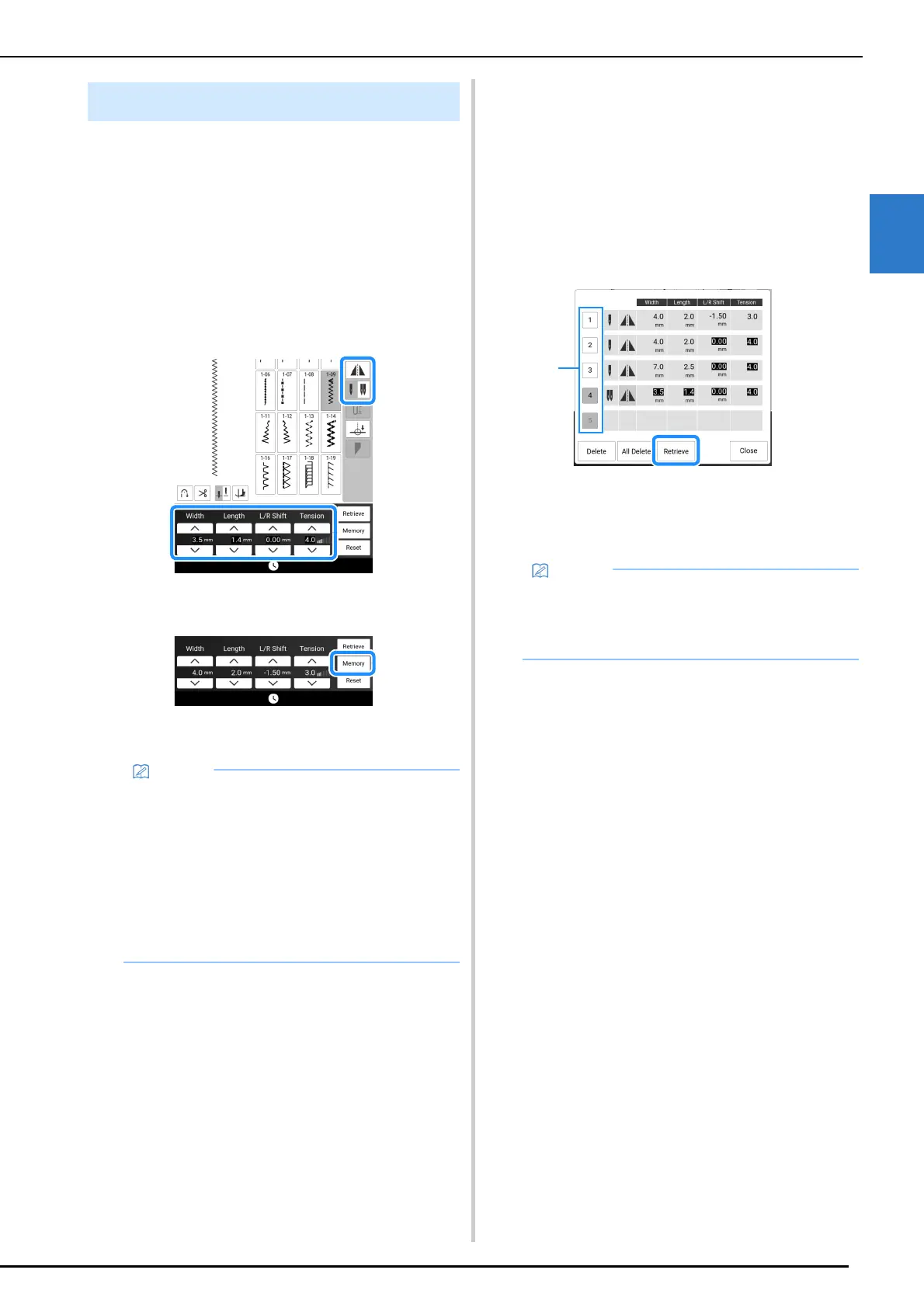
2 Specify your preferred settings.
3 Touch [Memory].
The settings are saved and the original screen
automatically appears.
Retrieving Saved Settings
1
Select a stitch.
2 Touch [Retrieve].
3 Touch the numbered key of the settings
to be retrieved and then touch [Retrieve].
* Touch [Close] to return to the original screen
without retrieving settings.
a Numbered keys
The selected settings are retrieved, and the
original screen automatically appears.
Saving the Utility Stitch Settings
• Touch [Reset] and then [Memory] to return the
selected stitch pattern saved settings to the
default settings.
• If you touch [Memory] when there are already
5 sets of settings saved for a stitch, a message
appears. Touch [OK] to close the message,
and then touch [Retrieve] to delete a setting
referring to “Retrieving Saved Settings” on
page 63. Touch [Memory] again to save the
settings.
• Touch [Delete] to delete the settings of the
selected number.
• You can delete all the saved settings by
touching [All Delete].



 To Next Page