Key Functions (My Design Center)
236
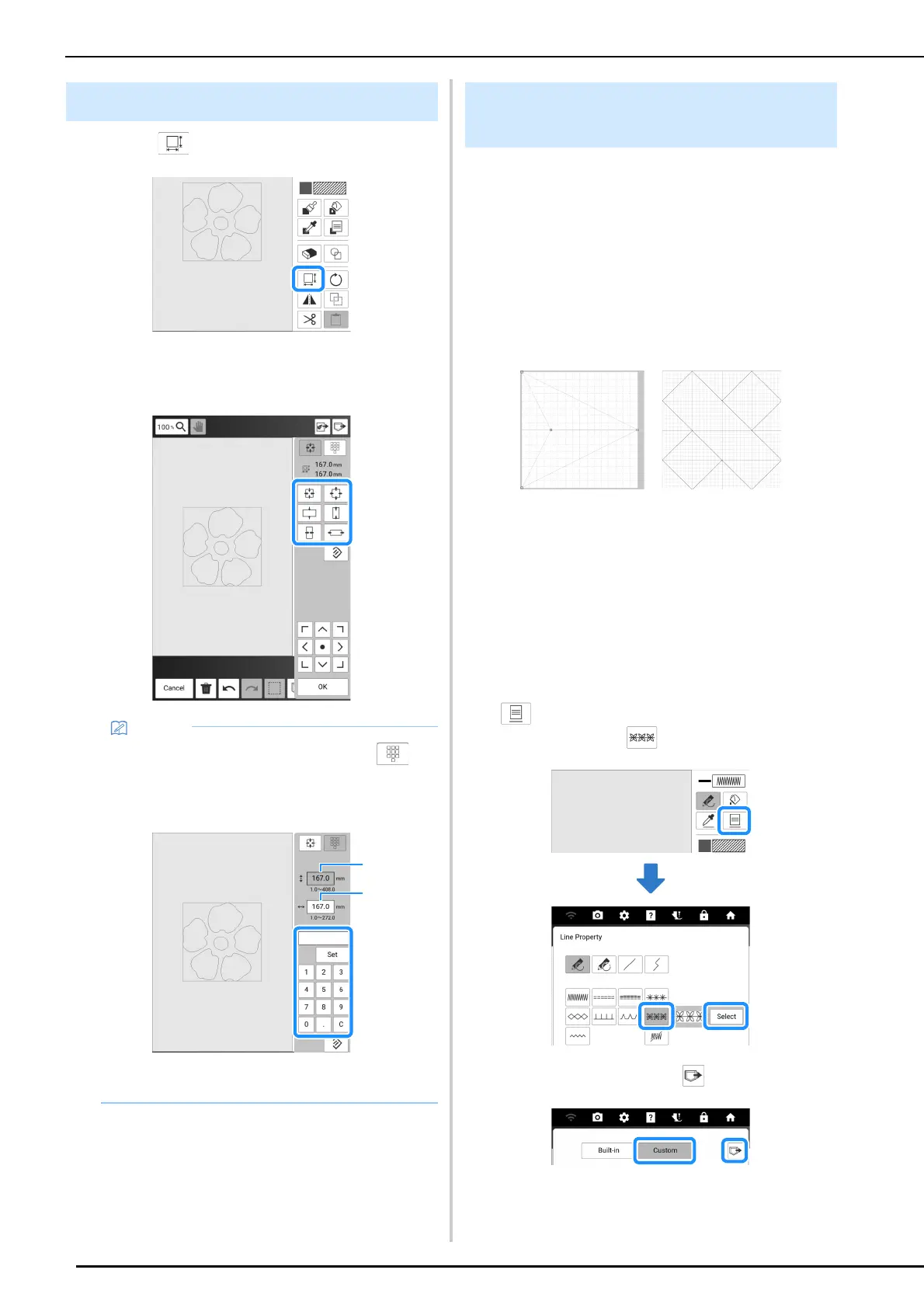
1 Touch .
2 Select the direction in which to change
the size.
3 Touch [OK].
Motif stitch pattern data or decorative fill pattern
data created in [Programmable Stitch Creator] of
PE-DESIGN can be imported into My Design
Center.
* Motif stitch pattern data can be created on PE-
DESIGN version 4 or later. Decorative fill pattern
can be created on PE-DESIGN version 11 or later.
* For information on the file extensions for motif
stitch pattern data and decorative fill pattern data,
refer to “Specifications” on page 271.
1 Save the motif stitch pattern data and/or
decorative fill pattern data in the USB
media.
2 Insert the USB media into the USB port
on the machine.
3 Touch [My Design Center].
4 To import motif stitch pattern data, touch
. After [Line Property] screen
appears, touch , then [Select].
5 Touch [Custom], then .
Using the Size Key
• To specify the size by number, touch .
Touch the box for the height or width, specify a
value with the number keys, and then touch
[Set].
a Box for height
b Box for width
Importing Motif Stitch Pattern Data
or Decorative Fill Pattern Data



 To Next Page