Key Functions (My Design Center)
237
My Design Center
6
6 Select the motif stitch pattern data, and
then touch [OK].
* If two USB media are connected to the machine,
check the USB media names that are displayed,
and then touch the name of the USB media that
you wish to use.
The motif stitch pattern data is saved to the
machine.
7 Select the motif stitch pattern to be used,
and then touch [OK].
8 To import decorative fill pattern data,
touch . After [Region Property]
screen appears, touch , then [Select].
9 Refer to steps 5 through 7 to select an
imported decorative fill pattern.
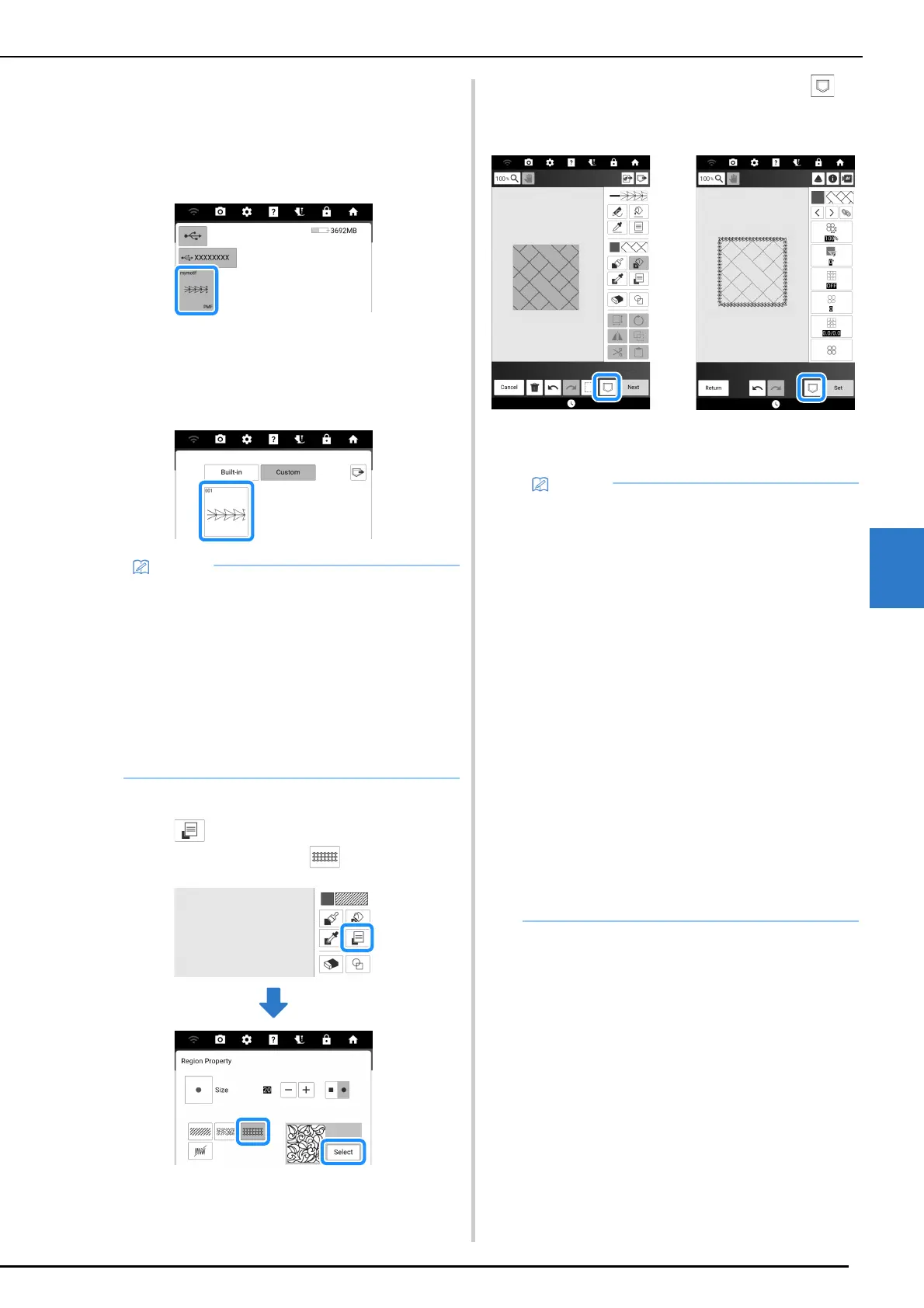
10 Edit the pattern. If necessary, touch to
save the pattern.
a Pattern drawing screen
b Stitch settings screen
• Saved motif stitch patterns are assigned a
pattern number. The pattern number appears
in the upper-left corner of the key.
• Up to 12 motif stitch patterns can be saved to
the machine. When trying to save more motif
stitch pattern data than this maximum, a
message will appear. Follow the on-screen
instructions, and select the pattern number of
the motif stitch pattern data to be replaced.
• Touch [Clear all] to delete all saved motif stitch
pattern data.
12
• When saving a pattern (that contains an
imported motif stitch pattern or decorative fill
pattern) as pattern drawing data, it can only be
saved in the machine’s memory.
• When recalling a saved design, the motif stitch
pattern or decorative fill pattern currently
saved under the assigned pattern number is
imported. (If the custom stitch pattern that was
assigned to a saved design has been replaced
by another custom stitch pattern, the original
stitch pattern will not be recalled. It will be
replaced with the replacement stitch pattern.)
• If all custom stitch patterns are cleared, the
custom stitch pattern that was assigned to a
saved design will not be recalled. It will be
replaced with a default stitch pattern. Patterns
with deleted custom motif patterns will be
recalled with a zigzag stitch. Patterns with
deleted custom decorative fill patterns will be
recalled with a standard fill stitch.
• If the design is saved on the embroidery edit
screen after touching [Set] on stitch settings
screen, the custom motif and decorative fill
pattern will be preserved.



 To Next Page