Embroidering Quilting
202
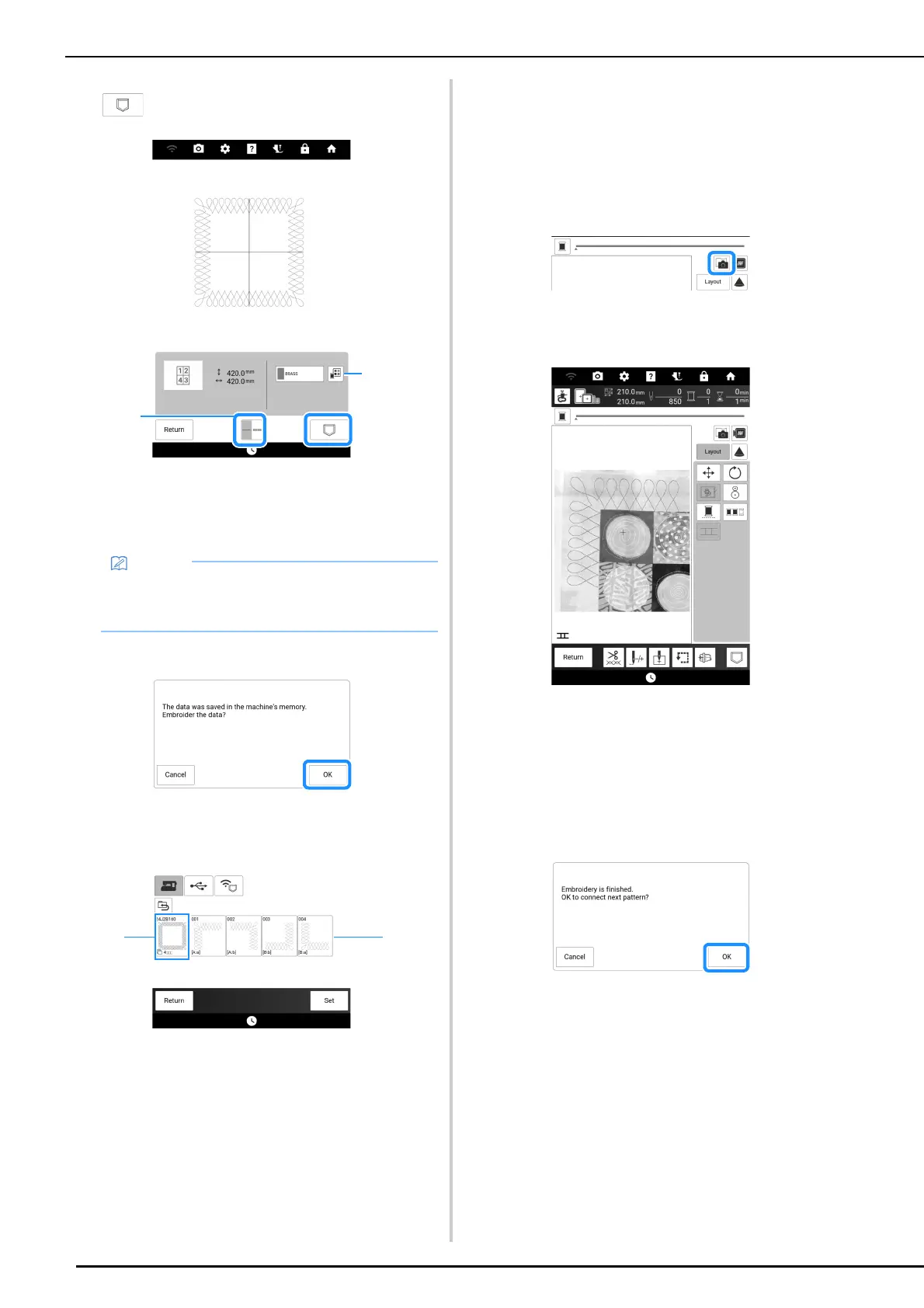
6 Check the split pattern, and then touch
.
a You can change the thread color.
b Select single stitching or triple stitching.
The data for the split embroidery pattern is saved
on the machine.
7 To embroider the pattern, touch [OK].
8 Select the embroidering method, and
then touch [Set].
a To embroider using the built-in camera for aligning
the embroidering position, touch the key showing
the entire pattern.
b To embroider by visually aligning the pattern
sections, touch the pattern section to be
embroidered.
* This manual shows method 1. For method 2,
refer to “Connecting the Pattern Sections
Manually” on page 215.
9 Touch [Embroidery].
10 Attach the embroidery frame along with
the first section being embroidered, and
scan the embroidery frame. For scanning
the background, refer to “Display the
Fabric on the Screen” on page 157.
11 Move and rotate the pattern to align with
the background.
• For moving or rotating the pattern, refer to
“[Layout] Window” on page 145.
12 Embroider the first section.
13 After embroidering the first section, the
following message appears. Touch [OK].
• The data for the split embroidery pattern
cannot be saved on external media such as
USB media.



 To Next Page