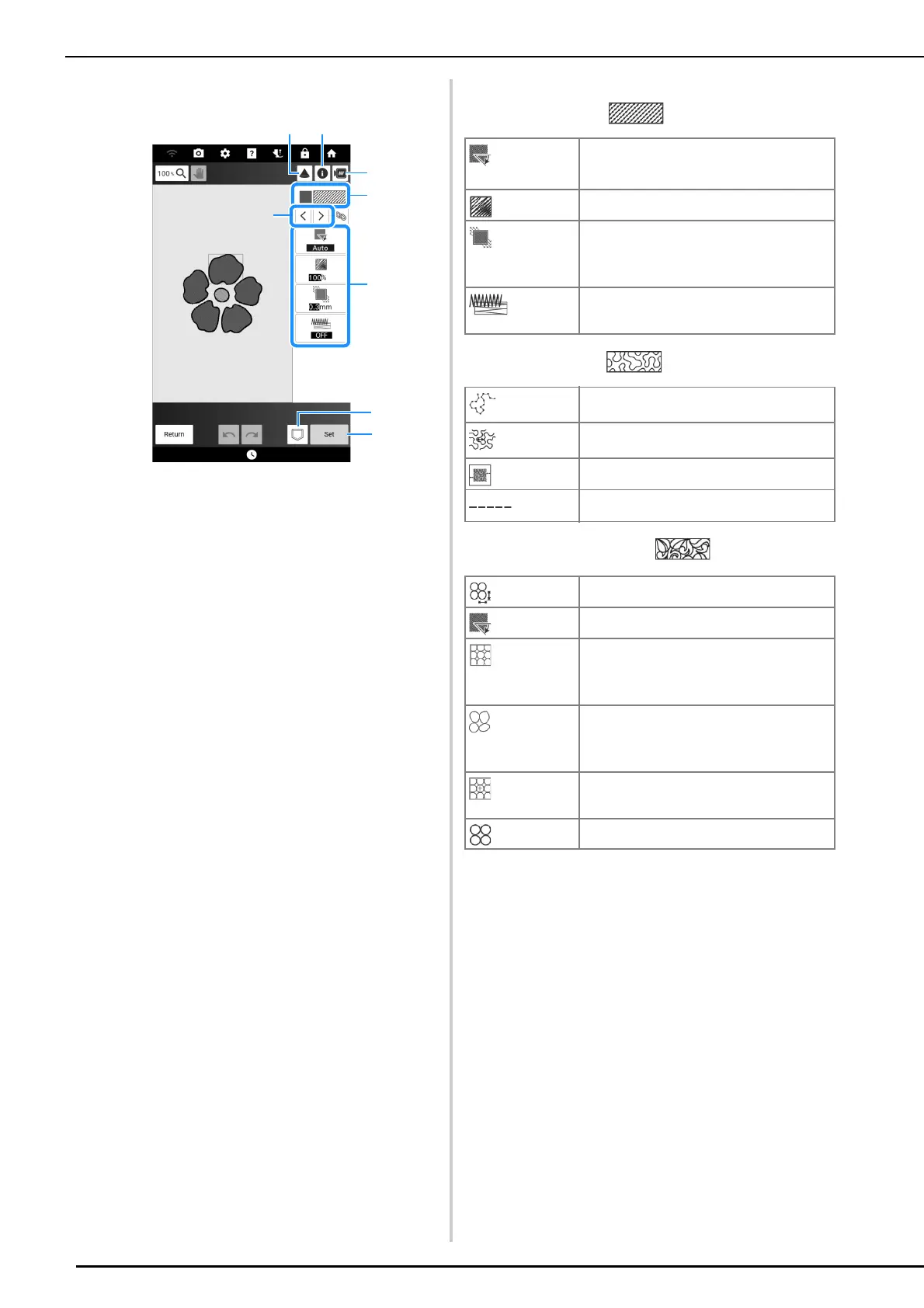
Stitch Settings Screen
240
Region Settings
a Shows/Changes the stitch type and color for the
selected region.
b Select the region to be changed.
c Shows/Changes the stitch settings for the selected
region.
d Save the pattern drawing data and embroidery
data.
e Proceed to embroidery edit screen.
f Use the projector to project the pattern. (page 154)
g See detailed information about the pattern.
h Preview the pattern.
Region Stitch Settings
Fill stitch pattern
Stippling pattern
Decorative fill patterns
[Direction]
Specifies the embroidering direction. Select
[Manual] to change to the desired direction of fill
stitch.
[Density]
Specifies the stitch density of fill stitch.
[Pull
compensation]
Specifies to correct the shrinkage of the pattern by
slightly shortening or lengthening the stitching.
Change the setting after you test embroider the
pattern and can check the shrinkage.
[Under sewing]
Select if you need or do not need the under
sewing for the stabilized fabric.
[Run Pitch]
Specifies the length of a stitch of the stippling
stitch.
[Spacing]
Specifies the spacing between the stitches
when embroidering the stippling stitch.
[Distance] Specifies the offset from the pattern outline.
[Stitch]
Specifies the stitch type (Single/Triple stitch).
[Size]
Increases/reduces the size of the pattern.
[Direction]
Specifies the rotation angle of the pattern.
[Outline]
Select whether (turned on) or not (turned off)
the outline is also converted to embroidery
data. If turned on, the number of thread
jumps can be reduced.
[Random shift]
Randomly varies the line.
If a setting of 1 or more is specified for
[Random shift], a [Type] setting for the
[Random shift] can be selected.
[Position Offset]
Specifies the reference point for the pattern.
[Thickness]
Sets repeated or single stitching of the pattern.



 To Next Page