EasyManua.ls Logo

Dynon Avionics SkyView Classic - Physical Installation; SV-BAT-320 Location

Default Icon
573 pages
Print Icon
To Next Page IconTo Next Page
To Previous Page IconTo Previous Page
Loading...
SV-BAT-320 Backup Battery Installation
9-2 SkyView System Installation Guide - Revision AA
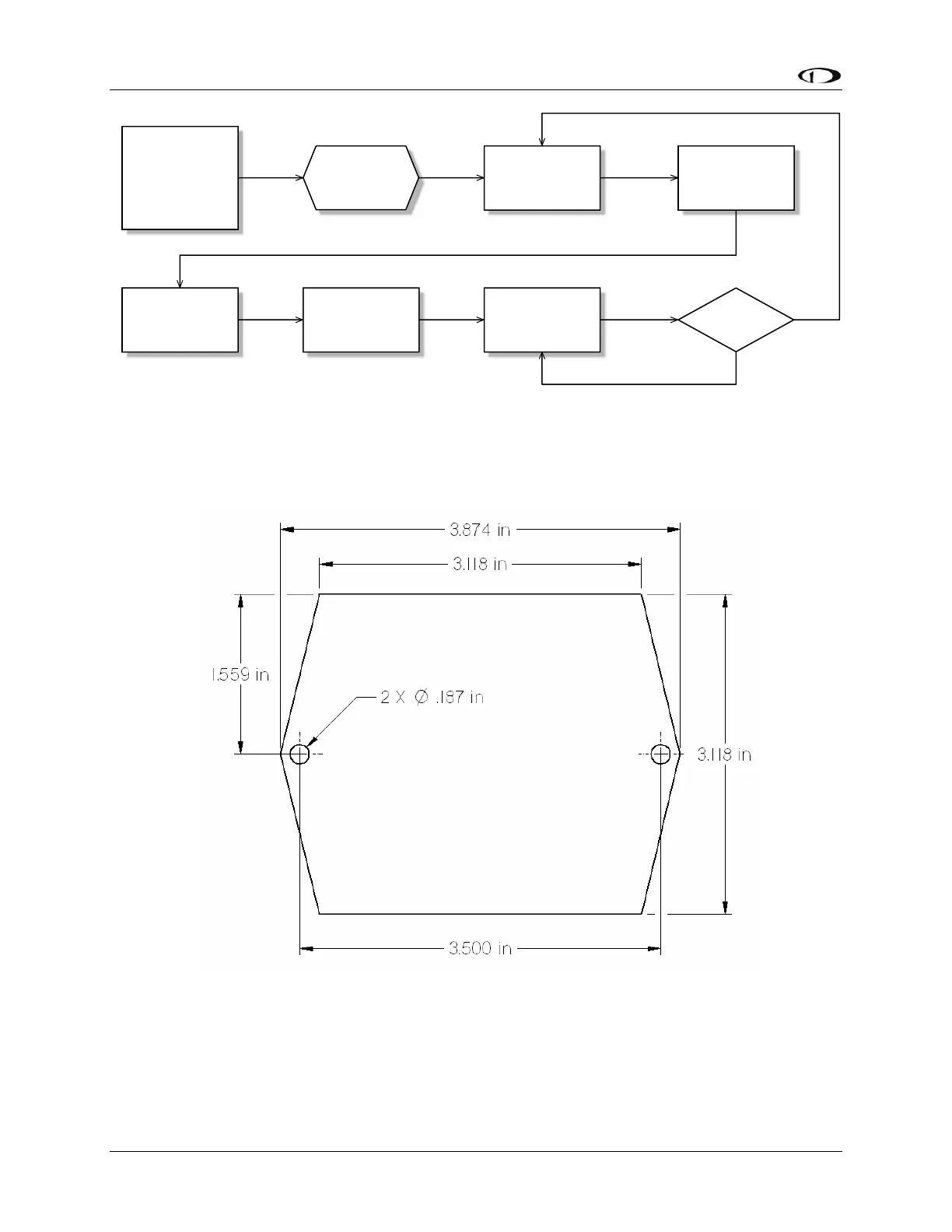
Figure 99 Suggested SV-BAT-320 Installation, Configuration, and Maintenance Procedure
Physical Installation
The diagram below shows the mounting dimensions of the SV-BAT-320.
Figure 100 SV-BAT-320 Mounting Dimensions
SV-BAT-320 Location
Observe the following guidelines when choosing a location for an SV-BAT-320:

Choose a
location based on
Location
Requirements
Section
Install battery
Prepare the
location
Connect battery to
the display wiring
harness
*Assumes SV-D700 or SV-D1000 is properly installed and working.
Charge battery*
Confirm battery
charged
Perform yearly
battery check
Pass?
Yes
No

Table of Contents

Related product manuals