SkyView Display Installation and Configuration
20-2 SkyView System Installation Guide - Revision AA
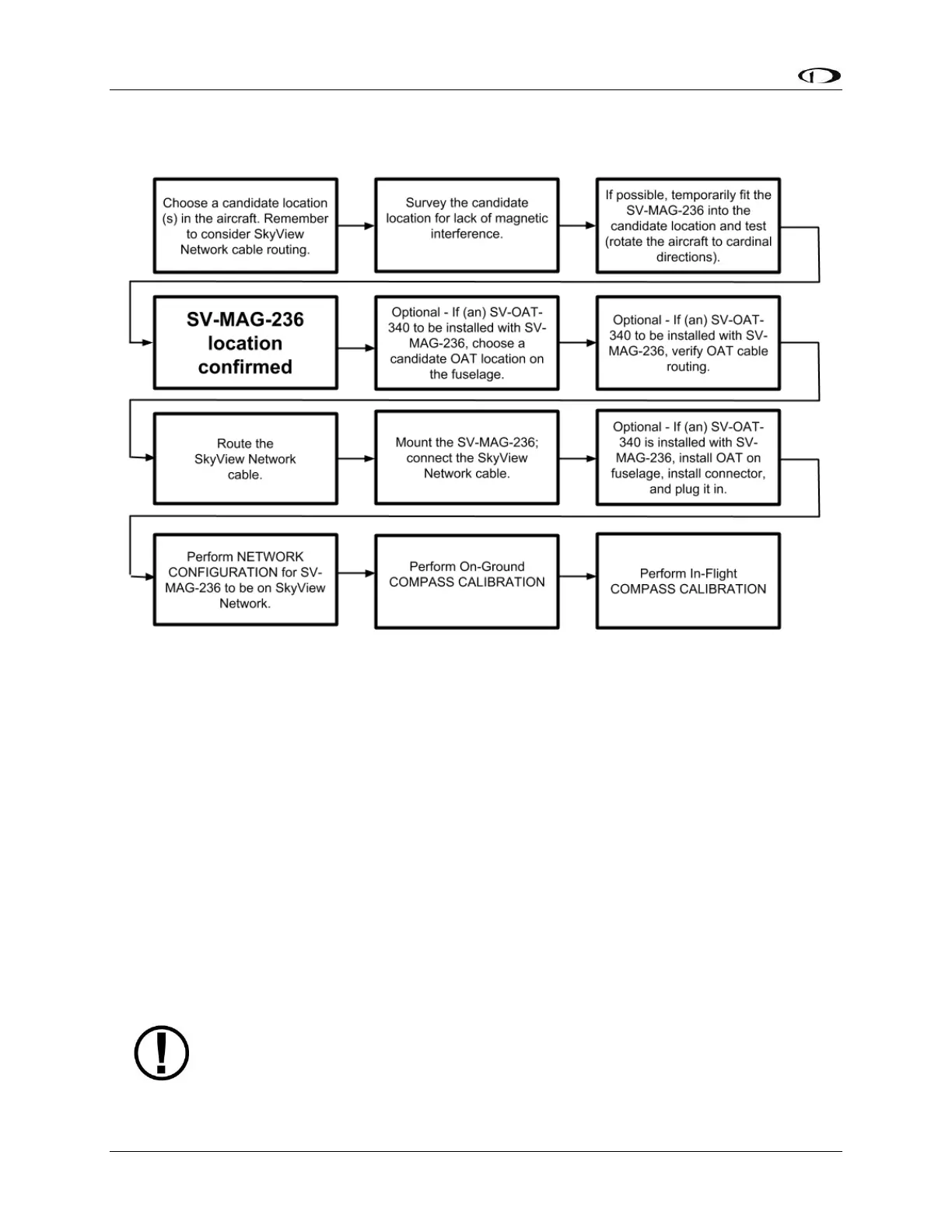
Figure 202 is a high-level overview of a suggested installation and configuration procedure for
the SV-MAG-236:
Figure 202 – Suggested Installation Sequence for the SV-MAG-236
Physical Installation
The most critical factor in the SV-MAG-236 being able to accurately sense magnetic heading is
for it to be installed in an area of the plane that is magnetically benign.
Given that it may be difficult or impossible to avoid all sources of magnetic interference, it is
possible to characterize and compensate for small, static magnetic fields with calibration.
Calibration cannot, however, compensate for dynamic magnetic fields (e.g., AC currents, non-
constant DC currents, and non-stationary ferrous material such as electric turn coordinators
and control surfaces). Thus, you must avoid mounting the module close to sources of dynamic
magnetic fields, avoid wires that carry large amounts of current, and use non-magnetic
fasteners for installation (see caution below). Dynon Avionics’ general rule of thumb is that 1 to
2 feet between the module and sources of magnetic fields is generally good enough, but 2 or
more feet is better.
Stainless steel mounting hardware is not always non-magnetic, and thus is not
recommended. The best type of mounting hardware (screws, bolts, washers, AND
nuts) to install the SV-ADAHRS-200/201 is brass.










 To Next Page