SkyView System Installation Guide - Revision AA 28-1
28. Appendix H: Sensor Debug Data
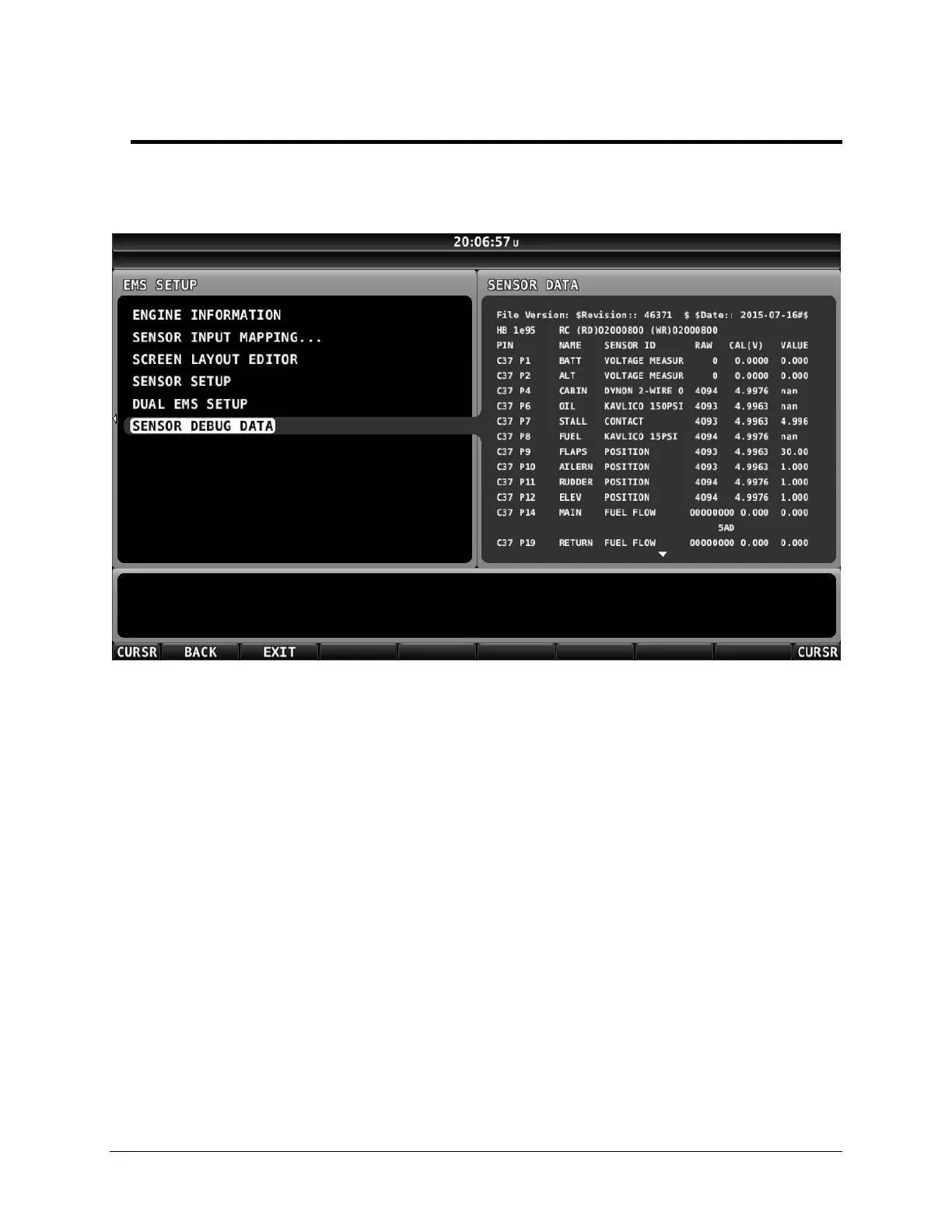
If you have installed one, or dual SV-EMS-220/221s, SkyView can display the “raw data” from all
connected and configured engine sensors to assist in troubleshooting engine sensor issues:
SETUP MENU > EMS SETUP > SENSOR DEBUG DATA.
Figure 229 – SENSOR DEBUG DATA Page
File Version
This is the sensor file version, with a revision number which should always be unique, as well as
the date it was created at Dynon Avionics.
If you see a EMS SFG FILE MISMATCH warning, compare the file version between the two
displays and update one display (load a new SFG file) so that both displays have the same File
Version.
HB
“HeartBeat” – Increments steadily as data is received from the SV-EMS-220/221(s).
RC
“Resistor Control” – Status of the “pull up resistors” in the SV-EMS-220/221(s); Dynon Avionics
internal use only.
Columns:
PIN
o C37 (Connector, 37-pin) – the 37-pin connector on the SV-EMS-220/221.










 To Next Page